# 0 - Robotique et physical AI


# IA robotique - Architectures pour l'apprentissage profond

Le contrôle d'un robot pour une application donnée au moyen d'un modèle de réseaux de neurones nécessite de fournir une quantité importante de données d'apprentissage. Ces données doivent permettre de comprendre comment résoudre la tâche, par exemple pour une tâche de saisie et dépose d'un objet (Pick and Place) elles doivent donc comporter :

- Comment bouge le robot et chacun de ses moteurs
- Comment bouge la pince
- Où sont placés les objets au début "problème"
- Où sont placé les objets à la fin "solution"

L'approche la plus répandue pour générer ces données d'apprentissage est la démonstration : le robot est "téléguidé" par un opérateur. On enregistre la trajectoire des servomoteurs ainsi qu'une ou plusieurs vidéos filmant les objets et le robot.

### Bancs matériel de Machine Learning

#### Open ARM et open arm mini

[https://huggingface.co/spaces/lerobot/robot-folding](https://huggingface.co/spaces/lerobot/robot-folding)

- Follower : Open ARM modified by LeRobot
- [https://huggingface.co/datasets/lerobot/openarms-hardware-modifications](https://huggingface.co/datasets/lerobot/openarms-hardware-modifications)

[![image.png](https://innovation.iha.unistra.fr/uploads/images/gallery/2026-05/scaled-1680-/RWyimage.png)](https://innovation.iha.unistra.fr/uploads/images/gallery/2026-05/RWyimage.png)

- Teleop : open-arms-mini
- [https://github.com/pkooij/open-arms-mini](https://github.com/pkooij/open-arms-mini)
- 8× Feetech STS3215-C046 servo (7.4 V, 1:147)

[![openarm-mini1.0Xrhdt1t.jpg](https://innovation.iha.unistra.fr/uploads/images/gallery/2026-05/scaled-1680-/openarm-mini1-0xrhdt1t.jpg)](https://innovation.iha.unistra.fr/uploads/images/gallery/2026-05/openarm-mini1-0xrhdt1t.jpg)

#### Koch

#### Robotis OMX

[https://ai.robotis.com/omx/introduction\_omx.html](https://ai.robotis.com/omx/introduction_omx.html)

#### LeRobot SO-ARM10X

[![PXL_20250613_153054943.jpg](https://innovation.iha.unistra.fr/uploads/images/gallery/2025-07/scaled-1680-/pxl-20250613-153054943.jpg)](https://innovation.iha.unistra.fr/uploads/images/gallery/2025-07/pxl-20250613-153054943.jpg)

#### Aloha Solo

Base : <span class="color_36 wixui-rich-text__text">$9,899.95</span>

- <span class="color_36 wixui-rich-text__text">WidowX Leader Arm ($4,949.95)</span>
- <span class="color_36 wixui-rich-text__text">ViperX Follower Arm ($7,149.95)</span>
- <span class="color_36 wixui-rich-text__text">2x Intel RealSense D405 Cameras</span>
- <span class="color_36 wixui-rich-text__text">Portable Touchscreen Monitor</span>
- <span class="color_36 wixui-rich-text__text">Tripod, Cables, Accessories</span>

[![image.png](https://innovation.iha.unistra.fr/uploads/images/gallery/2025-05/scaled-1680-/iFvimage.png)](https://innovation.iha.unistra.fr/uploads/images/gallery/2025-05/iFvimage.png)

[https://www.youtube.com/watch?v=hFqZJZ666Cw](https://www.youtube.com/watch?v=hFqZJZ666Cw)

[![Whole Product Shot Square.jpg](https://innovation.iha.unistra.fr/uploads/images/gallery/2025-05/scaled-1680-/whole-product-shot-square.jpg)](https://innovation.iha.unistra.fr/uploads/images/gallery/2025-05/whole-product-shot-square.jpg)

[https://www.trossenrobotics.com/aloha-solo](https://www.trossenrobotics.com/aloha-solo)

#### Aloha Stationary

Without Laptop : $30,799.98

[![aloha-stationary-mv-p2.jpg](https://innovation.iha.unistra.fr/uploads/images/gallery/2025-05/scaled-1680-/aloha-stationary-mv-p2.jpg)](https://innovation.iha.unistra.fr/uploads/images/gallery/2025-05/aloha-stationary-mv-p2.jpg)

### Environnement logiciel de collecte de données

#### Hugging Face LeRobot - Python

Visualisation des DataSet : [https://huggingface.co/spaces/lerobot/visualize\_dataset](https://huggingface.co/spaces/lerobot/visualize_dataset)

On note qu'il y a beaucoup de tests avec le SO-ARM10X. Mais pas d'homogénéité dans la collecte de données : les caméras sont placées la plupart du temps devant le robot, parfois sur la pince, et quasiment jamais avec le setup recommandé.

Rechercher des DataSet qui ont servi à entrainer des modèles disponibles publiés :

- [https://huggingface.co/models?pipeline\_tag=robotics&amp;sort=trending](https://huggingface.co/models?pipeline_tag=robotics&sort=trending)
- Dans le panneau de droite &gt; Sélectionner le filtre Reinforcement Learning &gt; Robotics
- Beaucoup de DataSets sont uploadés mais peu de modèles entrainés le sont
- Par exemple on recherche les travaux de Rémi Cadene 
    - Modèles : il y en a 4 [https://huggingface.co/models?pipeline\_tag=robotics&amp;sort=trending&amp;search=cadene](https://huggingface.co/models?pipeline_tag=robotics&sort=trending&search=cadene)
    - DataSets : Il y en a beaucoup [https://huggingface.co/datasets?task\_categories=task\_categories:robotics&amp;sort=trending&amp;search=cadene](https://huggingface.co/datasets?task_categories=task_categories:robotics&sort=trending&search=cadene)
- Les Modèles entrainés avec le SO-ARM10 concernent la manipulation de Lego, par exemple le plus récent : 
    - Modèle : [https://huggingface.co/cadene/act\_so100\_5\_lego\_test\_080000](https://huggingface.co/cadene/act_so100_5_lego_test_080000)
    - DataSet pour le training : [https://huggingface.co/datasets/cadene/so100\_5\_lego\_test](https://huggingface.co/datasets/cadene/so100_5_lego_test)
    - DataSet pour l'évaluation du modèle : [https://huggingface.co/datasets/cadene/eval\_act\_so100\_5\_lego\_test\_080000](https://huggingface.co/datasets/cadene/eval_act_so100_5_lego_test_080000)

Setup similaires à celui du SO-ARM10X simple :

- Robot Koch : /lerobot/koch\_pick\_place\_1\_lego

Télécharger un DataSet : [https://github.com/huggingface/lerobot/blob/a1daeaf0c4ae345df9b2f5b862f091ce158e4446/examples/1\_load\_lerobot\_dataset.py](https://github.com/huggingface/lerobot/blob/a1daeaf0c4ae345df9b2f5b862f091ce158e4446/examples/1_load_lerobot_dataset.py)

Rejouer les épisodes d'un DataSet : [https://github.com/huggingface/lerobot/blob/a1daeaf0c4ae345df9b2f5b862f091ce158e4446/examples/12\_use\_so101.md#replay-an-episode](https://github.com/huggingface/lerobot/blob/a1daeaf0c4ae345df9b2f5b862f091ce158e4446/examples/12_use_so101.md#replay-an-episode)

Evaluer un modèle pré-entrainé : [https://github.com/huggingface/lerobot/blob/a1daeaf0c4ae345df9b2f5b862f091ce158e4446/examples/2\_evaluate\_pretrained\_policy.py](https://github.com/huggingface/lerobot/blob/a1daeaf0c4ae345df9b2f5b862f091ce158e4446/examples/2_evaluate_pretrained_policy.py)

#### Trossen Robotics Interbotix - ROS, Python,   

# Banc de machine learning avec SO-ARM101

### Assemblage et démarrage du SO-ARM101

#### Configurer les servomoteurs

La carte `FE-URT-1` fournie par Feetech n'est pas détectée sous Ubuntu à cause d'un conflit avec un paquet de brail. On le désinstalle :

```
sudo apt-get autoremove brltty
```

[https://askubuntu.com/questions/1321442/how-to-look-for-ch340-usb-drivers/1472246#1472246](https://askubuntu.com/questions/1321442/how-to-look-for-ch340-usb-drivers/1472246#1472246)

[https://github.com/huggingface/lerobot/blob/main/examples/10\_use\_so100.md#c-configure-the-motors](https://github.com/huggingface/lerobot/blob/main/examples/10_use_so100.md#c-configure-the-motors)

- Brancher la carte
- Trouver l'interface USB sur laquelle est branchée la carte

```
python lerobot/scripts/find_motors_bus_port.py
```

- - Sous Linux, par ex. `/dev/ttyACM0` ou `/dev/ttyUSB0`
    - Sous Windows, par ex. `COM13` ou `COM14`
- Sous Linux, Changer les droits sur les interfaces USB

```bash
sudo chmod 666 /dev/ttyACM0
sudo chmod 666 /dev/ttyACM1
```

- Ouvrir Codium &gt; File &gt; Open Folder &gt; `admin_ros/lerobot`
- Modifier le fichier de config

`gedit ~/lerobot/lerobot/common/robot_devices/robots/configs.py`

- Chercher la config du So100 en ligne 436 `class So100RobotConfig(ManipulatorRobotConfig):`
- Remplacer `port="/dev/tty.usbmodem58760431091",` pour le `leader_arms` (L446) et le `follower_arms` (L463) par le port découvert
- Brancher les servos un à un à la carte puis lancer le script d'initialisation, en incrémentant l'ID à chaque fois :

```bash
python lerobot/scripts/configure_motor.py \
  --port /dev/tty.usbmodem58760432961 \
  --brand feetech \
  --model sts3215 \
  --baudrate 1000000 \
  --ID 1
```

- Au fur et à mesure les brancher en série et/ou noter l'ID sur le moteur
- Les servos sont bougés à leur position centrale et l'offset mis à 0

<p class="callout warning">Ne plus bouger les servos jusqu'à l'assemblage</p>

#### Construction et assemblage mécanique

Une version 101 est sortie en 05/2025. Le Leader est plus simple à assembler, et plus besoin de[ démonter les servos pour enlever un engrenage et les rendre passifs](https://huggingface.co/docs/lerobot/so100#remove-the-gears-of-the-6-leader-motors). Il suffit d'acheter le kit de 6 servos avec 3 rapports de transmission différents :

- [https://github.com/TheRobotStudio/SO-ARM100?tab=readme-ov-file#getting-your-own-so101](https://github.com/TheRobotStudio/SO-ARM100?tab=readme-ov-file#getting-your-own-so101)
- [https://www.alibaba.com/product-detail/6PCS-7-4V-STS3215-Servos-for\_1601428584027.html?spm=a2747.product\_manager.0.0.757c2c3clU7uH3](https://www.alibaba.com/product-detail/6PCS-7-4V-STS3215-Servos-for_1601428584027.html?spm=a2747.product_manager.0.0.757c2c3clU7uH3)
- Imprimer la mâchoire statique intégrant le support de caméra : [https://github.com/TheRobotStudio/SO-ARM100/blob/main/Optional/Wrist\_Cam\_Mount\_32x32\_UVC\_Module/README.md](https://github.com/TheRobotStudio/SO-ARM100/blob/main/Optional/Wrist_Cam_Mount_32x32_UVC_Module/README.md)
- Suivre le guide d'assemblage pour le SO101 : [https://huggingface.co/docs/lerobot/so101#step-by-step-assembly-instructions](https://huggingface.co/docs/lerobot/so101#step-by-step-assembly-instructions)
- Pour le SO100 : [https://huggingface.co/docs/lerobot/so100#step-by-step-assembly-instructions](https://huggingface.co/docs/lerobot/so100#step-by-step-assembly-instructions)

#### Astuces pour l'assemblage

- Mettre une vis sur l'arbre moteur et l'axe passif (à l'opposée de l'arbre moteur) quand il y a la place d'en mettre une (vérifier qu'il y aura la place après assemblage des éléments autour du moteur)
- Ne plus bouger les servos après leur initialisation qui les met à l'angle 0. Dans l'idéal, assembler les éléments de manière à ce que le robot soit en configuration initiale avec tous les moteurs à 0
- En pratique, on monte le robot dans la configuration ci-dessous. C'est l'étape de calibration qui permettra de définir un offset pour que le zéro des moteurs corresponde au modèle cinématique du SO-ARM10X

[![image.png](https://innovation.iha.unistra.fr/uploads/images/gallery/2025-06/scaled-1680-/A0gimage.png)](https://innovation.iha.unistra.fr/uploads/images/gallery/2025-06/A0gimage.png)
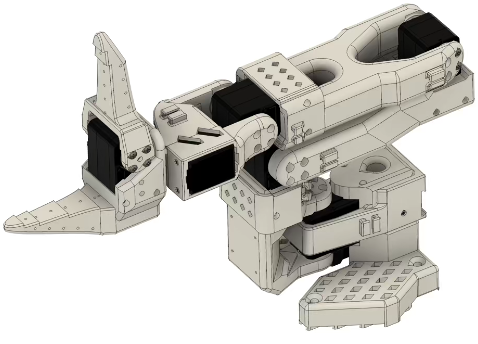
- Il est possible d'ajouter un offset dans la configuration des servomoteurs, par exemple via les scripts du projet LeRobot
- Attention si vous démarrez le robot sous ROS avant d'avoir lancer la calibration LeRobot qui fixe l'Offset dans les servomoteurs, vous risquez de casser le robot

### Banc de Machine Learning LeRobot

#### Agencement des caméras et robots

Le nombre, le positionnement et la qualité des caméras sont importants pour la qualité du DataSet :

- Plusieurs setup sont proposés : 
    - Caméras d'environnement : [https://github.com/TheRobotStudio/SO-ARM100?tab=readme-ov-file#2-overhead-camera-mount](https://github.com/TheRobotStudio/SO-ARM100?tab=readme-ov-file#2-overhead-camera-mount)
    - Caméras de poignet : [https://github.com/TheRobotStudio/SO-ARM100?tab=readme-ov-file#5-wristmount-cameras](https://github.com/TheRobotStudio/SO-ARM100?tab=readme-ov-file#5-wristmount-cameras)
- Attention au champ de vision des caméras si vous prenez une de vos webcams 
    - Il risque de ne pas être assez "fish eye"
    - Par exemple, la WebCam Logitech C270 (720p) a un champ trop étroit pour être intégrée au [module Overhead](https://github.com/TheRobotStudio/SO-ARM100/blob/main/Optional/Overhead_Cam_Mount_Webcam/README.md)

##### Au FabLab de IUT Haguenau

[![PXL_20250613_142740983_crop.jpg](https://innovation.iha.unistra.fr/uploads/images/gallery/2025-07/scaled-1680-/pxl-20250613-142740983-crop.jpg)](https://innovation.iha.unistra.fr/uploads/images/gallery/2025-07/pxl-20250613-142740983-crop.jpg)
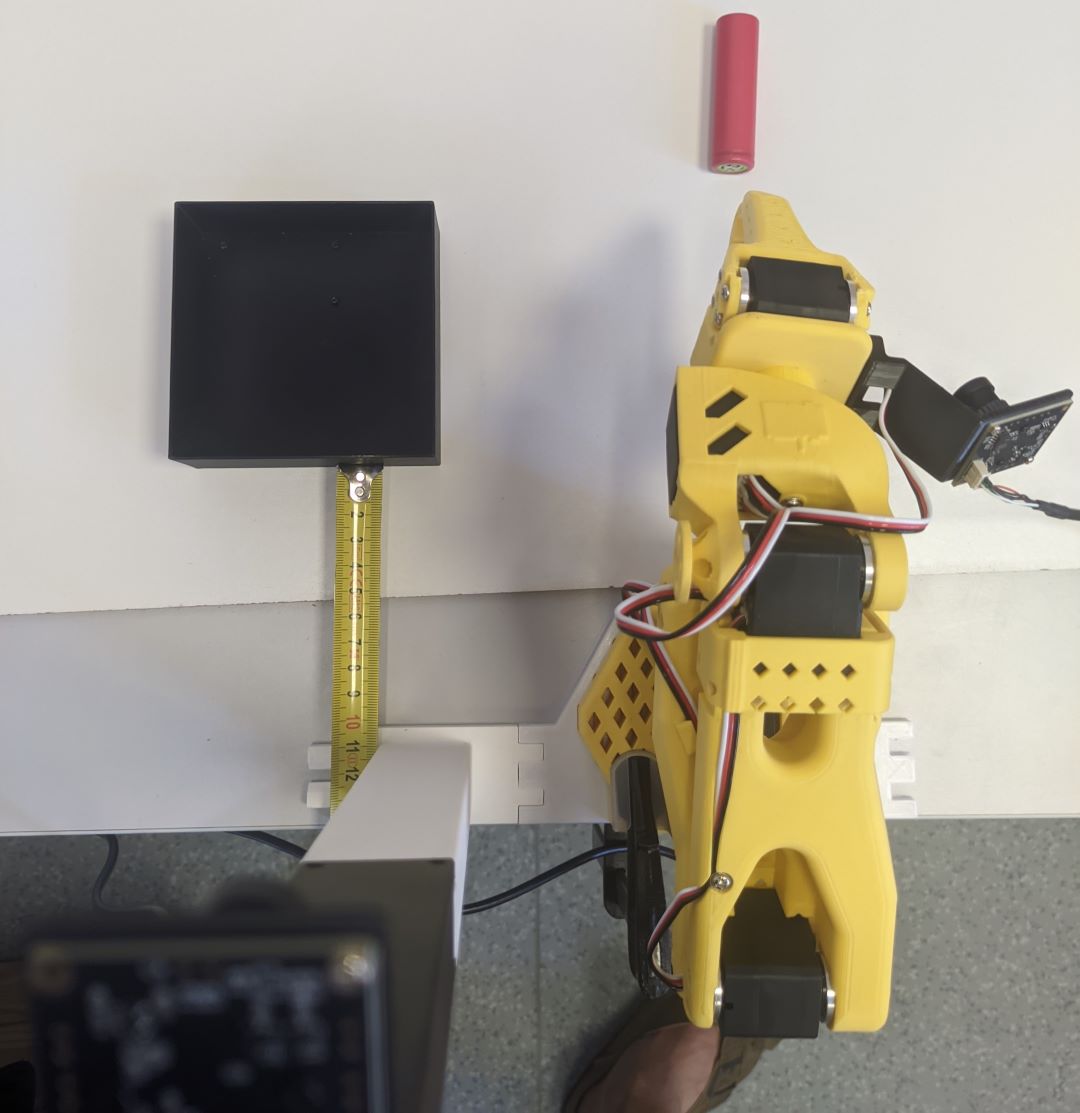
- On choisit de prendre deux caméras au format 32 x 32 , la version 1080p permet d'augmenter la qualité du DataSet 
    - [https://www.amazon.com/innomaker-Computer-Raspberry-Support-Windows/dp/B0CNCSFQC1/132-7372155-9780230](https://www.amazon.com/innomaker-Computer-Raspberry-Support-Windows/dp/B0CNCSFQC1/132-7372155-9780230)
- Imprimer et assembler la mâchoire statique intégrant le support de caméra : [https://github.com/TheRobotStudio/SO-ARM100/blob/main/Optional/Wrist\_Cam\_Mount\_32x32\_UVC\_Module/README.md](https://github.com/TheRobotStudio/SO-ARM100/blob/main/Optional/Wrist_Cam_Mount_32x32_UVC_Module/README.md)
- Imprimer et assembler le support de robot et de caméra Overhead : [https://github.com/TheRobotStudio/SO-ARM100/blob/main/Optional/Overhead\_Cam\_Mount\_32x32\_UVC\_Module/README.md](https://github.com/TheRobotStudio/SO-ARM100/blob/main/Optional/Overhead_Cam_Mount_32x32_UVC_Module/README.md)

#### Calibration des caméras

[https://huggingface.co/docs/lerobot/cameras](https://huggingface.co/docs/lerobot/cameras)

# Assembler un PC d'IA en 2026

Usages :

- Serveur pour enseignement robotique et IA
- Pilotage de robots temps-réel avec ROS2
- Inférence de larges modèles d'IA, ex.
- Fine-tuning de modèles d'IA, ex. LeRobot

Configuration pour un total d'environ 1500€ :

- Carte graphique Nvidia RTX 5070 Ti 16GB (~900€)
- Processeur AMD AM5 Ryzen 7 7700 (~190€) 
    - [https://www.reddit.com/r/MSI\_Gaming/comments/1090yb6/65w\_ryzen\_7\_7700\_performance\_scaling\_with\_pbo/](https://www.reddit.com/r/MSI_Gaming/comments/1090yb6/65w_ryzen_7_7700_performance_scaling_with_pbo/)
- Carte mère moyenne gamme (~150€) AMD AM5 PCIe 5.0 x16 b650/e [https://pausehardware.com/comparatif-des-chipsets-amd-x870-x670-b650-ryzen/](https://pausehardware.com/comparatif-des-chipsets-amd-x870-x670-b650-ryzen/) [https://www.cdiscount.com/mp-267-asu1705279946652.html](https://www.cdiscount.com/mp-267-asu1705279946652.html) [https://www.pccomponentes.fr/carte-mere-gigabyte-b650e-eagle-amd-b650-socket-am5-ddr5-atx-wifi-6e-pcie-50-raid-rgb](https://www.pccomponentes.fr/carte-mere-gigabyte-b650e-eagle-amd-b650-socket-am5-ddr5-atx-wifi-6e-pcie-50-raid-rgb) [https://www.pccomponentes.fr/carte-mere-asus-tuf-gaming-b650e-plus-wifi-b650-am5-ddr5-atx-wifi-6e-pcie-50-raid](https://www.pccomponentes.fr/carte-mere-asus-tuf-gaming-b650e-plus-wifi-b650-am5-ddr5-atx-wifi-6e-pcie-50-raid)
    - 1 x PCIe 5.0 x16 @CPU
    - 1 x PCIe 4.0 x16 (max. @x1) @PCH
    - 3 x M2 (1 x <span class="pcie-version pcie-5">PCIe 5.0 et 2 x PCIe 4.0)</span>
    - <span class="pcie-version pcie-5">1 x USB 20GBps</span>
    - <span class="pcie-version pcie-5">4 x ports SATA</span>
    - <span class="pcie-version pcie-5">Wi-Fi 6E, Ethernet Realtek 2,5 Gbit</span>
    - <span class="pcie-version pcie-5">4 x DDR5</span>
- <span class="pcie-version pcie-5">64GB DDR5 5600 MHz</span>
- <span class="pcie-version pcie-5">Alimentation 750-850W 80+ Gold</span>
- <span class="pcie-version pcie-5">Boîtier silencieux Antec P10C silent</span>

### <span class="pcie-version pcie-5">5070 Ti</span>

- <span class="pcie-version pcie-5">Installer nvidia-driver &gt;570 et linux-kernel &gt;6.11</span>
- <span class="pcie-version pcie-5">Installer la version open du driver : `nvidia-driver-570-open`</span>

<span class="pcie-version pcie-5">Donc par exemple : </span>

```
export distro="ubuntu2404"
export arch="x86_64"
export version="570"
wget https://developer.download.nvidia.com/compute/cuda/repos/$distro/$arch/cuda-keyring_1.1-1_all.deb
sudo dpkg -i cuda-keyring_1.1-1_all.deb
sudo apt update
sudo apt install nvidia-driver-pinning-$version
sudo IGNORE_PREEMPT_RT_PRESENCE=1 apt install cuda-drivers nvidia-driver-$version-open
```

<span class="pcie-version pcie-5">Benchmark glmark2 en résolution 1920x1080 [https://openbenchmarking.org/test/pts/glmark2](https://openbenchmarking.org/test/pts/glmark2) </span>

```
glmark2 -s 1920x1080
=======================================================
    glmark2 2023.01
=======================================================
    OpenGL Information
    GL_VENDOR:      NVIDIA Corporation
    GL_RENDERER:    NVIDIA GeForce RTX 5070 Ti/PCIe/SSE2
    GL_VERSION:     4.6.0 NVIDIA 570.211.01
    Surface Config: buf=32 r=8 g=8 b=8 a=8 depth=24 stencil=0 samples=0
    Surface Size:   1920x1080 windowed
=======================================================
[build] use-vbo=false: FPS: 17118 FrameTime: 0.058 ms
[build] use-vbo=true: FPS: 29160 FrameTime: 0.034 ms
[texture] texture-filter=nearest: FPS: 24267 FrameTime: 0.041 ms
[texture] texture-filter=linear: FPS: 29185 FrameTime: 0.034 ms
[texture] texture-filter=mipmap: FPS: 29395 FrameTime: 0.034 ms
[shading] shading=gouraud: FPS: 28971 FrameTime: 0.035 ms
[shading] shading=blinn-phong-inf: FPS: 28964 FrameTime: 0.035 ms
[shading] shading=phong: FPS: 28750 FrameTime: 0.035 ms
[shading] shading=cel: FPS: 28703 FrameTime: 0.035 ms
[bump] bump-render=high-poly: FPS: 26538 FrameTime: 0.038 ms
[bump] bump-render=normals: FPS: 29854 FrameTime: 0.033 ms
[bump] bump-render=height: FPS: 29795 FrameTime: 0.034 ms
[effect2d] kernel=0,1,0;1,-4,1;0,1,0;: FPS: 25300 FrameTime: 0.040 ms
[effect2d] kernel=1,1,1,1,1;1,1,1,1,1;1,1,1,1,1;: FPS: 19425 FrameTime: 0.051 ms
[pulsar] light=false:quads=5:texture=false: FPS: 27432 FrameTime: 0.036 ms
[desktop] blur-radius=5:effect=blur:passes=1:separable=true:windows=4: FPS: 9557 FrameTime: 0.105 ms
[desktop] effect=shadow:windows=4: FPS: 17248 FrameTime: 0.058 ms
[buffer] columns=200:interleave=false:update-dispersion=0.9:update-fraction=0.5:update-method=map: FPS: 3425 FrameTime: 0.292 ms
[buffer] columns=200:interleave=false:update-dispersion=0.9:update-fraction=0.5:update-method=subdata: FPS: 3852 FrameTime: 0.260 ms
[buffer] columns=200:interleave=true:update-dispersion=0.9:update-fraction=0.5:update-method=map: FPS: 4847 FrameTime: 0.206 ms
[ideas] speed=duration: FPS: 24299 FrameTime: 0.041 ms
[jellyfish] <default>: FPS: 20993 FrameTime: 0.048 ms
[terrain] <default>: FPS: 2663 FrameTime: 0.376 ms
[shadow] <default>: FPS: 17595 FrameTime: 0.057 ms
[refract] <default>: FPS: 6201 FrameTime: 0.161 ms
[conditionals] fragment-steps=0:vertex-steps=0: FPS: 28276 FrameTime: 0.035 ms
[conditionals] fragment-steps=5:vertex-steps=0: FPS: 28159 FrameTime: 0.036 ms
[conditionals] fragment-steps=0:vertex-steps=5: FPS: 23158 FrameTime: 0.043 ms
[function] fragment-complexity=low:fragment-steps=5: FPS: 24062 FrameTime: 0.042 ms
[function] fragment-complexity=medium:fragment-steps=5: FPS: 27253 FrameTime: 0.037 ms
[loop] fragment-loop=false:fragment-steps=5:vertex-steps=5: FPS: 28133 FrameTime: 0.036 ms
[loop] fragment-steps=5:fragment-uniform=false:vertex-steps=5: FPS: 28144 FrameTime: 0.036 ms
[loop] fragment-steps=5:fragment-uniform=true:vertex-steps=5: FPS: 28068 FrameTime: 0.036 ms
=======================================================
                                  glmark2 Score: 22083 
=======================================================
```

### Config laptop

- suspend-then-hibernate swap partition 
    - [https://forums.linuxmint.com/viewtopic.php?t=388398](https://forums.linuxmint.com/viewtopic.php?t=388398)
    - [https://forums.linuxmint.com/viewtopic.php?t=287015](https://forums.linuxmint.com/viewtopic.php?t=287015)
    - [https://forums.linuxmint.com/viewtopic.php?t=322002](https://forums.linuxmint.com/viewtopic.php?t=322002)

# Installation de machine avec RT Kernel et accélération graphique

### Déploiement avec FAI-Project

[https://fai-project.org/FAIme/](https://fai-project.org/FAIme/)

- Sélectionner Ubuntu
- Basculer en mode avancé en cliquant sur Toggle
- Si le mdp est laissé vide, ce sera le code du projet FAI
- Choisir un utilisateur, par ex. `etudiant`
- Attention si vous choisissez US, le clavier sera QWERTZ

Your job BYDEGIKS is currently being processed. [https://fai-project.org/myimages/BYDEGIKS](https://fai-project.org/myimages/BYDEGIKS/)

Your web config:

```
type="install"
partition="ONE"
desktop="XORG"
suite="ubuntu"
keyboard="fr"
addpkgs="software-properties-common terminator nano htop wget curl gpg apt-transport-https python3-rosdep2 ubuntu-realtime docker-ce docker-ce-cli containerd.io docker-buildx-plugin docker-compose-plugin"
email="robotics@hentz.eu"
rootpw=''
username="etudiant"
userpw=''
gittype=""
gituser=""
repo="deb [trusted=yes] http://download.docker.com/linux/ubuntu noble stable"
postinst="install_pc_aica.sh"
rclocal="1"
datapart=""
cmdline=""
options="STANDARD REBOOT RECOMMENDS"
```

`curl "https://fai-project.org/cgi/faime.cgi?type=install;username=etudiant;partition=ONE;repo=http%3A%2F%2Fdownload.docker.com%2Flinux%2Fubuntu%20noble%20stable;keyboard=fr;suite=ubuntu;desktop=XORG;cl6=STANDARD;addpkgs=software-properties-common%20terminator%20nano%20htop%20wget%20curl%20gpg%20apt-transport-https%20python3-rosdep2%20ubuntu-realtime%20docker-ce%20docker-ce-cli%20containerd.io%20docker-buildx-plugin%20docker-compose-plugin;cl9=RECOMMENDS;email=robotics%40hentz.eu;postinst=install_pc_aica.sh;rclocal=1;cl8=REBOOT;sbm=2"`

```
sudo apt install ubuntu-realtime
sudo nano /etc/default/grub
sudo update-grub
uname -v | cut -d" " -f1-4
sudo apt install cpufrequtils
sudo systemctl disable ondemand
sudo systemctl enable cpufrequtils
sudo sh -c 'echo "GOVERNOR=performance" > /etc/default/cpufrequtils'
sudo systemctl daemon-reload && sudo systemctl restart cpufrequtils
sudo systemctl status docker
cpufreq-info

wget <https://developer.download.nvidia.com/compute/cuda/repos/ubuntu2404/x86_64/cuda-keyring_1.1-1_all.deb>
sudo dpkg -i cuda-keyring_1.1-1_all.deb
sudo apt update
sudo apt install nvidia-driver-pinning-570
sudo IGNORE_PREEMPT_RT_PRESENCE=1 apt install cuda-drivers

sudo apt-get update && sudo apt-get install -y --no-install-recommends    ca-certificates    curl    gnupg2
sudo apt-get remove docker docker-engine docker.io containerd runc
sudo install -m 0755 -d /etc/apt/keyrings
sudo curl -fsSL <https://download.docker.com/linux/ubuntu/gpg> -o /etc/apt/keyrings/docker.asc
sudo chmod a+r /etc/apt/keyrings/docker.asc
# Add the repository to Apt sources:
sudo tee /etc/apt/sources.list.d/docker.sources <<EOF
Types: deb
URIs: <https://download.docker.com/linux/ubuntu>
Suites: $(. /etc/os-release && echo "${UBUNTU_CODENAME:-$VERSION_CODENAME}")
Components: stable
Signed-By: /etc/apt/keyrings/docker.asc
EOF
sudo apt update
sudo apt install docker-ce docker-ce-cli containerd.io docker-buildx-plugin docker-compose-plugin
sudo docker run hello-world
sudo usermod -aG docker $USER

curl -fsSL <https://nvidia.github.io/libnvidia-container/gpgkey> | sudo gpg --dearmor -o /usr/share/keyrings/nvidia-container-toolkit-keyring.gpg   && curl -s -L <https://nvidia.github.io/libnvidia-container/stable/deb/nvidia-container-toolkit.list> |     sed 's#deb <https://#deb> [signed-by=/usr/share/keyrings/nvidia-container-toolkit-keyring.gpg] <https://#g>' |     sudo tee /etc/apt/sources.list.d/nvidia-container-toolkit.list
sudo apt update
sudo apt install nvidia-container-toolkit
sudo nvidia-ctk runtime configure --runtime=docker
sudo reboot
sudo docker run --rm --runtime=nvidia --gpus all ubuntu nvidia-smi

git clone <https://github.com/gautz/unistra-aica-practical> aica
cd ~/aica/package-template
docker build -f aica-package.toml -t object-detection-utils .
```

### RT Kernel

RT Kernel ou Low Latency ?

[https://unix.stackexchange.com/questions/553980/why-would-anyone-choose-not-to-use-the-lowlatency-kernel](https://unix.stackexchange.com/questions/553980/why-would-anyone-choose-not-to-use-the-lowlatency-kernel)

Soit on build à la main ([https://innovation.iha.unistra.fr/books/robotique-open-source/page/commander-un-robot-ur-avec-le-driver-ros2#bkmrk-installation-d%27ubunt](https://innovation.iha.unistra.fr/books/robotique-open-source/page/commander-un-robot-ur-avec-le-driver-ros2#bkmrk-installation-d%27ubunt) ), soit on prend un Kernel qui est dispo dans les dépôts

`sudo apt list *realtime* linux*rt`

```
ubuntu-realtime
linux-realtime
linux-image-6.8.1-1015-realtime
```

- On install `sudo apt install ubuntu-realtime`
- Permettre le choix du noyau au démarrage (grub)
- `sudo nano /etc/default/grub`

```
GRUB_SAVEDEFAULT=true
GRUB_DEFAULT="saved" # Le dernier Kernel choisi devient le Kernel par défaut
#GRUB_DEFAULT="Advanced options for Ubuntu>Ubuntu, with Linux 6.8.1-1015-realtime"
#GRUB_TIMEOUT_STYLE=hidden
GRUB_TIMEOUT=3 # 3 secondes pour choisir le Kernel à démarrer
```

- `sudo update-grub`

[https://unix.stackexchange.com/questions/198003/set-the-default-kernel-in-grub](https://unix.stackexchange.com/questions/198003/set-the-default-kernel-in-grub)

[https://www.gnu.org/software/grub/manual/grub/html\_node/Simple-configuration.html](https://www.gnu.org/software/grub/manual/grub/html_node/Simple-configuration.html)

### Accélération GPU

Que ce soit pour LeRobot, pour AICA, ou en général pour utiliser des modèles d'IA, l'installation de Linux avec les bons drivers graphiques n'est pas toujours aisé.

On veut accéder dans Docker aux capacités Compute d'un GPU, essentiellement fournie par NVidia Cuda. On différentiera l'installation d'un serveur qui n'a pas besoin de l'accélération graphique liée à l'affichage, ni de capacités temps-réel, contrairement à un PC de commande de robot.

#### NVidia Driver et RT Kernel

[https://interfacinglinux.com/2024/01/16/nvidia-cuda-on-debian-real-time-kernel/](https://interfacinglinux.com/2024/01/16/nvidia-cuda-on-debian-real-time-kernel/)

[https://gist.github.com/pantor/9786c41c03a97bca7a52aa0a72fa9387](https://gist.github.com/pantor/9786c41c03a97bca7a52aa0a72fa9387)

##### Prérequis

- Les paquets Nvidia pour les Kernels installés ne sont pas nécessairement dispos, mais le patch est automatique
- Par contre le patch échoue si un RT Kernel est détecté
- Il faut forcer le patch à s'appliquer sur le RT Kernel
- `export IGNORE_PREEMPT_RT_PRESENCE=1`
- On peut l'ajouter au `~.bashrc` pour ne pas oublier de le faire lors d'un upgrade de Kernel)
- On installe les headers pour le Kernel en cours
- `sudo apt install linux-headers-$(uname -r)`
- S'il y a d'autres Kernel, installer les header
- `sudo apt install linux-headers-`...

<p class="callout warning">`sudo apt install nvidia-driver` installe la dernière version du driver dispo, mais cuda-drivers n'est pas forcément dispo pour cette version. Donc on va chercher la bonne version.</p>

<p class="callout danger">Pour supprimer tous les drivers nvidia précédemment installés. **A utiliser avec précautions** : `sudo apt autoremove --purge *nvidia*`</p>

##### Installation du `nvidia-driver` et de cuda

- On installe le dépôt CUDA
- ```
    wget https://developer.download.nvidia.com/compute/cuda/repos/$distro/x86_64/cuda-keyring_1.1-1_all.deb
    sudo dpkg -i cuda-keyring_1.1-1_all.deb
    sudo apt update
    ```
- On regarde les version de `nvidia-driver` qui peuvent être pin :
- `sudo apt install nvidia-driver-pinning-*`
- On regarde les version des `cuda-drivers` qui peuvent être installées :
- `sudo apt list cuda-drivers-*`
- On regarde quelle version de `nvidia-driver` serait installé pour une version voulue de cuda :
- Exemple : `sudo apt install cuda-13-1` OU `sudo apt install cuda-12-8`
- On choisi de pin la version de `nvidia-driver` qui a un `cuda-drivers` et qui permet d'installer la bonne version de CUDA :
- Exemple : `sudo apt install nvidia-driver-pinning-550` installe CUDA 12.5
- Exemple : `sudo apt install nvidia-driver-pinning-560` installe CUDA 12.6
- Exemple : `sudo apt install nvidia-driver-pinning-570` installe CUDA 12.8
- Exemple : `sudo apt install nvidia-driver-pinning-580` installe CUDA 13.0
- On install les drivers propriétaires (Calcul et Affichage GPU) :
- `sudo IGNORE_PREEMPT_RT_PRESENCE=1 apt install cuda-drivers` (pour patcher même les RT Kernel)
- Installer nvidia-container-toolkit pour Docker : `sudo apt install nvidia-container-toolkit`

[https://docs.nvidia.com/datacenter/cloud-native/container-toolkit/latest/install-guide.html#configuring-docker](https://docs.nvidia.com/datacenter/cloud-native/container-toolkit/latest/install-guide.html#configuring-docker)

##### Optionnel

- Si on est sur un serveur, on peut aussi n'installer que les composants de Calcul GPU :

`sudo apt -V install libnvidia-compute nvidia-dkms`

- Si on est sur un PC, on peut aussi n'installer que les composants d'Affichage GPU :

`sudo apt -V install libnvidia-gl nvidia-dkms`

- Pour installer les composants Libres (Open Kernel Modules), voir :

[https://docs.nvidia.com/datacenter/tesla/driver-installation-guide/ubuntu.html](https://docs.nvidia.com/datacenter/tesla/driver-installation-guide/ubuntu.html)

- Installer le SDK CUDA `sudo apt install cuda-toolkit`
- puis les paquets GDS `sudo apt install nvidia-gds` (qui contient `nvidia-fs` kernel module)
- pour `arm64-jetson` : `sudo apt install cuda-compat`

[https://docs.nvidia.com/cuda/cuda-installation-guide-linux/#network-repo-installation-for-ubuntu](https://docs.nvidia.com/cuda/cuda-installation-guide-linux/#network-repo-installation-for-ubuntu)

#### Vérification de la compatibilité GPU - Application IA

##### Procédure :

- Lister les applications d'IA qu'on va vouloir faire tourner
- Regarder les **prérequis de la version actuelle de l'application** IA
- Regarder les prérequis de ses dépendances
- Par exemple YOLO requiert onnxruntime-gpu
- Regarder les **prérequis en termes GPU** (Compute Capability, etc.)
- Regarder les **prérequis en termes d'environnement d'exécution**
    - Version d'Ubuntu et drivers dispos
    - Version de CUDA, cuDNN, Pytorch
- Acheter le GPU nécessaire et installer la version d'Ubuntu nécessaire
- Si on est motivé et qu'on veut essayer avec notre GPU et notre version d'Ubuntu actuelle, regarder les prérequis des versions précédentes et voir s'il y en a une qui passe

##### On a une application d'IA donnée

Par exemple YOLO :

- utilise onnxruntime [https://onnxruntime.ai/docs/execution-providers/CUDA-ExecutionProvider.html](https://onnxruntime.ai/docs/execution-providers/CUDA-ExecutionProvider.html)
- onnxruntime-gpu &gt;=1.18.1 : CUDA 12.x ; cuDNN 9.x ; PyTorch &gt;= 2.4.0
- onnxruntime-gpu &lt; 1.18.0 : CUDA 12.x ; cuDNN 8.x ; PyTorch &lt; 2.4.0
- onnxruntime-gpu 1.18-1.20 : CUDA 11.8 ; cuDNN 8.x ; PyTorch &lt;= 2.3.1

[ONNX Runtime (ORT) qui sert à l'inférence des modèles Yolo sur GPU nécessitent des Compute Capability](https://github.com/microsoft/onnxruntime/blob/v1.24.2/tools/ci_build/github/linux/build_cuda_c_api_package.sh#L4-L7) &gt;= 6.0

- onnxruntime-gpu &gt;= [1.16](https://github.com/microsoft/onnxruntime/blob/rel-1.16.0/tools/ci_build/github/linux/build_cuda_c_api_package.sh) supports CC 6.0 or above
- **onnxruntime-gpu &lt; 1.18 requiert CUDA 11.x**
- **L'environnement YOLO de AICA utilise onnxruntime-gpu=1.22.2**
- **onnxruntime-gpu &gt;=1.24 requiert CC 6.0 pour CUDA 12 et CC 7.5 pour CUDA 13**

##### Différentes versions de l'environnement d'exécution

- Grâce à la [compatibilité des versions mineures de Nvidia CUDA](https://docs.nvidia.com/deploy/cuda-compatibility/#minor-version-compatibility), une application d'IA compilée avec CUDA 11.8 peut être exécutée avec n'importe laquelle des version CUDA 11.x . Idem pour CUDA 12.x .
- Par contre une application cuDNN 8.x n'est pas compatible avec cuDNN 9.x .
- PyTorch 2.3 et inférieur utilisent cuDNN 8.x
- PyTorch 2.4 et supérieur utilisent cuDNN 9.x
- Il faut donc choisir la version de Pytorch en fonction des versions de CUDA et cuDNN qui sont compatibles avec l'environnement d'exécution (carte graphique et driver)

[https://docs.nvidia.com/deeplearning/cudnn/backend/latest/reference/support-matrix.html](https://docs.nvidia.com/deeplearning/cudnn/backend/latest/reference/support-matrix.html)

cuDNN&gt;=v9.12.0 supporte :

- CUDA 12.x (nvidia-driver&gt;=525.60.13)
- CUDA 13.x (nvidia-driver&gt;=580.65.06)
- CUDA CC&gt;=7.5

cuDNN&lt;=v9.11.1

- CUDA 12.x (nvidia-driver&gt;=525.60.13)
- CUDA CC&gt;=5.0-9.0 (10.0-12.0 avec CUDA&gt;=12.8 et nvidia-driver&gt;=570.26)

cuDNN&lt;=v9.10.2 :

- CUDA 12.x (nvidia-driver&gt;=525.60.13) (12.8-9 pour &gt;=570.26 et CC 10-12)
- CUDA 11.x (nvidia-driver&gt;=450.80.02)
- CUDA CC&gt;=5.0-9.0 (10.0-12.0 avec CUDA&gt;=12.8 et nvidia-driver&gt;=570.26)

##### Compatibilité de version d'Ubuntu

Sur Ubuntu 24.04 :

- les `sudo apt list nvidia-driver*` dispos sont 460-470,515-590
- les `sudo apt list cuda-drivers*` dispos sont 550,555,560,565,570,575,580
- les `sudo apt list nvidia-driver-pinning*` dispo sont 570,580,590
- les `sudo apt list cuda-toolkit*` seuls CUDA 12.5-13.1 sont dispos

##### On a une carte graphique donnée :

- Vérification du **Compute Capability (CC)** [https://developer.nvidia.com/cuda/gpus](https://developer.nvidia.com/cuda/gpus)
- Si on est dans cette liste, donc **CC &gt;= 7.5 c'est TOP, on est compatible avec onnx et CUDA 13**
- A partir de 6.0 on est compatible avec onnx et CUDA 12 (mais pas CUDA 13)
- On conseille de **laisser tomber l'IA avec des CC de 5.0** ou inférieur
- Si on a **5.2 &gt;= CC &lt; 6.0** , on a une carte Legacy, voir ci-dessous, **c'est compliqué**
- On vérifie la version de CUDA Max supportée en fonction du CC : [https://stackoverflow.com/questions/28932864/which-compute-capability-is-supported-by-which-cuda-versions](https://stackoverflow.com/questions/28932864/which-compute-capability-is-supported-by-which-cuda-versions)
- On va donc pouvoir chercher une compatibilité d'exécution avec CUDA 12.x et CUDA 11.x , mais pas CUDA 13.x

Problèmes avec les GPU NVidia anciens : [https://github.com/ultralytics/ultralytics/issues/5305](https://github.com/ultralytics/ultralytics/issues/5305)

#### GPU NVidia anciens / Legacy

On lance Yolo et on a l'erreur suivante :

`10:17:40.111 [yolo_executor] error: ONNX Runtime error during model query: Non-zero status code returned while running QuickGelu node. Name:'node_silu/QuickGeluFusion/' Status Message: CUDA error cudaErrorNoKernelImageForDevice:no kernel image is available for execution on the device`

[ONNX Runtime (ORT) qui sert à l'inférence des modèles Yolo sur GPU nécessitent des Compute Capability](https://github.com/microsoft/onnxruntime/blob/v1.24.2/tools/ci_build/github/linux/build_cuda_c_api_package.sh#L4-L7) &gt; 5.2

- onnxruntime-gpu [1.14](https://github.com/microsoft/onnxruntime/blob/rel-1.14.0/tools/ci_build/github/linux/build_cuda_c_api_package.sh) supports CC 3.7 or above
- **onnxruntime-gpu [1.15](https://github.com/microsoft/onnxruntime/blob/rel-1.15.0/tools/ci_build/github/linux/build_cuda_c_api_package.sh) supports CC 5.2 or above**
- onnxruntime-gpu &gt;=[1.16](https://github.com/microsoft/onnxruntime/blob/rel-1.16.0/tools/ci_build/github/linux/build_cuda_c_api_package.sh) supports CC 6.0 or above
- **onnxruntime-gpu &lt;1.18 requiert CUDA 11.x**
- **&gt;1.24 requiert CC 6.0 pour CUDA 12 et CC 7.5 pour CUDA 13**
- **L'environnement YOLO de AICA utilise onnxruntime-gpu=1.22.2**
- FP16 models ne tournent qu'à partir de CC 5.3
- C'est pour ça que l'erreur indique qu'il n'y a pas de kernel FP16 compilé pour notre GPU
- Problème : CUDA 11.x n'est pas dispo sur Ubuntu 24.04
- Mais peut être installé : [https://askubuntu.com/questions/1536271/can-i-install-cuda-11-4-in-ubuntu-24-04-if-so-how](https://askubuntu.com/questions/1536271/can-i-install-cuda-11-4-in-ubuntu-24-04-if-so-how)

Solution (voir analyse ci-dessous) :

- Installer le driver 470
- Installer CUDA 11.8? en suivant [https://askubuntu.com/questions/1536271/can-i-install-cuda-11-4-in-ubuntu-24-04-if-so-how](https://askubuntu.com/questions/1536271/can-i-install-cuda-11-4-in-ubuntu-24-04-if-so-how)
- Exporter le modèle onnx en kernel FP32
- Déployer le modèle YOLO dans un environnement Legacy avec onnxruntime-gpu [1.15](https://github.com/microsoft/onnxruntime/blob/rel-1.15.0/tools/ci_build/github/linux/build_cuda_c_api_package.sh)

[https://github.com/microsoft/onnxruntime/issues/17861#issuecomment-1758098712](https://github.com/microsoft/onnxruntime/issues/17861#issuecomment-1758098712)

##### On a une carte graphique donnée | par exemple Quadro M620 (GM107GLM) :

- Vérification du Compute Capability [https://developer.nvidia.com/cuda/gpus/legacy](https://developer.nvidia.com/cuda/gpus/legacy) | CC5.2
- On conseille de **laisser tomber l'IA avec des Compute Capability de 5.0** ou inférieur |
- Si on a une Compute Capability entre 5.2 et 7.2 , on peut envisager des choses mais c'est compliqué
- On vérifie la version de CUDA Max supportée : [https://stackoverflow.com/questions/28932864/which-compute-capability-is-supported-by-which-cuda-versions](https://stackoverflow.com/questions/28932864/which-compute-capability-is-supported-by-which-cuda-versions) | pour CC5.2 : CUDA 12.x
- On va donc pouvoir chercher une compatibilité d'exécution avec CUDA 12.x et CUDA 11.x , mais pas CUDA 13.x
- Les `nvidia-driver` dispos sont 460-470,515-590 (535 est testé/recommandé)
- mais les `cuda-drivers` dispos sont 550,555,560,565,570,575,580
- et les `nvidia-driver-pinning` et dispo de 570,580,590
- Exemple : `sudo apt install nvidia-driver-470` mais CUDA 11.x pas dispo sur Ubuntu 24.04
- Exemple : `sudo apt install nvidia-driver-pinning-550` installe CUDA 12.5
- Exemple : `sudo apt install nvidia-driver-pinning-560` installe CUDA 12.6
- Exemple : `sudo apt install nvidia-driver-pinning-570` installe CUDA 12.8
- Exemple : `sudo apt install nvidia-driver-pinning-580` installe CUDA 13.0
- Avec CUDA 12.0-1 et le driver 535 on peut avoir v8.9.2&lt;=cuDNN&lt;=v9.11.1
- Avec CUDA 12.2 v8.9.7&lt;=cuDNN&lt;=v9.11.1
- Avec CUDA &gt;=12.3 v9&lt;=cuDNN&lt;=v9.11.1
- Donc il faudrait CUDA 12.0-2
- mais `sudo apt list cuda-toolkit*` seuls CUDA 12.5-13.1 sont dispos

Option 1 : Driver Version: 580 CUDA Version: 13.0

- On n'a pas cuDNN v8
- on a `cuda-drivers-580`

Option 2 : Driver Version: 570 CUDA Version: 12.8

- 
- on a `cuda-drivers-570`

Option 3 : Driver Version: 535.288.01 CUDA Version: 12.2

- On a v8.9.7&lt;=cuDNN&lt;=v9.11.1
- Mais on n'a pas `cuda-drivers`

Option 4 : Driver Version: 470 CUDA Version: 11.x

- Installer CUDA 11.8? en suivant [https://askubuntu.com/questions/1536271/can-i-install-cuda-11-4-in-ubuntu-24-04-if-so-how](https://askubuntu.com/questions/1536271/can-i-install-cuda-11-4-in-ubuntu-24-04-if-so-how)
- On n'a pas `cuda-drivers` -&gt; Problème ?

[https://pytorch.org/get-started/previous-versions/](https://pytorch.org/get-started/previous-versions/)

- Avec pytorch 2.1.1 et 2.2.0 , c'est cuddn 8.9.2 qui est installé par défaut
- pytorch &lt;2.2.0 n'est plus supporté dans pip

[https://docs.nvidia.com/deeplearning/cudnn/archives/cudnn-892/support-matrix/index.html](https://docs.nvidia.com/deeplearning/cudnn/archives/cudnn-892/support-matrix/index.html)

cuDNN=v8.9.2 :

- CUDA 12.0-1 (nvidia-driver&gt;=525.60.13)
- CUDA 11.x (nvidia-driver&gt;=450.80.02)
- CUDA CC&gt;=5.0 &lt;=8.6 (8.9-9.0 avec CUDA&gt;=11.8)
- Avec pytorch ... c'est cuddn 8.9.7 qui est installé par défaut

[https://docs.nvidia.com/deeplearning/cudnn/archives/cudnn-897/support-matrix/index.html](https://docs.nvidia.com/deeplearning/cudnn/archives/cudnn-897/support-matrix/index.html)

cuDNN=v8.9.7 :

- CUDA 12.0-2 (nvidia-driver&gt;=525.60.13)
- CUDA 11.x (nvidia-driver&gt;=450.80.02)
- CUDA CC&gt;=5.0 &lt;=8.6 (8.9-9.0 avec CUDA&gt;=11.8)

Voir aussi [https://docs.nvidia.com/deeplearning/cudnn/onnxruntime-gpuarchives/index.html](https://docs.nvidia.com/deeplearning/cudnn/archives/index.html)

Avec :

```
#syntax=ghcr.io/aica-technology/app-builder:v2
# launch with bash: 
[core]
"image" = "v5.1.0"

[packages]
# add components
#"@aica/components/rl-policy-components" = "v3.0.0"
"@aica/components/advanced-perception" = "v1.0.0" # contains YoloExecutor
"@aica/components/core-vision" = "v1.1.2" # contains CameraStreamer
"@aica/foss/toolkits/cuda" = "v1.0.0-cuda24.12" # prerequisite for NVidia GPU acceleration
"@aica/foss/toolkits/ml" = "v1.0.0-gpu24.12" # prerequisite for ML model inference

# other extensions
"object-detection-utils" # self-built component to feed goal frame extracted from yolo to robot velocity controller

# add hardware collections
"@aica/collections/intel-realsense-collection" = "v2.0.1" # D4XX and L515 cameras models, stream RGBD
"@aica/collections/ur-collection" = "v4.3.0"
```

On a :

```
ros2@iha-portrob-1:~/examples$ python3 -m torch.utils.collect_env 
<frozen runpy>:128: RuntimeWarning: 'torch.utils.collect_env' found in sys.modules after import of package 'torch.utils', but prior to execution of 'torch.utils.collect_env'; this may result in unpredictable behaviour
Collecting environment information...
PyTorch version: 2.6.0+cu126
Is debug build: False
CUDA used to build PyTorch: 12.6
ROCM used to build PyTorch: N/A

OS: Ubuntu 24.04.2 LTS (x86_64)
GCC version: (Ubuntu 13.3.0-6ubuntu2~24.04) 13.3.0
Clang version: Could not collect
CMake version: version 3.28.3
Libc version: glibc-2.39

Python version: 3.12.3 (main, Feb  4 2025, 14:48:35) [GCC 13.3.0] (64-bit runtime)
Python platform: Linux-6.17.0-14-generic-x86_64-with-glibc2.39
Is CUDA available: True
CUDA runtime version: 12.6.85
CUDA_MODULE_LOADING set to: LAZY
GPU models and configuration: GPU 0: Quadro M620
Nvidia driver version: 570.211.01
cuDNN version: Probably one of the following:
/usr/lib/libcudnn.so.9.6.0
/usr/lib/libcudnn_adv.so.9.6.0
/usr/lib/libcudnn_cnn.so.9.6.0
/usr/lib/libcudnn_engines_precompiled.so.9.6.0
/usr/lib/libcudnn_engines_runtime_compiled.so.9.6.0
/usr/lib/libcudnn_graph.so.9.6.0
/usr/lib/libcudnn_heuristic.so.9.6.0
/usr/lib/libcudnn_ops.so.9.6.0
HIP runtime version: N/A
MIOpen runtime version: N/A
Is XNNPACK available: True

CPU:
Architecture:                            x86_64
CPU op-mode(s):                          32-bit, 64-bit
Address sizes:                           39 bits physical, 48 bits virtual
Byte Order:                              Little Endian
CPU(s):                                  4
On-line CPU(s) list:                     0-3
Vendor ID:                               GenuineIntel
Model name:                              Intel(R) Core(TM) i5-7440HQ CPU @ 2.80GHz
CPU family:                              6
Model:                                   158
Thread(s) per core:                      1
Core(s) per socket:                      4
Socket(s):                               1
Stepping:                                9
CPU(s) scaling MHz:                      84%
CPU max MHz:                             3800.0000
CPU min MHz:                             800.0000
BogoMIPS:                                5599.85
Flags:                                   fpu vme de pse tsc msr pae mce cx8 apic sep mtrr pge mca cmov pat pse36 clflush dts acpi mmx fxsr sse sse2 ss ht tm pbe syscall nx pdpe1gb rdtscp lm constant_tsc art arch_perfmon pebs bts rep_good nopl xtopology nonstop_tsc cpuid aperfmperf pni pclmulqdq dtes64 monitor ds_cpl vmx smx est tm2 ssse3 sdbg fma cx16 xtpr pdcm pcid sse4_1 sse4_2 x2apic movbe popcnt tsc_deadline_timer aes xsave avx f16c rdrand lahf_lm abm 3dnowprefetch cpuid_fault epb pti ssbd ibrs ibpb stibp tpr_shadow flexpriority ept vpid ept_ad fsgsbase tsc_adjust bmi1 avx2 smep bmi2 erms invpcid mpx rdseed adx smap clflushopt intel_pt xsaveopt xsavec xgetbv1 xsaves dtherm ida arat pln pts hwp hwp_notify hwp_act_window hwp_epp vnmi md_clear flush_l1d arch_capabilities
Virtualization:                          VT-x
L1d cache:                               128 KiB (4 instances)
L1i cache:                               128 KiB (4 instances)
L2 cache:                                1 MiB (4 instances)
L3 cache:                                6 MiB (1 instance)
NUMA node(s):                            1
NUMA node0 CPU(s):                       0-3
Vulnerability Gather data sampling:      Vulnerable
Vulnerability Ghostwrite:                Not affected
Vulnerability Indirect target selection: Not affected
Vulnerability Itlb multihit:             KVM: Mitigation: Split huge pages
Vulnerability L1tf:                      Mitigation; PTE Inversion; VMX conditional cache flushes, SMT disabled
Vulnerability Mds:                       Mitigation; Clear CPU buffers; SMT disabled
Vulnerability Meltdown:                  Mitigation; PTI
Vulnerability Mmio stale data:           Mitigation; Clear CPU buffers; SMT disabled
Vulnerability Old microcode:             Not affected
Vulnerability Reg file data sampling:    Not affected
Vulnerability Retbleed:                  Mitigation; IBRS
Vulnerability Spec rstack overflow:      Not affected
Vulnerability Spec store bypass:         Mitigation; Speculative Store Bypass disabled via prctl
Vulnerability Spectre v1:                Mitigation; usercopy/swapgs barriers and __user pointer sanitization
Vulnerability Spectre v2:                Mitigation; IBRS; IBPB conditional; STIBP disabled; RSB filling; PBRSB-eIBRS Not affected; BHI Not affected
Vulnerability Srbds:                     Mitigation; Microcode
Vulnerability Tsa:                       Not affected
Vulnerability Tsx async abort:           Mitigation; TSX disabled
Vulnerability Vmscape:                   Mitigation; IBPB before exit to userspace

Versions of relevant libraries:
[pip3] ament-flake8==0.17.2
[pip3] flake8==7.0.0
[pip3] flake8-builtins==2.1.0
[pip3] flake8-comprehensions==3.14.0
[pip3] flake8-docstrings==1.6.0
[pip3] flake8-import-order==0.18.2
[pip3] flake8-quotes==3.4.0
[pip3] numpy==1.26.4
[pip3] nvidia-cublas-cu12==12.6.4.1
[pip3] nvidia-cuda-cupti-cu12==12.6.80
[pip3] nvidia-cuda-nvrtc-cu12==12.6.77
[pip3] nvidia-cuda-runtime-cu12==12.6.77
[pip3] nvidia-cudnn-cu12==9.5.1.17
[pip3] nvidia-cufft-cu12==11.3.0.4
[pip3] nvidia-curand-cu12==10.3.7.77
[pip3] nvidia-cusolver-cu12==11.7.1.2
[pip3] nvidia-cusparse-cu12==12.5.4.2
[pip3] nvidia-cusparselt-cu12==0.6.3
[pip3] nvidia-nccl-cu12==2.21.5
[pip3] nvidia-nvjitlink-cu12==12.6.85
[pip3] nvidia-nvtx-cu12==12.6.77
[pip3] onnxruntime-gpu==1.22.2
[pip3] pytorch3d==0.7.8
[pip3] torch==2.6.0+cu126
[pip3] torchaudio==2.6.0+cu126
[pip3] torchvision==0.21.0+cu126
[pip3] triton==3.2.0
[conda] Could not collect
```

Avec :

```
"@aica/foss/toolkits/cuda" = "v1.0.0-cuda24.12" # prerequisite for NVidia GPU acceleration
"@aica/foss/toolkits/ml" = "v1.0.0-gpu24.12" # prerequisite for ML model inference
```

On a :

```
ros2@iha-portrob-1:~/examples$ python3 -m torch.utils.collect_env
<frozen runpy>:128: RuntimeWarning: 'torch.utils.collect_env' found in sys.modules after import of package 'torch.utils', but prior to execution of 'torch.utils.collect_env'; this may result in unpredictable behaviour
Collecting environment information...
PyTorch version: 2.6.0+cu126
Is debug build: False
CUDA used to build PyTorch: 12.6
ROCM used to build PyTorch: N/A

OS: Ubuntu 24.04.2 LTS (x86_64)
GCC version: (Ubuntu 13.3.0-6ubuntu2~24.04) 13.3.0
Clang version: Could not collect
CMake version: version 3.28.3
Libc version: glibc-2.39

Python version: 3.12.3 (main, Feb  4 2025, 14:48:35) [GCC 13.3.0] (64-bit runtime)
Python platform: Linux-6.17.0-14-generic-x86_64-with-glibc2.39
Is CUDA available: True
CUDA runtime version: 12.6.85
CUDA_MODULE_LOADING set to: LAZY
GPU models and configuration: GPU 0: Quadro M620
Nvidia driver version: 570.211.01
cuDNN version: Probably one of the following:
/usr/lib/libcudnn.so.9.6.0
/usr/lib/libcudnn_adv.so.9.6.0
/usr/lib/libcudnn_cnn.so.9.6.0
/usr/lib/libcudnn_engines_precompiled.so.9.6.0
/usr/lib/libcudnn_engines_runtime_compiled.so.9.6.0
/usr/lib/libcudnn_graph.so.9.6.0
/usr/lib/libcudnn_heuristic.so.9.6.0
/usr/lib/libcudnn_ops.so.9.6.0
HIP runtime version: N/A
MIOpen runtime version: N/A
Is XNNPACK available: True

CPU:
Architecture:                            x86_64
CPU op-mode(s):                          32-bit, 64-bit
Address sizes:                           39 bits physical, 48 bits virtual
Byte Order:                              Little Endian
CPU(s):                                  4
On-line CPU(s) list:                     0-3
Vendor ID:                               GenuineIntel
Model name:                              Intel(R) Core(TM) i5-7440HQ CPU @ 2.80GHz
CPU family:                              6
Model:                                   158
Thread(s) per core:                      1
Core(s) per socket:                      4
Socket(s):                               1
Stepping:                                9
CPU(s) scaling MHz:                      81%
CPU max MHz:                             3800.0000
CPU min MHz:                             800.0000
BogoMIPS:                                5599.85
Flags:                                   fpu vme de pse tsc msr pae mce cx8 apic sep mtrr pge mca cmov pat pse36 clflush dts acpi mmx fxsr sse sse2 ss ht tm pbe syscall nx pdpe1gb rdtscp lm constant_tsc art arch_perfmon pebs bts rep_good nopl xtopology nonstop_tsc cpuid aperfmperf pni pclmulqdq dtes64 monitor ds_cpl vmx smx est tm2 ssse3 sdbg fma cx16 xtpr pdcm pcid sse4_1 sse4_2 x2apic movbe popcnt tsc_deadline_timer aes xsave avx f16c rdrand lahf_lm abm 3dnowprefetch cpuid_fault epb pti ssbd ibrs ibpb stibp tpr_shadow flexpriority ept vpid ept_ad fsgsbase tsc_adjust bmi1 avx2 smep bmi2 erms invpcid mpx rdseed adx smap clflushopt intel_pt xsaveopt xsavec xgetbv1 xsaves dtherm ida arat pln pts hwp hwp_notify hwp_act_window hwp_epp vnmi md_clear flush_l1d arch_capabilities
Virtualization:                          VT-x
L1d cache:                               128 KiB (4 instances)
L1i cache:                               128 KiB (4 instances)
L2 cache:                                1 MiB (4 instances)
L3 cache:                                6 MiB (1 instance)
NUMA node(s):                            1
NUMA node0 CPU(s):                       0-3
Vulnerability Gather data sampling:      Vulnerable
Vulnerability Ghostwrite:                Not affected
Vulnerability Indirect target selection: Not affected
Vulnerability Itlb multihit:             KVM: Mitigation: Split huge pages
Vulnerability L1tf:                      Mitigation; PTE Inversion; VMX conditional cache flushes, SMT disabled
Vulnerability Mds:                       Mitigation; Clear CPU buffers; SMT disabled
Vulnerability Meltdown:                  Mitigation; PTI
Vulnerability Mmio stale data:           Mitigation; Clear CPU buffers; SMT disabled
Vulnerability Old microcode:             Not affected
Vulnerability Reg file data sampling:    Not affected
Vulnerability Retbleed:                  Mitigation; IBRS
Vulnerability Spec rstack overflow:      Not affected
Vulnerability Spec store bypass:         Mitigation; Speculative Store Bypass disabled via prctl
Vulnerability Spectre v1:                Mitigation; usercopy/swapgs barriers and __user pointer sanitization
Vulnerability Spectre v2:                Mitigation; IBRS; IBPB conditional; STIBP disabled; RSB filling; PBRSB-eIBRS Not affected; BHI Not affected
Vulnerability Srbds:                     Mitigation; Microcode
Vulnerability Tsa:                       Not affected
Vulnerability Tsx async abort:           Mitigation; TSX disabled
Vulnerability Vmscape:                   Mitigation; IBPB before exit to userspace

Versions of relevant libraries:
[pip3] ament-flake8==0.17.2
[pip3] flake8==7.0.0
[pip3] flake8-builtins==2.1.0
[pip3] flake8-comprehensions==3.14.0
[pip3] flake8-docstrings==1.6.0
[pip3] flake8-import-order==0.18.2
[pip3] flake8-quotes==3.4.0
[pip3] numpy==1.26.4
[pip3] nvidia-cublas-cu12==12.6.4.1
[pip3] nvidia-cuda-cupti-cu12==12.6.80
[pip3] nvidia-cuda-nvrtc-cu12==12.6.77
[pip3] nvidia-cuda-runtime-cu12==12.6.77
[pip3] nvidia-cudnn-cu12==9.5.1.17
[pip3] nvidia-cufft-cu12==11.3.0.4
[pip3] nvidia-curand-cu12==10.3.7.77
[pip3] nvidia-cusolver-cu12==11.7.1.2
[pip3] nvidia-cusparse-cu12==12.5.4.2
[pip3] nvidia-cusparselt-cu12==0.6.3
[pip3] nvidia-nccl-cu12==2.21.5
[pip3] nvidia-nvjitlink-cu12==12.6.85
[pip3] nvidia-nvtx-cu12==12.6.77
[pip3] onnxruntime-gpu==1.22.2
[pip3] pytorch3d==0.7.8
[pip3] torch==2.6.0+cu126
[pip3] torchaudio==2.6.0+cu126
[pip3] torchvision==0.21.0+cu126
[pip3] triton==3.2.0
[conda] Could not collect
```

### Sources

[https://stackoverflow.com/questions/30820513/what-is-the-correct-version-of-cuda-for-my-nvidia-driver/30820690#30820690](https://stackoverflow.com/questions/30820513/what-is-the-correct-version-of-cuda-for-my-nvidia-driver/30820690#30820690)

[https://interfacinglinux.com/2024/01/16/nvidia-cuda-on-debian-real-time-kernel/](https://interfacinglinux.com/2024/01/16/nvidia-cuda-on-debian-real-time-kernel/)

[https://forum.zorin.com/t/nvidia-drivers-cannot-be-installed-because-of-real-time-kernel/46419/22](https://forum.zorin.com/t/nvidia-drivers-cannot-be-installed-because-of-real-time-kernel/46419/22)

# Machine Learning LeRobot avec SO-ARM101

### Installation et prérequis

- Une carte graphique NVidia et une installation de Cuda ?
- Comparaison cartes graphiques (un peu dépassé car ne prend pas en compte les dernières génération type 5090) [https://www.geeksforgeeks.org/machine-learning/choosing-the-right-gpu-for-your-machine-learning/](https://www.geeksforgeeks.org/machine-learning/choosing-the-right-gpu-for-your-machine-learning/)
- Puissance de calcul dispo à l'Innov'Lab TPS [https://www.innovlab-tps.net/calcul-et-stockage.html](https://www.innovlab-tps.net/calcul-et-stockage.html)
    - <span style="color: #2a2a2a;">Pour l'**entraînement** des modèles : Serveur de calcul Apollo 6500 doté de **4 GPU HGX A100, 80Go**</span>
    - <span style="color: #2a2a2a;">Pour l'**inférence** des modèles : Terminaux de calcul dotés GPU Nvidia **RTX 4090, 24Go**</span>

Prérequis pour l'exécution d'un modèle d'IA :

- Config minimum : L'exécution semble résulter en un mouvement saccadé du robot sur une Quadro P620 (2 GB GDDR5).
- Config recommandée : 4-8 GB GDDR, testé avec RTX 2080 Super de 2019 (8 GB GDDR6)
- Il faut au moins 16 GB de RAM (CPU) sinon elle sature pendant l'enregistrement du dataset d'évaluation.

Prérequis pour l'entraînement d'un modèle d'IA :

- L'entrainement avec 100 épisodes et 100 000 steps a mis 12H sur une RTX 2080 Super de 2019 
    - mais `batch_size=8` alors qu'il faut un minimum de 16, et dans l'idéal 64. Cela résulte sans doute en des mouvements saccadés et une mauvaise généralisation du modèle (variation de la position de la pile).
    - Il n'aboutit pas au bout de plus de 24H sur une Quadro P620 (via WSL2 et Docker)
- Config minimum pour ACT : `batch_size=16`
    - Tesla T4 (gratuit 5H / mois sur Google Colab) on a 15G de RAM qui permet donc un `batch_size=15`
    - [https://github.com/huggingface/lerobot/issues/2213](https://github.com/huggingface/lerobot/issues/2213)
- Config recommandée pour ACT : `batch_size=64`
    - avec A100 (12€ les 100 compute units, 70 = ~5H sur Google Colab) on a 40G de RAM ou 80G de RAM (extra RAM)
    - [https://github.com/huggingface/lerobot/blob/main/docs/source/notebooks.mdx#training-act](https://github.com/huggingface/lerobot/blob/main/docs/source/notebooks.mdx#training-act)
    - [https://colab.research.google.com/github/antonilo/real\_world\_robot\_learning\_sp25/blob/main/\_tutorials/lerobot\_tutorial/lerobot\_tutorial.ipynb#scrollTo=ff7eafe4](https://colab.research.google.com/github/antonilo/real_world_robot_learning_sp25/blob/main/_tutorials/lerobot_tutorial/lerobot_tutorial.ipynb#scrollTo=ff7eafe4)
    - avec un `batch_size=64` la RAM consommée était d'environ 50G, l'entraînement a mis 7H environ pour environ 80 compute units, soit environ 10€
    - [https://huggingface.co/gautz/act\_so101\_pick\_red\_18650\_drop\_black\_box\_test2\_100ep\_64batch\_60ksteps](https://huggingface.co/gautz/act_so101_pick_red_18650_drop_black_box_test2_100ep_64batch_60ksteps)
    - [https://wandb.ai/hentz-robotics/lerobot/runs/niiti0v3?nw=nwusergautz](https://wandb.ai/hentz-robotics/lerobot/runs/niiti0v3?nw=nwusergautz)

#### Installation sous Linux

- [Installer Miniconda pour Linux](https://www.anaconda.com/docs/getting-started/miniconda/install#linux-terminal-installer) : l'environnement de développement Python

```
wget https://repo.anaconda.com/miniconda/Miniconda3-latest-Linux-x86_64.sh
# Vérifier que la clé SHA256 de Miniconda3-latest-Linux-x86_64.sh ici : https://repo.anaconda.com/miniconda/ correspond à :
sha256sum ~/Miniconda3-latest-Linux-x86_64.sh
bash ~/Miniconda3-latest-Linux-x86_64.sh
source ~/.bashrc
```

- Créer et activer l'environnement Conda

```
conda create -y -n lerobot python=3.10
conda activate lerobot
git clone https://github.com/huggingface/lerobot.git ~/lerobot
conda install ffmpeg=7.1.1 -c conda-forge
cd ~/lerobot && pip install -e ".[feetech]"
```

- A chaque ouverture de Terminal l'environnement python conda est activé, voir au bas du `~/.bashrc`
- Pour éviter les conflits, on propose d'avoir un fichier `~/.bashrc_conda` pour conda et un `~/.bashrc_ros` pour ros

Astuces pour activer/désactiver l'environnement conda sans passer par la modification du `~/.bashrc` :

- Ne pas activer conda au démarrage : `conda config --set auto_activate_base false`
- Ne pas configurer le shell pour initialiser conda au démarrage : `conda init --reverse $SHELL`

#### Installation Windows

- Le compte utilisateur doit avoir les droits pour créer des raccourcis (liens symboliques) dans les sous-dossiers de `C:\Users\$USER\lerobot\outputs\train\`
- Ils seront utilisés lors de l'entraînement pour créer un lien entre le dossier `last` et le dossier du dernier Checkpoint par ex. `100000`
    - Le plus sûr est de **travailler avec un compte administrateur**
    - Il faut peut-être aussi les droits dans le dossier `C:\Users\$USER\.cache\huggingface\lerobot\$HUGGINGFACE_USER`
- [Installer Miniconda pour Windows](https://www.anaconda.com/docs/getting-started/miniconda/install#windows-installation) : l'environnement de développement Python
- Ouvrir `Anaconda PowerShell Prompt`
- Créer et activer l'environnement Conda

```
conda create -y -n lerobot python=3.10
conda activate lerobot
git clone https://github.com/huggingface/lerobot.git ~/lerobot
```

- Installer Pytorch pour la version de Cuda installée sur votre système (testé avec une version Cuda 127 installée et la version cu128 de Pytorch) et autres dépendances nécessaires

```bash
cd ~/lerobot
# pip install av poetry-core
conda install ffmpeg=7.1.1 -c conda-forge
pip3 install --pre torch torchvision torchaudio --index-url https://download.pytorch.org/whl/cu128
pip install -e ".[feetech]"
```


#### Débuguer l'installation si les scripts basculent sur le `cpu`

S'assurer que Pytorch a été installé, cela installe Cuda :

`pip3 install --pre torch torchvision torchaudio --index-url https://download.pytorch.org/whl/cu128`

Récupérer les infos système :

- `python lerobot/scripts/display_sys_info.py`
- `python -m torch.utils.collect_env`
- `python -c "import torch; print(torch.cuda.is_available())" && nvcc -V`
- cf. [https://github.com/huggingface/lerobot/issues/928](https://github.com/huggingface/lerobot/issues/928) &gt; Here for additional information of my full installation.

#### Créer un compte HuggingFace et se login via un token

- Se créer un compte sur [https://huggingface.co/settings/tokens](https://huggingface.co/settings/tokens)
- Aller dans le menu &gt; Access Tokens
- Récupérer un `TOKEN` avec des droits en écriture
- Ouvrir un Anaconda PowerShell lerobot  
    `(lerobot) PS C:\Users\gauthier.hentz\github\lerobot>`
- Login avec le Token  
    `huggingface-cli.exe login --token TOKEN`

Vous pouvez maintenant uploader et downloaded des DataSets et Modèles vers le Hub HuggingFace pour collaborer avec des experts du Machine Learning.

### Google Colab

Pour avoir accès à un GPU avec suffisamment de mémoire (16G recommandé et 64G dans l'idéal) on peut utiliser Google Colab

- Avec Tesla T4 (gratuit 5H / mois) on a 15G de RAM qui permet donc un `batch_size=15`
- Avec A100 (12€ les 70 crédits) on a 80G de RAM qui permet donc un `batch_size=64`

- Ouvrir le Notebook : [https://colab.research.google.com/github/huggingface/notebooks/blob/main/lerobot/training-act.ipynb#scrollTo=NQUk3Y0WwYZ4](https://colab.research.google.com/github/huggingface/notebooks/blob/main/lerobot/training-act.ipynb#scrollTo=NQUk3Y0WwYZ4)
- Voir aussi [https://colab.research.google.com/github/antonilo/real\_world\_robot\_learning\_sp25/blob/main/\_tutorials/lerobot\_tutorial/lerobot\_tutorial.ipynb#scrollTo=ff7eafe4](https://colab.research.google.com/github/antonilo/real_world_robot_learning_sp25/blob/main/_tutorials/lerobot_tutorial/lerobot_tutorial.ipynb#scrollTo=ff7eafe4)
- Change runtime type

[![image.png](https://innovation.iha.unistra.fr/uploads/images/gallery/2025-10/scaled-1680-/zk0image.png)](https://innovation.iha.unistra.fr/uploads/images/gallery/2025-10/zk0image.png)

- Install conda
- Install LeRobot
- Login avec un jeton d'API Weights &amp; Biases
- Login avec un jeton d'API Hugging Face Hub
- Modifier la commande d'entrainement et l'exécuter :

```bash
!cd lerobot && python src/lerobot/scripts/lerobot_train.py \
  --dataset.repo_id=gautz/so101_pick_red_18650_drop_black_box_test2_100ep \
  --policy.type=act \
  --output_dir=outputs/train/act_so101_pick_red_18650_drop_black_box_test2_100ep_64batch \
  --job_name=act_so101_pick_red_18650_drop_black_box_test2_100ep_64batch \
  --policy.device=cuda \
  --policy.push_to_hub=True \
  --policy.repo_id=gautz/act_so101_pick_red_18650_drop_black_box_test2_100ep_64batch \
  --batch_size=64 \
  --wandb.enable=true
```

- Surveiller l'éxecution depuis le runtime ou WanDB
- Ouvrir un Terminal et lancer la commande pour uploader le dernier Checkpoint du modèle :

<div id="bkmrk-huggingface-cli-uplo" style="color: #000000; background-color: #ffffff; font-family: monospace, 'Droid Sans Mono', 'monospace', monospace; font-weight: normal; font-size: 14px; line-height: 19px; white-space: pre;"><div>`<span style="color: #000000;">huggingface-cli upload ${HF_USER}/act_so101_pick_red_18650_drop_black_box_test2_100ep_64batch \</span>`</div><div>`<span style="color: #000000;"> /content/lerobot/outputs/train/act_so101_pick_red_18650_drop_black_box_test2_100ep_64batch/checkpoints/last/pretrained_model</span>`</div></div>Astuces et Erreurs :

- Si vous utilisez Colab avec un compte gratuit, il faut utiliser l'extension Colab Auto Reconnect pour ne pas être déconnecté au boût de 1H. Il est probable que le runtime soit déconnecté par manque de crédit gratuit avant d'arriver à un checkpoint. Faire des CheckPoint plus souvent, ou passer à un compte payant.
- Si vous utilisez un compte payant, vous ne serez pas déconnecté mais il faut surveiller pour déconnecter le Runtime à la fin de l'entraînement (ou d'un Checkpoint)
- [https://github.com/huggingface/lerobot/issues/1532](https://github.com/huggingface/lerobot/issues/1532)

```
   18  cd /content/
   20  cd lerobot/
   24  python
   25              from huggingface_hub import HfApi
   26              hub_api = HfApi()
   27              hub_api.create_tag("gautz/so101_pick_red_18650_drop_black_box_test2_100ep", tag="v2.1", repo_type="dataset"
   30  cd src/
   32  cd lerobot
   34  python -m lerobot.datasets.v30.convert_dataset_v21_to_v30 --repo-id=gautz/so101_pick_red_18650_drop_black_box_test2_100ep
```

- [https://stackoverflow.com/questions/78448832/colab-how-to-increase-the-num-workers-in-dataloader](https://stackoverflow.com/questions/78448832/colab-how-to-increase-the-num-workers-in-dataloader)

Voir le rapport : [https://api.wandb.ai/links/hentz-robotics/wdsr4k2r](https://api.wandb.ai/links/hentz-robotics/wdsr4k2r) <span aria-hidden="true" style="border-block: unset; border-inline: unset; border-start-start-radius: unset; border-start-end-radius: unset; border-end-start-radius: unset; border-end-end-radius: unset; overflow-block: unset; overflow-inline: unset; overscroll-behavior-block: unset; overscroll-behavior-inline: unset; margin-block: unset; margin-inline: unset; scroll-margin-block: unset; scroll-margin-inline: unset; padding-block: unset; padding-inline: unset; scroll-padding-block: unset; scroll-padding-inline: unset; inset-block: unset; inset-inline: unset; block-size: unset; min-block-size: unset; max-block-size: unset; inline-size: unset; min-inline-size: unset; max-inline-size: unset; contain-intrinsic-block-size: unset; contain-intrinsic-inline-size: unset; background: unset; background-blend-mode: unset; border: unset; border-radius: unset; box-decoration-break: unset; -moz-float-edge: unset; display: unset; position: fixed; float: unset; clear: unset; vertical-align: unset; baseline-source: unset; overflow: unset; overflow-anchor: unset; transform: unset; rotate: unset; scale: unset; translate: unset; offset: unset; scroll-behavior: unset; scroll-snap-align: unset; scroll-snap-type: unset; scroll-snap-stop: unset; overscroll-behavior: unset; isolation: unset; break-after: unset; break-before: unset; break-inside: unset; resize: unset; perspective: unset; perspective-origin: unset; backface-visibility: unset; transform-box: unset; transform-style: unset; transform-origin: unset; contain: unset; content-visibility: unset; container: unset; appearance: unset; -moz-orient: unset; will-change: unset; shape-image-threshold: unset; shape-margin: unset; shape-outside: unset; touch-action: unset; -webkit-line-clamp: unset; scrollbar-gutter: unset; zoom: unset; columns: unset; column-fill: unset; column-rule: unset; column-span: unset; content: unset; counter-increment: unset; counter-reset: unset; counter-set: unset; opacity: unset; box-shadow: unset; clip: rect(0px, 0px, 0px, 0px); filter: unset; backdrop-filter: unset; mix-blend-mode: unset; font: unset; font-synthesis: unset; font-palette: unset; math-depth: unset; math-style: unset; visibility: unset; writing-mode: unset; text-orientation: unset; print-color-adjust: unset; image-rendering: unset; image-orientation: unset; dominant-baseline: unset; text-anchor: unset; color-interpolation: unset; color-interpolation-filters: unset; fill: unset; fill-opacity: unset; fill-rule: unset; shape-rendering: unset; stroke: unset; stroke-width: unset; stroke-linecap: unset; stroke-linejoin: unset; stroke-miterlimit: unset; stroke-opacity: unset; stroke-dasharray: unset; stroke-dashoffset: unset; clip-rule: unset; marker: unset; paint-order: unset; border-collapse: unset; empty-cells: unset; caption-side: unset; border-spacing: unset; color: unset; text-transform: unset; hyphens: unset; -moz-text-size-adjust: unset; text-indent: unset; overflow-wrap: unset; word-break: unset; text-justify: unset; text-align-last: unset; text-align: unset; letter-spacing: unset; word-spacing: unset; white-space: pre; text-shadow: unset; text-emphasis: unset; text-emphasis-position: unset; tab-size: unset; line-break: unset; -webkit-text-fill-color: unset; -webkit-text-stroke: unset; ruby-align: unset; ruby-position: unset; text-combine-upright: unset; text-rendering: unset; text-underline-offset: unset; text-underline-position: unset; text-decoration-skip-ink: unset; hyphenate-character: unset; forced-color-adjust: unset; -webkit-text-security: unset; hyphenate-limit-chars: unset; text-wrap-style: unset; cursor: unset; pointer-events: unset; caret-color: unset; accent-color: unset; color-scheme: unset; scrollbar-color: unset; list-style: unset; quotes: unset; margin: unset; overflow-clip-margin: unset; scroll-margin: unset; outline: unset; outline-offset: unset; padding: unset; scroll-padding: unset; page: unset; top: 0px; right: unset; bottom: unset; left: unset; z-index: unset; flex-flow: unset; place-content: unset; place-items: unset; flex: unset; place-self: unset; order: unset; height: unset; min-height: unset; max-height: unset; width: unset; min-width: unset; max-width: unset; box-sizing: unset; object-fit: unset; object-position: unset; grid-area: unset; grid: unset; gap: unset; aspect-ratio: unset; contain-intrinsic-size: unset; vector-effect: unset; stop-color: unset; stop-opacity: unset; flood-color: unset; flood-opacity: unset; lighting-color: unset; mask-type: unset; clip-path: unset; mask: unset; x: unset; y: unset; cx: unset; cy: unset; rx: unset; ry: unset; r: unset; d: unset; table-layout: unset; text-overflow: unset; text-decoration: unset; ime-mode: unset; scrollbar-width: unset; user-select: text; -moz-force-broken-image-icon: unset; transition: unset; animation: unset; animation-composition: unset; -moz-box-align: unset; -moz-box-direction: unset; -moz-box-flex: unset; -moz-box-orient: unset; -moz-box-pack: unset; -moz-box-ordinal-group: unset;">https://api.wandb.ai/links/hentz-robotics/wdsr4k2r</span><span aria-hidden="true" style="border-block: unset; border-inline: unset; border-start-start-radius: unset; border-start-end-radius: unset; border-end-start-radius: unset; border-end-end-radius: unset; overflow-block: unset; overflow-inline: unset; overscroll-behavior-block: unset; overscroll-behavior-inline: unset; margin-block: unset; margin-inline: unset; scroll-margin-block: unset; scroll-margin-inline: unset; padding-block: unset; padding-inline: unset; scroll-padding-block: unset; scroll-padding-inline: unset; inset-block: unset; inset-inline: unset; block-size: unset; min-block-size: unset; max-block-size: unset; inline-size: unset; min-inline-size: unset; max-inline-size: unset; contain-intrinsic-block-size: unset; contain-intrinsic-inline-size: unset; background: unset; background-blend-mode: unset; border: unset; border-radius: unset; box-decoration-break: unset; -moz-float-edge: unset; display: unset; position: fixed; float: unset; clear: unset; vertical-align: unset; baseline-source: unset; overflow: unset; overflow-anchor: unset; transform: unset; rotate: unset; scale: unset; translate: unset; offset: unset; scroll-behavior: unset; scroll-snap-align: unset; scroll-snap-type: unset; scroll-snap-stop: unset; overscroll-behavior: unset; isolation: unset; break-after: unset; break-before: unset; break-inside: unset; resize: unset; perspective: unset; perspective-origin: unset; backface-visibility: unset; transform-box: unset; transform-style: unset; transform-origin: unset; contain: unset; content-visibility: unset; container: unset; appearance: unset; -moz-orient: unset; will-change: unset; shape-image-threshold: unset; shape-margin: unset; shape-outside: unset; touch-action: unset; -webkit-line-clamp: unset; scrollbar-gutter: unset; zoom: unset; columns: unset; column-fill: unset; column-rule: unset; column-span: unset; content: unset; counter-increment: unset; counter-reset: unset; counter-set: unset; opacity: unset; box-shadow: unset; clip: rect(0px, 0px, 0px, 0px); filter: unset; backdrop-filter: unset; mix-blend-mode: unset; font: unset; font-synthesis: unset; font-palette: unset; math-depth: unset; math-style: unset; visibility: unset; writing-mode: unset; text-orientation: unset; print-color-adjust: unset; image-rendering: unset; image-orientation: unset; dominant-baseline: unset; text-anchor: unset; color-interpolation: unset; color-interpolation-filters: unset; fill: unset; fill-opacity: unset; fill-rule: unset; shape-rendering: unset; stroke: unset; stroke-width: unset; stroke-linecap: unset; stroke-linejoin: unset; stroke-miterlimit: unset; stroke-opacity: unset; stroke-dasharray: unset; stroke-dashoffset: unset; clip-rule: unset; marker: unset; paint-order: unset; border-collapse: unset; empty-cells: unset; caption-side: unset; border-spacing: unset; color: unset; text-transform: unset; hyphens: unset; -moz-text-size-adjust: unset; text-indent: unset; overflow-wrap: unset; word-break: unset; text-justify: unset; text-align-last: unset; text-align: unset; letter-spacing: unset; word-spacing: unset; white-space: pre; text-shadow: unset; text-emphasis: unset; text-emphasis-position: unset; tab-size: unset; line-break: unset; -webkit-text-fill-color: unset; -webkit-text-stroke: unset; ruby-align: unset; ruby-position: unset; text-combine-upright: unset; text-rendering: unset; text-underline-offset: unset; text-underline-position: unset; text-decoration-skip-ink: unset; hyphenate-character: unset; forced-color-adjust: unset; -webkit-text-security: unset; hyphenate-limit-chars: unset; text-wrap-style: unset; cursor: unset; pointer-events: unset; caret-color: unset; accent-color: unset; color-scheme: unset; scrollbar-color: unset; list-style: unset; quotes: unset; margin: unset; overflow-clip-margin: unset; scroll-margin: unset; outline: unset; outline-offset: unset; padding: unset; scroll-padding: unset; page: unset; top: 0px; right: unset; bottom: unset; left: unset; z-index: unset; flex-flow: unset; place-content: unset; place-items: unset; flex: unset; place-self: unset; order: unset; height: unset; min-height: unset; max-height: unset; width: unset; min-width: unset; max-width: unset; box-sizing: unset; object-fit: unset; object-position: unset; grid-area: unset; grid: unset; gap: unset; aspect-ratio: unset; contain-intrinsic-size: unset; vector-effect: unset; stop-color: unset; stop-opacity: unset; flood-color: unset; flood-opacity: unset; lighting-color: unset; mask-type: unset; clip-path: unset; mask: unset; x: unset; y: unset; cx: unset; cy: unset; rx: unset; ry: unset; r: unset; d: unset; table-layout: unset; text-overflow: unset; text-decoration: unset; ime-mode: unset; scrollbar-width: unset; user-select: text; -moz-force-broken-image-icon: unset; transition: unset; animation: unset; animation-composition: unset; -moz-box-align: unset; -moz-box-direction: unset; -moz-box-flex: unset; -moz-box-orient: unset; -moz-box-pack: unset; -moz-box-ordinal-group: unset;">https://api.wandb.ai/links/hentz-robotics/wdsr4k2r</span><span aria-hidden="true" style="border-block: unset; border-inline: unset; border-start-start-radius: unset; border-start-end-radius: unset; border-end-start-radius: unset; border-end-end-radius: unset; overflow-block: unset; overflow-inline: unset; overscroll-behavior-block: unset; overscroll-behavior-inline: unset; margin-block: unset; margin-inline: unset; scroll-margin-block: unset; scroll-margin-inline: unset; padding-block: unset; padding-inline: unset; scroll-padding-block: unset; scroll-padding-inline: unset; inset-block: unset; inset-inline: unset; block-size: unset; min-block-size: unset; max-block-size: unset; inline-size: unset; min-inline-size: unset; max-inline-size: unset; contain-intrinsic-block-size: unset; contain-intrinsic-inline-size: unset; background: unset; background-blend-mode: unset; border: unset; border-radius: unset; box-decoration-break: unset; -moz-float-edge: unset; display: unset; position: fixed; float: unset; clear: unset; vertical-align: unset; baseline-source: unset; overflow: unset; overflow-anchor: unset; transform: unset; rotate: unset; scale: unset; translate: unset; offset: unset; scroll-behavior: unset; scroll-snap-align: unset; scroll-snap-type: unset; scroll-snap-stop: unset; overscroll-behavior: unset; isolation: unset; break-after: unset; break-before: unset; break-inside: unset; resize: unset; perspective: unset; perspective-origin: unset; backface-visibility: unset; transform-box: unset; transform-style: unset; transform-origin: unset; contain: unset; content-visibility: unset; container: unset; appearance: unset; -moz-orient: unset; will-change: unset; shape-image-threshold: unset; shape-margin: unset; shape-outside: unset; touch-action: unset; -webkit-line-clamp: unset; scrollbar-gutter: unset; zoom: unset; columns: unset; column-fill: unset; column-rule: unset; column-span: unset; content: unset; counter-increment: unset; counter-reset: unset; counter-set: unset; opacity: unset; box-shadow: unset; clip: rect(0px, 0px, 0px, 0px); filter: unset; backdrop-filter: unset; mix-blend-mode: unset; font: unset; font-synthesis: unset; font-palette: unset; math-depth: unset; math-style: unset; visibility: unset; writing-mode: unset; text-orientation: unset; print-color-adjust: unset; image-rendering: unset; image-orientation: unset; dominant-baseline: unset; text-anchor: unset; color-interpolation: unset; color-interpolation-filters: unset; fill: unset; fill-opacity: unset; fill-rule: unset; shape-rendering: unset; stroke: unset; stroke-width: unset; stroke-linecap: unset; stroke-linejoin: unset; stroke-miterlimit: unset; stroke-opacity: unset; stroke-dasharray: unset; stroke-dashoffset: unset; clip-rule: unset; marker: unset; paint-order: unset; border-collapse: unset; empty-cells: unset; caption-side: unset; border-spacing: unset; color: unset; text-transform: unset; hyphens: unset; -moz-text-size-adjust: unset; text-indent: unset; overflow-wrap: unset; word-break: unset; text-justify: unset; text-align-last: unset; text-align: unset; letter-spacing: unset; word-spacing: unset; white-space: pre; text-shadow: unset; text-emphasis: unset; text-emphasis-position: unset; tab-size: unset; line-break: unset; -webkit-text-fill-color: unset; -webkit-text-stroke: unset; ruby-align: unset; ruby-position: unset; text-combine-upright: unset; text-rendering: unset; text-underline-offset: unset; text-underline-position: unset; text-decoration-skip-ink: unset; hyphenate-character: unset; forced-color-adjust: unset; -webkit-text-security: unset; hyphenate-limit-chars: unset; text-wrap-style: unset; cursor: unset; pointer-events: unset; caret-color: unset; accent-color: unset; color-scheme: unset; scrollbar-color: unset; list-style: unset; quotes: unset; margin: unset; overflow-clip-margin: unset; scroll-margin: unset; outline: unset; outline-offset: unset; padding: unset; scroll-padding: unset; page: unset; top: 0px; right: unset; bottom: unset; left: unset; z-index: unset; flex-flow: unset; place-content: unset; place-items: unset; flex: unset; place-self: unset; order: unset; height: unset; min-height: unset; max-height: unset; width: unset; min-width: unset; max-width: unset; box-sizing: unset; object-fit: unset; object-position: unset; grid-area: unset; grid: unset; gap: unset; aspect-ratio: unset; contain-intrinsic-size: unset; vector-effect: unset; stop-color: unset; stop-opacity: unset; flood-color: unset; flood-opacity: unset; lighting-color: unset; mask-type: unset; clip-path: unset; mask: unset; x: unset; y: unset; cx: unset; cy: unset; rx: unset; ry: unset; r: unset; d: unset; table-layout: unset; text-overflow: unset; text-decoration: unset; ime-mode: unset; scrollbar-width: unset; user-select: text; -moz-force-broken-image-icon: unset; transition: unset; animation: unset; animation-composition: unset; -moz-box-align: unset; -moz-box-direction: unset; -moz-box-flex: unset; -moz-box-orient: unset; -moz-box-pack: unset; -moz-box-ordinal-group: unset;">https://api.wandb.ai/links/hentz-robotics/wdsr4k2r</span>

### Utilisation de LeRobot avec le bash Linux

- Activer l'environnement conda lerobot  
    `cd ~/lerobot`  
    `conda activate lerobot`

`lerobot-find-port`

A chaque connexion du robot : `sudo chmod 666 /dev/ttyACM1`

`lerobot-find-cameras opencv`

`lerobot-calibrate     --robot.type=so101_follower     --robot.port=/dev/ttyACM0     --robot.id=follower_arm_fan1`

`lerobot-calibrate     --teleop.type=so101_leader     --teleop.port=/dev/ttyACM1     --teleop.id=leader_arm_fan1`

`lerobot-teleoperate     --robot.type=so101_follower     --robot.port=/dev/ttyACM0     --robot.id=follower_arm_fan1     --teleop.type=so101_leader     --teleop.port=/dev/ttyACM1     --teleop.id=leader_arm_fan1`

`lerobot-dataset-viz     --repo-id gautz/so101_pick_red_18650_drop_black_box_test2_100ep     --episode-index 0`

`lerobot-record   --robot.type=so101_follower   --robot.port=/dev/ttyACM0   --robot.id=follower_arm_fan1   --robot.cameras="{ top: {type: opencv, index_or_path: 4, width: 800, height: 600, fps: 20},follower: {type: opencv, index_or_path: 2, width: 800, height: 600, fps: 20}}"   --display_data=true   --dataset.push_to_hub=False   --dataset.repo_id=gautz/eval_act_so101_pick_red_18650_drop_black_box_test2_100ep_64batch_60ksteps   --dataset.num_episodes=10   --dataset.single_task="Pick red 18650 battery place black box"   --policy.path=gautz/act_so101_pick_red_18650_drop_black_box_test2_100ep_64batch_60ksteps`

`--resume=true`

`lerobot-train   --dataset.repo_id=gautz/so101_pick_red_18650_drop_black_box_test2_100ep   --policy.type=act   --output_dir=outputs/train/act_so101_pick_red_18650_drop_black_box_test2_100ep_m620   --job_name=act_so101_pick_red_18650_drop_black_box_test2_100ep_m620   --policy.device=cuda   --wandb.enable=false   --policy.repo_id=gautz/act_so101_pick_red_18650_drop_black_box_test2_100ep_m620 --batch_size=2`

nano lerobot/common/robot\_devices/robots/configs.py

python lerobot/scripts/control\_robot.py --robot.type=so101 --robot.cameras='{}' --control.type=teleoperate

`lerobot-record     --robot.type=so101_follower     --robot.port=/dev/ttyACM0     --robot.id=follower_arm_fan1 --robot.cameras="{ top: {type: opencv, index_or_path: 0, width: 800, height: 600, fps: 20},follower: {type: opencv, index_or_path: 2, width: 800, height: 600, fps: 20}}"   --dataset.push_to_hub=False   --dataset.repo_id=gautz/eval_act_so101_pick_battery_place_ifixit_test1_50ep_rtx507016_chkpt100kter --dataset.num_episodes=10   --dataset.single_task="Eval Pick battery place ifixit" --policy.path=outputs/train/act_so101_pick_battery_place_ifixit_test1_50ep_rtx507016/checkpoints/100000/pretrained_model --display_data=false`

#### Server inference

`pip install 'lerobot[feetech,async]'`

`python -m lerobot.async_inference.robot_client     --server_address=127.0.0.1:8080     --robot.type=so101_follower     --robot.port=/dev/ttyACM0     --robot.id=follower_arm_fan1     --robot.cameras="{ top: {type: opencv, index_or_path: 0, width: 800, height: 600, fps: 20},follower: {type: opencv, index_or_path: 2, width: 800, height: 600, fps: 20}}"     --task="Eval Pick battery place ifixit"     --policy_type=act     --pretrained_name_or_path=gautz/act_so101_pick_battery_place_ifixit_test1_50ep_rtx507016_chkpt100000     --policy_device=cuda     --actions_per_chunk=50     --chunk_size_threshold=0.5     --aggregate_fn_name=weighted_average     --debug_visualize_queue_size=True`

#### Calibration robot et configuration caméras

`python -m lerobot.calibrate     --teleop.type=so101_leader  --teleop.port=/dev/ttyACM0 --teleop.id=leader_arm_fan1`

`python -m lerobot.calibrate     --robot.type=so101_follower     --robot.port=/dev/ttyUSB0 --robot.id=follower_arm_fan1`

#### Téléopération

```
python -m lerobot.teleoperate \
    --robot.type=so101_follower \
    --robot.port=/dev/ttyUSB0 \
    --robot.id=follower_arm_fan1 \
    --robot.cameras="{ top: {type: opencv, index_or_path: 2, width: 640, height: 480, fps: 30},follower: {type: opencv, index_or_path: 4, width: 640, height: 480, fps: 30}}" \
    --teleop.type=so101_leader \
    --teleop.port=/dev/ttyACM0 \
    --teleop.id=leader_arm_fan1 \
    --display_data=true
```

Rejouer dataset en local :

```
python -m lerobot.replay \
    --robot.type=so101_follower \
    --robot.port=/dev/ttyUSB0 \
    --robot.id=follower_arm_fan1 \
    --dataset.repo_id=gautz/18650-test1-10ep \
    --dataset.episode=0 # choose the episode you want to replay
```

#### Machine Learning

Enregistrer dataset en local :

```bash
python -m lerobot.record \
    --robot.type=so101_follower \
    --robot.port=/dev/ttyUSB0 \
    --robot.id=follower_arm_fan1 \
    --robot.cameras="{ top: {type: opencv, index_or_path: 2, width: 640, height: 480, fps: 30},follower: {type: opencv, index_or_path: 4, width: 640, height: 480, fps: 30}}" \
    --teleop.type=so101_leader \
    --teleop.port=/dev/ttyACM0 \
    --teleop.id=leader_arm_fan1 \
    --display_data=true \
    --dataset.repo_id=gautz/18650-test1-10ep \
    --dataset.episode_time_s=10 \
    --dataset.reset_time_s=10 \
    --dataset.num_episodes=10 \
    --dataset.single_task="Pick red 18650 battery place black box" \
    --dataset.push_to_hub=False
```

Entrainer en local avec le CPU

```bash
python lerobot/scripts/train.py \
  --dataset.repo_id=gautz/18650-test1-10ep \
  --policy.type=act \
  --output_dir=outputs/train/act_so101_18650-test1-10ep \
  --job_name=act_so101_18650-test1-10ep \
  --policy.device=cpu # \
  --wandb.enable=false # true
```

Entrainer en local avec le GPU NVidia

```bash
python lerobot/scripts/train.py \
  --dataset.repo_id=gautz/18650-test1-10ep \
  --policy.type=act \
  --output_dir=outputs/train/act_so101_18650-test1-10ep \
  --job_name=act_so101_18650-test1-10ep \
  --policy.device=cuda \
  --wandb.enable=false
```

Enregistrer un dataset d'évaluation d'un modèle à un checkpoint donné :

```
python -m lerobot.record  \
--robot.type=so101_follower \
--robot.port=/dev/ttyUSB0 \
--robot.cameras="{ top: {type: opencv, index_or_path: 2, width: 800, height: 600, fps: 30},follower: {type: opencv, index_or_path: 4, width: 800, height: 600, fps: 30}}" \
--robot.id=follower_arm_fan1 \
--display_data=false \
--dataset.repo_id=gautz/eval_act_18650-test2-100ep \
--dataset.single_task="Pick red 18650 battery place black box" \
--policy.path=outputs/train/act_so101_18650-test2-100ep/checkpoints/last/pretrained_model \
--dataset.push_to_hub=False
```

### Utilisation de LeRobot avec Anaconda Powershell Prompt

#### Calibration des robots

`python -m lerobot.setup_motors --robot.type=so101_follower --robot.port=COM13`  
`python -m lerobot.setup_motors --robot.type=so101_leader --robot.port=COM14`


#### Machine Learning

Collecte de données :

Uploader les données vers le Hub HuggingFace :

[https://huggingface.co/docs/lerobot/en/il\_robots#dataset-upload](https://huggingface.co/docs/lerobot/en/il_robots#dataset-upload)

`huggingface-cli.exe upload gautz/so101_pick_red_18650_drop_black_box_test2_100ep ..\.cache\huggingface\lerobot\gautz\18650-test2-100ep\ --repo-type dataset`

Entrainer un modèle sur un Dataset (sur `IHA-QLIOVR-1`, compte admin) :

```powershell
cd ..\gauthier.hentz\lerobot\
conda activate lerobot
cd .\lerobot\
conda create -y -n lerobot python=3.10
conda activate lerobot
conda install ffmpeg -c conda-forge
ffmpeg -encoders
conda install ffmpeg=7.1.1 -c conda-forge
pip install av poetry-core 
pip3 install --pre torch torchvision torchaudio --index-url https://download.pytorch.org/whl/cu128
pip install -e .
python lerobot/scripts/train.py --dataset.repo_id=gautz/18650-test2-100ep --policy.type=act --output_dir=outputs/train/act_so101_18650-test2-100ep --job_name=act_so101_18650-test2-100ep --policy.device=cuda --wandb.enable=false

```

Enregistrer un dataset d'évaluation d'un modèle à un checkpoint donné :

`python -m lerobot.record  --robot.type=so101_follower --robot.port=/dev/ttyUSB0 --robot.cameras="{ top: {type: opencv, index_or_path: 2, width: 800, height: 600, fps: 30},follower: {type: opencv, index_or_path: 4, width: 800, height: 600, fps: 30}}" --robot.id=follower_arm_fan1 --display_data=false --dataset.repo_id=gautz/eval_act_18650-test2-100ep --dataset.single_task="Pick red 18650 battery place black box" --policy.path=outputs/train/act_so101_18650-test2-100ep/checkpoints/last/pretrained_model --dataset.push_to_hub=False`

#### Uploader un modèle vers HuggingFace

[https://github.com/huggingface/lerobot/?tab=readme-ov-file#add-a-pretrained-policy](https://github.com/huggingface/lerobot/?tab=readme-ov-file#add-a-pretrained-policy)

- Rechercher le dossier du Checkpoint voulu, par ex.  
    `C:\Users\User\github\lerobot\outputs\train\act_so101_18650-test2-100ep\checkpoints\100000`
- Définir le User HuggingFace (qui doit être Login via un Token) `gautz` et le Repo `act_so101_pick_red_18650_drop_black_box_test2_100ep_100000` , puis uploader le Checkpoint :  
    `huggingface-cli.exe upload gautz/act_so101_pick_red_18650_drop_black_box_test2_100ep_100000 .\outputs\train\act_so101_18650-test2-100ep\checkpoints\100000`

#### Historique du Terminal complet

```powershell
wget "https://repo.anaconda.com/miniconda/Miniconda3-latest-Windows-x86_64.exe" -outfile ".\Downloads\Miniconda3-latest-Windows-x86_64.exe"
cd .\github\lerobot\
conda create -y -n lerobot python=3.10
conda activate lerobot
conda install ffmpeg -c conda-forge
conda install ffmpeg=7.1.1 -c conda-forge
wsl --shutdown
pip install -e .
pip install -e ".[feetech]" # or "[dynamixel]" for example
python lerobot/find_port.py
python lerobot/find_cameras.py opencv 
python -m lerobot.setup_motors --robot.type=so101_follower --robot.port=COM13`
python -m lerobot.record  --robot.type=so101_follower --robot.port=COM13 --robot.cameras="{ top: {type: opencv, index_or_path: 2, width: 800, height: 600, fps: 30},follower: {type: opencv, index_or_path: 4, width: 800, height: 600, fps: 30}}" --robot.id=follower_arm_fan1 --display_data=false --dataset.repo_id=gautz/eval_act_18650-test2-100ep --dataset.single_task="Pick red 18650 battery place black box" --policy.path=outputs/train/act_so101_18650-test2-100ep/checkpoints/last/pretrained_model --dataset.push_to_hub=False
python -m lerobot.calibrate     --teleop.type=so101_leader  --teleop.port=COM14 --teleop.id=leader_arm_fan1`
python -m lerobot.calibrate     --robot.type=so101_follower  --robot.port=COM13 --robot.id=follower_arm_fan1
python -m lerobot.teleoperate   --robot.type=so101_follower   --robot.port=COM13   --robot.id=follower_arm_fan1   --robot.cameras="{ top: {type: opencv, index_or_path: 1, width: 640, height: 480, fps: 30},follower: {type: opencv, index_or_path: 2, width: 640, height: 480, fps: 30}}"   --teleop.type=so101_leader   --teleop.port=COM14   --teleop.id=leader_arm_fan1   --display_data=true
python lerobot/find_cameras.py opencv 
python -m lerobot.teleoperate   --robot.type=so101_follower   --robot.port=COM13   --robot.id=follower_arm_fan1   --robot.cameras="{ top: {type: opencv, index_or_path: 1, width: 800, height: 600, fps: 30},follower: {type: opencv, index_or_path: 2, width: 800, height: 600, fps: 30}}"   --teleop.type=so101_leader   --teleop.port=COM14   --teleop.id=leader_arm_fan1   --display_data=true
pip install -e .
python lerobot/find_cameras.py opencv 
python -m lerobot.teleoperate   --robot.type=so101_follower   --robot.port=COM13   --robot.id=follower_arm_fan1   --robot.cameras="{ top: {type: opencv, index_or_path: 1, width: 800, height: 600, fps: 30},follower: {type: opencv, index_or_path: 0, width: 800, height: 600, fps: 30}}"   --teleop.type=so101_leader   --teleop.port=COM14   --teleop.id=leader_arm_fan1   --display_data=true
python -m lerobot.record  --robot.type=so101_follower --robot.port=COM13 --robot.cameras="{ top: {type: opencv, index_or_path: 1, width: 800, height: 600, fps: 30},follower: {type: opencv, index_or_path: 0, width: 800, height: 600, fps: 30}}" --robot.id=follower_arm_fan1 --display_data=false --dataset.repo_id=gautz/eval_act_18650-test2-100ep --dataset.single_task="Pick red 18650 battery place black box" --policy.path=outputs/train/act_so101_18650-test2-100ep/checkpoints/last/pretrained_model --dataset.push_to_hub=False
python lerobot/scripts/display_sys_info.py
python -m torch.utils.collect_env
python -c "import torch; print(torch.cuda.is_available())" && nvcc -V
python -c "import torch; print(torch.cuda.is_available())"
pip3 install --pre torch torchvision torchaudio --index-url https://download.pytorch.org/whl/cu128
python -m lerobot.record  --robot.type=so101_follower --robot.port=COM13 --robot.cameras="{ top: {type: opencv, index_or_path: 1, width: 800, height: 600, fps: 30},follower: {type: opencv, index_or_path: 0, width: 800, height: 600, fps: 30}}" --robot.id=follower_arm_fan1 --display_data=false --dataset.repo_id=gautz/eval_act_18650-test2-100ep --dataset.single_task="Pick red 18650 battery place black box" --policy.path=outputs/train/act_so101_18650-test2-100ep/checkpoints/last/pretrained_model --dataset.push_to_hub=False --wandb.enable=false
python -m lerobot.record  --robot.type=so101_follower --robot.port=COM13 --robot.cameras="{ top: {type: opencv, index_or_path: 1, width: 800, height: 600, fps: 30},follower: {type: opencv, index_or_path: 0, width: 800, height: 600, fps: 30}}" --robot.id=follower_arm_fan1 --display_data=false --dataset.repo_id=gautz/eval_act_18650-test2-100ep --dataset.single_task="Pick red 18650 battery place black box" --policy.path=outputs/train/act_so101_18650-test2-100ep/checkpoints/last/pretrained_model --dataset.push_to_hub=False     --dataset.episode_time_s=10  --dataset.reset_time_s=10    --dataset.num_episodes=10
exit
cd .\github\lerobot\
conda activate lerobot
python -m lerobot.record  --robot.type=so101_follower --robot.port=COM13 --robot.cameras="{ top: {type: opencv, index_or_path: 1, width: 800, height: 600, fps: 30},follower: {type: opencv, index_or_path: 0, width: 800, height: 600, fps: 30}}" --robot.id=follower_arm_fan1 --display_data=false --dataset.repo_id=gautz/eval_act_18650-test2-100ep --dataset.single_task="Pick red 18650 battery place black box" --policy.path=outputs/train/act_so101_18650-test2-100ep/checkpoints/last/pretrained_model --dataset.push_to_hub=False     --dataset.episode_time_s=15  --dataset.reset_time_s=10    --dataset.num_episodes=10
python -m lerobot.teleoperate   --robot.type=so101_follower   --robot.port=COM13   --robot.id=follower_arm_fan1   --robot.cameras="{ top: {type: opencv, index_or_path: 1, width: 800, height: 600, fps: 30},follower: {type: opencv, index_or_path: 0, width: 800, height: 600, fps: 30}}"   --teleop.type=so101_leader   --teleop.port=COM14   --teleop.id=leader_arm_fan1   --display_data=true
exit
cd .\github\lerobot\
conda activate lerobot
python -m lerobot.teleoperate   --robot.type=so101_follower   --robot.port=COM13   --robot.id=follower_arm_fan1   --robot.cameras="{ top: {type: opencv, index_or_path: 1, width: 800, height: 600, fps: 30},follower: {type: opencv, index_or_path: 0, width: 800, height: 600, fps: 30}}"   --teleop.type=so101_leader   --teleop.port=COM14   --teleop.id=leader_arm_fan1   --display_data=true
python lerobot/find_port.py
python -m lerobot.teleoperate   --robot.type=so101_follower   --robot.port=COM15   --robot.id=follower_arm_fan1   --robot.cameras="{ top: {type: opencv, index_or_path: 1, width: 800, height: 600, fps: 30},follower: {type: opencv, index_or_path: 0, width: 800, height: 600, fps: 30}}"   --teleop.type=so101_leader   --teleop.port=COM14   --teleop.id=leader_arm_fan1   --display_data=true
python lerobot/find_cameras.py opencv 
python -m lerobot.teleoperate   --robot.type=so101_follower   --robot.port=COM15   --robot.id=follower_arm_fan1   --robot.cameras="{ top: {type: opencv, index_or_path: 0, width: 800, height: 600, fps: 30},follower: {type: opencv, index_or_path: 2, width: 800, height: 600, fps: 30}}"   --teleop.type=so101_leader   --teleop.port=COM14   --teleop.id=leader_arm_fan1   --display_data=true
python -m lerobot.record  --robot.type=so101_follower --robot.port=COM15 --robot.cameras="{ top: {type: opencv, index_or_path: 1, width: 800, height: 600, fps: 30},follower: {type: opencv, index_or_path: 0, width: 800, height: 600, fps: 30}}" --robot.id=follower_arm_fan1 --display_data=false --dataset.repo_id=gautz/eval_act_18650-test2-100ep --dataset.single_task="Pick red 18650 battery place black box" --policy.path=outputs/train/act_so101_18650-test2-100ep/checkpoints/last/pretrained_model --dataset.push_to_hub=False     --dataset.episode_time_s=15  --dataset.reset_time_s=10    --dataset.num_episodes=10
python -m lerobot.record  --robot.type=so101_follower --robot.port=COM15 --robot.cameras="{ top: {type: opencv, index_or_path: 0, width: 800, height: 600, fps: 30},follower: {type: opencv, index_or_path: 2, width: 800, height: 600, fps: 30}}" --robot.id=follower_arm_fan1 --display_data=false --dataset.repo_id=gautz/eval_act_18650-test2-100ep --dataset.single_task="Pick red 18650 battery place black box" --policy.path=outputs/train/act_so101_18650-test2-100ep/checkpoints/last/pretrained_model --dataset.push_to_hub=False     --dataset.episode_time_s=15  --dataset.reset_time_s=10    --dataset.num_episodes=10
python -m lerobot.teleoperate   --robot.type=so101_follower   --robot.port=COM15   --robot.id=follower_arm_fan1   --robot.cameras="{ top: {type: opencv, index_or_path: 0, width: 800, height: 600, fps: 30},follower: {type: opencv, index_or_path: 2, width: 800, height: 600, fps: 30}}"   --teleop.type=so101_leader   --teleop.port=COM14   --teleop.id=leader_arm_fan1   --display_data=true
cd .\github\lerobot\
cd ..
cd .\.cache\
cd .\huggingface\ls
cd .\huggingface\lerobot\calibration\cd ..
cd .\huggingface\lerobot\
cd .\gautz\
cd ..
cd .\github\lerobot\
cd .\outputs\train\
cd .\act_so101_18650-test2-100ep\
cd .\checkpoints\
```

### Migration dataset v2.1 to v3

[https://github.com/huggingface/lerobot/blob/main/docs/source/lerobot-dataset-v3.mdx#migrate-v21--v30](https://github.com/huggingface/lerobot/blob/main/docs/source/lerobot-dataset-v3.mdx#migrate-v21--v30)

### Sources

[https://wiki.seeedstudio.com/lerobot\_so100m/](https://wiki.seeedstudio.com/lerobot_so100m/)

[https://huggingface.co/spaces/lerobot/visualize\_dataset?path=%2Fsebastiandavidlee%2Fbimanual-so101-handover-plushie%2Fepisode\_40](https://huggingface.co/spaces/lerobot/visualize_dataset?path=%2Fsebastiandavidlee%2Fbimanual-so101-handover-plushie%2Fepisode_40)

[https://huggingface.co/blog/sherryxychen/train-act-on-so-101](https://huggingface.co/blog/sherryxychen/train-act-on-so-101)

[https://github.com/sherrychen1120/so101\_bench](https://github.com/sherrychen1120/so101_bench)

[https://www.linkedin.com/posts/sherryxychen\_robotics-machinelearning-ai-ugcPost-7378831270207954944-WsI5?utm\_source=share&amp;utm\_medium=member\_desktop&amp;rcm=ACoAAA1icaQBkYXRoM1Oslzrh8psuL0MmHpaT\_4](https://www.linkedin.com/posts/sherryxychen_robotics-machinelearning-ai-ugcPost-7378831270207954944-WsI5?utm_source=share&utm_medium=member_desktop&rcm=ACoAAA1icaQBkYXRoM1Oslzrh8psuL0MmHpaT_4)

# Démo AICA YOLO Portes Ouvertes 2026

### Mise en place

<span style="font-family: 'Aptos'; font-size: 12pt; color: #000000; mso-style-textfill-fill-color: #000000;">Après avoir récupéré le robot UR5e et l'armoire à roulettes qui contient le PC AICA :</span>

- <span style="font-family: 'Aptos'; font-size: 12pt; color: #000000; mso-style-textfill-fill-color: #000000;">Brancher l’</span><span style="font-family: 'Aptos'; font-size: 12pt; color: #000000; mso-style-textfill-fill-color: #000000;">alimentation</span><span style="font-family: 'Aptos'; font-size: 12pt; color: #000000; mso-style-textfill-fill-color: #000000;"> du robot UR5e et du PC AICA</span>
- <span style="font-family: 'Aptos'; font-size: 12pt; color: #000000; mso-style-textfill-fill-color: #000000;">La webcam et le dongle Wifi sont branchés en USB sur le PC </span>
- <span style="font-family: 'Aptos'; font-size: 12pt; color: #000000; mso-style-textfill-fill-color: #000000;">On a une paire de ciseau ou autre</span>
- <span style="font-family: 'Aptos'; font-size: 12pt; color: #000000; mso-style-textfill-fill-color: #000000;">Le câble Ethernet relie le PC AICA et le contrôleur de l’UR5e</span>
- <span style="font-family: 'Aptos'; font-size: 12pt; color: #000000; mso-style-textfill-fill-color: #000000;">On démarre le PC et le robot.</span>
- <span style="font-family: 'Aptos'; font-size: 12pt; color: #000000; mso-style-textfill-fill-color: #000000;">Adresse IP de l’UR5e : 192.168.0.10</span>

<span style="font-family: 'Aptos'; font-size: 12pt; color: #000000; mso-style-textfill-fill-color: #000000;">Sur le teach panel du robot :</span>

- <span style="font-family: 'Aptos'; font-size: 12pt; color: #000000; mso-style-textfill-fill-color: #000000;">Pour connaître l’adresse IP du robot : </span><span style="font-family: 'Aptos'; font-size: 12pt; color: #000000; mso-style-textfill-fill-color: #000000;">Cliquer sur les 3 petits points en haut à droite, puis À propos</span>
- <span style="font-family: 'Aptos'; font-size: 12pt; color: #000000; mso-style-textfill-fill-color: #000000;">Cliquer en bas à gauche sur le bouton rouge</span>
- <span style="font-family: 'Aptos'; font-size: 12pt; color: #000000; mso-style-textfill-fill-color: #000000;">Cliquer deux fois sur On pour allumer le robot puis quitter</span>
- <span style="font-family: 'Aptos'; font-size: 12pt; color: #000000; mso-style-textfill-fill-color: #000000;">Basculer en haut à droite sur le mode Remote Control</span>
- <span style="font-family: 'Aptos'; font-size: 12pt; color: #000000; mso-style-textfill-fill-color: #000000;">Le robot est prêt pour être commandé par AICA</span>
- <span style="font-family: 'Aptos'; font-size: 12pt; color: #000000; mso-style-textfill-fill-color: #000000;">Pour la sécurité lors du pilotage par AICA : </span><span style="font-family: 'Aptos'; font-size: 12pt; color: #000000; mso-style-textfill-fill-color: #000000;">Une personne tient le teach panel et reste prêt à déclencher le bouton d’arrêt</span>

<span style="font-family: 'Aptos'; font-size: 12pt; color: #000000; mso-style-textfill-fill-color: #000000;">Sur le PC AICA :</span>

- <span style="font-family: 'Aptos'; font-size: 12pt; color: #000000; mso-style-textfill-fill-color: #000000;">Adresse IP de l’ordinateur : 192.168.0.1</span>
- <span style="font-family: 'Aptos'; font-size: 12pt; color: #000000; mso-style-textfill-fill-color: #000000;">On se connecte à Ubuntu à l’aide du compte étudiant.</span><span style="font-family: 'Aptos'; font-size: 12pt; color: #000000; mso-style-textfill-fill-color: #000000;">  
     MDP : </span><span style="font-family: 'Aptos'; font-size: 12pt; color: #000000; mso-style-textfill-fill-color: #000000;">  
     Ensuite, on se connecte au Wifi Osiris (ouvert)  
     On ouvre le navigateur et on se connecte avec les identifiants</span><span style="font-family: 'Aptos'; font-size: 12pt; color: #000000; mso-style-textfill-fill-color: #000000;"> Unistra ou Portes ouvertes :  
     Login : Conf-</span><span style="font-family: 'Aptos'; font-size: 12pt; color: #000000; mso-style-textfill-fill-color: #000000;">jpoiha</span><span style="font-family: 'Aptos'; font-size: 12pt; color: #000000; mso-style-textfill-fill-color: #000000;">  
     MDP : demander à M. Le Normand.</span>
- <span style="font-family: 'Aptos'; font-size: 12pt; color: #000000; mso-style-textfill-fill-color: #000000;">Ouvrir l’explorateur de fichiers et cliquer sur le raccourci « aica launcher »</span><span style="font-family: 'Aptos'; font-size: 12pt; color: #000000; mso-style-textfill-fill-color: #000000;">  
     Dans le dossier /home/etudiant/aica/aica-launcher.../ on lance l’exécutable AICA Launcher</span>
- <span style="font-family: 'Aptos'; font-size: 12pt; color: #000000; mso-style-textfill-fill-color: #000000;">Sélectionner la configuration GPU et Cliquer sur « launcher AICA Studio » </span>
- <span style="font-family: 'Aptos'; font-size: 12pt; color: #000000; mso-style-textfill-fill-color: #000000;">On se retrouve sur la page d’identification de AICA Studio</span>
- <span style="font-family: 'Aptos'; font-size: 12pt; color: #000000; mso-style-textfill-fill-color: #000000;">Cliquer sur Login, à droite de </span>[<span style="font-family: 'Aptos'; font-size: 12pt; color: #467886; mso-style-textfill-fill-color: #467886;"><u>tp1@unistra.fr</u></span>](http://tp1@unistra.fr/ "http://tp1@unistra.fr")
- <span style="font-family: 'Aptos'; font-size: 12pt; color: #000000; mso-style-textfill-fill-color: #000000;">Le MDP du compte </span>[<span style="font-family: 'Aptos'; font-size: 12pt; color: #467886; mso-style-textfill-fill-color: #467886;"><u>tp1@unistra.fr</u></span>](http://tp1@unistra.fr/ "http://tp1@unistra.fr")<span style="font-family: 'Aptos'; font-size: 12pt; color: #000000; mso-style-textfill-fill-color: #000000;"> est dans le fichier </span><span style="font-family: 'Aptos'; font-size: 12pt; color: #000000; mso-style-textfill-fill-color: #000000;">/home/etudiant/aica/</span><span style="font-family: 'Aptos'; font-size: 12pt; color: #000000; mso-style-textfill-fill-color: #000000;">mdp.txt.</span>
- <span style="font-family: 'Aptos'; font-size: 12pt; color: #000000; mso-style-textfill-fill-color: #000000;">Sélectionner le Programme yolo</span><span style="font-family: 'Aptos'; font-size: 12pt; color: #000000; mso-style-textfill-fill-color: #000000;"> </span>
- <span style="font-family: 'Aptos'; font-size: 12pt; color: #000000; mso-style-textfill-fill-color: #000000;">OU créer un nouveau programme en y copiant le code ci-dessous</span><span style="font-family: 'Aptos'; font-size: 12pt; color: #000000; mso-style-textfill-fill-color: #000000;"> puis cliquer sur Generate Program</span>
- <span style="font-family: 'Aptos'; font-size: 12pt; color: #000000; mso-style-textfill-fill-color: #000000;">Cliquer sur Start</span>
- <span style="font-family: 'Aptos'; font-size: 12pt; color: #000000; mso-style-textfill-fill-color: #000000;">Accès à </span><span style="font-family: 'Aptos'; font-size: 12pt; color: #000000; mso-style-textfill-fill-color: #000000;">RViz</span><span style="font-family: 'Aptos'; font-size: 12pt; color: #000000; mso-style-textfill-fill-color: #000000;"> depuis le menu launcher en haut à droite </span>
- <span style="font-family: 'Aptos'; font-size: 12pt; color: #000000; mso-style-textfill-fill-color: #000000;">Dans RViz, une fois que le programme YOLO est Start, </span>
- <span style="font-family: 'Aptos'; font-size: 12pt; color: #000000; mso-style-textfill-fill-color: #000000;">cliquer en bas à gauche sur </span><span style="font-family: 'Aptos'; font-size: 12pt; color: #000000; mso-style-textfill-fill-color: #000000;">Add</span><span style="font-family: 'Aptos'; font-size: 12pt; color: #000000; mso-style-textfill-fill-color: #000000;">, puis by topic, puis tout en bas sur yolo &gt; annotated\_image &gt; image</span>
- <span style="font-family: 'Aptos'; font-size: 12pt; color: #000000; mso-style-textfill-fill-color: #000000;">On visualise ainsi </span><span style="font-family: 'Aptos'; font-size: 12pt; color: #000000; mso-style-textfill-fill-color: #000000;">l’image annotée de YOLO</span>
- <span style="font-family: 'Aptos'; font-size: 12pt; color: #000000; mso-style-textfill-fill-color: #000000;">Dans RViz afficher le collision box marker, cf. [https://docs.aica.tech/core/examples/core-components/colliders#box-collider-example](https://docs.aica.tech/core/examples/core-components/colliders#box-collider-example) </span>

### Déroulement de la démo

- <span style="font-family: 'Aptos'; font-size: 12pt; color: #000000; mso-style-textfill-fill-color: #000000;">On prend une paire de ciseaux</span>
- <span style="font-family: 'Aptos'; font-size: 12pt; color: #000000; mso-style-textfill-fill-color: #000000;">Quand ils sont au centre ou hors de l’image, le robot s’arrête</span>
- <span style="font-family: 'Aptos'; font-size: 12pt; color: #000000; mso-style-textfill-fill-color: #000000;">Quand ils sont au Nord, Sud, Est, Ouest de l’image, l’UR5e se déplace dans les 4 directions du plan X,Y</span>

<span style="font-family: 'Aptos'; font-size: 12pt; color: #000000; mso-style-textfill-fill-color: #000000;">Ce qu'on peut montrer en plus :</span>

- <span style="font-family: 'Aptos'; font-size: 12pt; color: #000000; mso-style-textfill-fill-color: #000000;">Dans le bloc Bounding Box tracker adapter les gains de commande du robot pour qu’il aille plus ou moins vite</span>
- <span style="font-family: 'Aptos'; font-size: 12pt; color: #000000; mso-style-textfill-fill-color: #000000;">Dans le bloc Yolo, on peut changer le type d'objet à suivre en remplaçant `scissors` par une des classes traitées par Yolo, par exemple un `sandwich` , une `bottle` ou une `apple` cf. [https://gist.github.com/rcland12/dc48e1963268ff98c8b2c4543e7a9be8](https://gist.github.com/rcland12/dc48e1963268ff98c8b2c4543e7a9be8) </span>
- <span style="font-family: 'Aptos'; font-size: 12pt; color: #000000; mso-style-textfill-fill-color: #000000;">Contraindre le mouvement dans une Collision Box, cf. code ci-dessous</span>
- <span style="font-family: 'Aptos'; font-size: 12pt; color: #000000; mso-style-textfill-fill-color: #000000;">Piloter le robot via un Point Attractor et contraindre son mouvement dans une Collision Box, cf. code ci-dessous</span>

### Ranger la démo

- <span style="font-family: 'Aptos'; font-size: 12pt; color: #000000; mso-style-textfill-fill-color: #000000;">Passer le teahc panel en mode manuel et remettre le robot dans sa position de repos</span>
- <span style="font-family: 'Aptos'; font-size: 12pt; color: #000000; mso-style-textfill-fill-color: #000000;">Cliquer en bas à gauche sur le bouton vert puis stopper le contrôleur</span>
- <span style="font-family: 'Aptos'; font-size: 12pt; color: #000000; mso-style-textfill-fill-color: #000000;">Cliquer en haut à droite sur les trois points puis arrêter le robot</span>
- <span style="font-family: 'Aptos'; font-size: 12pt; color: #000000; mso-style-textfill-fill-color: #000000;">Quitter AICA Studio en cliquant en haut à droite sur Launcher &gt; Force Stop</span>
- <span style="font-family: 'Aptos'; font-size: 12pt; color: #000000; mso-style-textfill-fill-color: #000000;">Fermer la fenêtre</span>
- <span style="font-family: 'Aptos'; font-size: 12pt; color: #000000; mso-style-textfill-fill-color: #000000;">Eteindre le PC</span>
- <span style="font-family: 'Aptos'; font-size: 12pt; color: #000000; mso-style-textfill-fill-color: #000000;">Débrancher PC et UR5e</span>
- <span style="font-family: 'Aptos'; font-size: 12pt; color: #000000; mso-style-textfill-fill-color: #000000;">voir la section mise-en-place à l'envers</span>

<span style="font-family: 'Aptos'; font-size: 12pt; color: #000000; mso-style-textfill-fill-color: #000000;">Si le programme AICA ne veut plus se stopper :</span>

- <span style="font-family: 'Aptos'; font-size: 12pt; color: #000000; mso-style-textfill-fill-color: #000000;">Cliquer en haut sur hardware puis revenir sur programme</span>
- <span style="font-family: 'Aptos'; font-size: 12pt; color: #000000; mso-style-textfill-fill-color: #000000;">Si ça ne fonctionne toujours pas, relancer le launcher en cliquant en haut à droite sur le menu Launcher, Force Stop puis redémarrer AICA Studio.</span>

### Programme YOLO avec UR5e

<p class="callout success">vérifier l'adresse IP du robot</p>

```yaml
schema: 2-0-6
dependencies:
  core: v5.1.0
on_start:
  load:
    - hardware: hardware
    - component: camera_streamer
components:
  yolo_executor:
    component: advanced_perception::object_detection::YoloExecutor
    display_name: YOLO Executor
    events:
      transitions:
        on_load:
          lifecycle:
            component: yolo_executor
            transition: configure
        on_configure:
          lifecycle:
            component: yolo_executor
            transition: activate
        on_activate:
          load:
            component: bounding_box_tracker
    parameters:
      model_file:
        value: /yolo-example-data/yolo12n.onnx
        type: string
      classes_file:
        value: /yolo-example-data/coco.yaml
        type: string
      object_class:
        value:
          - scissors
        type: string_array
      conf_threshold:
        value: 0.4
        type: double
      num_threads:
        value: 2
        type: int
    inputs:
      image: /camera_streamer/image
    outputs:
      detections: /yolo_executor/detections
  camera_streamer:
    component: core_vision_components::image_streaming::CameraStreamer
    display_name: Camera Streamer
    events:
      transitions:
        on_load:
          lifecycle:
            component: camera_streamer
            transition: configure
        on_configure:
          lifecycle:
            component: camera_streamer
            transition: activate
        on_activate:
          load:
            component: yolo_executor
    parameters:
      camera_frame:
        value: tool0
        type: string
    outputs:
      image: /camera_streamer/image
  bounding_box_tracker:
    component: object_detection_utils::BoundingBoxTracker
    display_name: Bounding box tracker
    events:
      transitions:
        on_load:
          lifecycle:
            component: bounding_box_tracker
            transition: configure
        on_configure:
          lifecycle:
            component: bounding_box_tracker
            transition: activate
    parameters:
      rate:
        value: 500
        type: double
    inputs:
      detections: /yolo_executor/detections
    outputs:
      twist: /yolo_to_marker/twist
hardware:
  hardware:
    display_name: Hardware Interface
    urdf: Universal Robots 5e
    rate: 500
    events:
      transitions:
        on_load:
          load:
            - controller: robot_state_broadcaster
              hardware: hardware
            - controller: joint_trajectory_controller
              hardware: hardware
            - controller: ur_dashboard_controller
              hardware: hardware
            - controller: ik_velocity_controller
              hardware: hardware
    parameters:
      headless_mode: "true"
      robot_ip: 192.168.0.10
      script_filename: /ws/install/ur_client_library/share/ur_client_library/resources/external_control.urscript
    controllers:
      robot_state_broadcaster:
        plugin: aica_core_controllers/RobotStateBroadcaster
        events:
          transitions:
            on_load:
              switch_controllers:
                hardware: hardware
                activate: robot_state_broadcaster
      joint_trajectory_controller:
        plugin: aica_core_controllers/trajectory/JointTrajectoryController
        events:
          predicates:
            has_trajectory_succeeded:
              call_service:
                controller: ur_dashboard_controller
                hardware: hardware
                service: hand_back_control
          transitions:
            on_activate:
              sequence:
                start: sequence
      ur_dashboard_controller:
        plugin: aica_ur_controllers/URDashboardController
        events:
          predicates:
            program_running:
              switch_controllers:
                hardware: hardware
                activate: joint_trajectory_controller
            hand_back_control_success:
              application: stop
          transitions:
            on_load:
              switch_controllers:
                hardware: hardware
                activate: ur_dashboard_controller
      ik_velocity_controller:
        plugin: aica_core_controllers/velocity/IKVelocityController
        inputs:
          command: /yolo_to_marker/twist
        events:
          transitions:
            on_load:
              switch_controllers:
                hardware: hardware
                activate: ik_velocity_controller
graph:
  positions:
    on_start:
      x: -20
      y: -360
    stop:
      x: -20
      y: -260
    components:
      yolo_executor:
        x: 740
        y: -180
      camera_streamer:
        x: 200
        y: -300
      bounding_box_tracker:
        x: 1400
        y: 180
    hardware:
      hardware:
        x: 1940
        y: -360
  edges:
    yolo_to_marker_marker_pose_signal_point_attractor_attractor:
      path:
        - x: 1360
          y: 520
        - x: 1360
          y: 680
    yolo_executor_detections_yolo_to_marker_json_input:
      path:
        - x: 1160
          y: 120
        - x: 1160
          y: 220
        - x: 860
          y: 220
        - x: 860
          y: 520
    yolo_to_marker_twist_hardware_hardware_ik_velocity_controller_command:
      path:
        - x: 1820
          y: 380
        - x: 1820
          y: 420
    yolo_executor_detections_yolo_to_marker_detections:
      path:
        - x: 1200
          y: 120
        - x: 1200
          y: 380
    on_start_on_start_camera_streamer_camera_streamer:
      path:
        - x: 140
          y: -300
        - x: 140
          y: -240
    yolo_executor_on_activate_bounding_box_tracker_bounding_box_tracker:
      path:
        - x: 1300
          y: 0
        - x: 1300
          y: 240
    hardware_hardware_joint_trajectory_controller_has_trajectory_succeeded_hardware_hardware_ur_dashboard_controller_hand_back_control:
      path:
        - x: 1920
          y: 400
        - x: 1920
          y: 900
    hardware_hardware_ur_dashboard_controller_program_running_hardware_hardware_joint_trajectory_controller:
      path:
        - x: 1920
          y: 820
        - x: 1920
          y: 240
    hardware_hardware_ur_dashboard_controller_hand_back_control_success_on_stop_on_stop:
      path:
        - x: -40
          y: 780
        - x: -40
          y: -200
    camera_streamer_image_yolo_executor_image:
      path:
        - x: 640
          y: -40
        - x: 640
          y: 120
    yolo_executor_detections_bounding_box_tracker_detections:
      path:
        - x: 1220
          y: 120
        - x: 1220
          y: 400
    bounding_box_tracker_twist_hardware_hardware_ik_velocity_controller_command:
      path:
        - x: 1860
          y: 400
        - x: 1860
          y: 1120

```

### Programme UR5e avec YOLO et Bounding Box

- <span style="font-family: 'Aptos'; font-size: 12pt; color: #000000; mso-style-textfill-fill-color: #000000;">Dans RViz afficher le collision box marker, cf. [https://docs.aica.tech/core/examples/core-components/colliders#box-collider-example](https://docs.aica.tech/core/examples/core-components/colliders#box-collider-example) </span>

```yaml
schema: 2-0-6
dependencies:
  core: v4.0.0
frames:
  start:
    reference_frame: world
    position:
      x: 0.016268
      y: 0.460877
      z: 0.574409
    orientation:
      w: 0.000502
      x: 0.999979
      y: -0.005594
      z: -0.003165
on_start:
  load:
    - component: frame_broadcaster
    - hardware: hardware
  sequence:
    start: sequence
sequences:
  sequence:
    display_name: Sequence
    steps:
      - check:
          condition:
            controller: joint_trajectory_controller
            hardware: hardware
            predicate: has_trajectory_succeeded
          wait_forever: true
      - call_service:
          controller: ur_dashboard_controller
          hardware: hardware
          service: zero_ftsensor
      - check:
          condition:
            controller: ur_dashboard_controller
            hardware: hardware
            predicate: zero_ftsensor_success
          wait_forever: true
      - switch_controllers:
          hardware: hardware
          deactivate: joint_trajectory_controller
components:
  frame_broadcaster:
    component: aica_core_components::ros::StaticFrameBroadcaster
    display_name: Frame Broadcaster
    parameters:
      frame:
        value: camera_link
        type: string
      reference_frame:
        value: ur_tool0
        type: string
      pose_values:
        value:
          - -0.02
          - -0.11752
          - 0.032
          - 1
          - 0
          - 0
          - 0
        type: double_array
      broadcast_periodically:
        value: true
        type: bool
  yolo_executor:
    component: advanced_perception::object_detection::YoloExecutor
    display_name: YOLO Executor
    events:
      transitions:
        on_load:
          lifecycle:
            component: yolo_executor
            transition: configure
        on_configure:
          lifecycle:
            component: yolo_executor
            transition: activate
        on_activate:
          load:
            component: bounding_box_tracker
    parameters:
      rate:
        value: 30
        type: double
      model_file:
        value: /data/models/yolo12n.onnx
        type: string
      classes_file:
        value: /data/models/coco.yaml
        type: string
      object_class:
        value:
          - scissors
        type: string_array
      conf_threshold:
        value: 0.4
        type: double
    inputs:
      image: /camera_streamer/image
    outputs:
      detections: /yolo_executor/detections
  bounding_box_tracker:
    component: object_detection_utils::BoundingBoxTracker
    display_name: Bounding box tracker
    events:
      transitions:
        on_load:
          lifecycle:
            component: bounding_box_tracker
            transition: configure
        on_configure:
          lifecycle:
            component: bounding_box_tracker
            transition: activate
    parameters:
      rate:
        value: 100
        type: double
      gains:
        value:
          - 0.008
          - 0.008
        type: double_array
      decay_rate:
        value: 8
        type: double
      reference_frame:
        value: world
        type: string
    inputs:
      detections: /yolo_executor/detections
    outputs:
      twist: /bounding_box_tracker/twist
  box_collider:
    component: aica_core_components::utility::BoxCollider
    display_name: Box Collider
    events:
      predicates:
        is_out_of_bounds:
          set:
            parameter: gains
            value:
              - 0
              - 0
            type: double_array
            component: bounding_box_tracker
        is_in_bounds:
          set:
            parameter: gains
            value:
              - 0.008
              - 0.008
            type: double_array
            component: bounding_box_tracker
      transitions:
        on_load:
          lifecycle:
            component: box_collider
            transition: configure
        on_configure:
          lifecycle:
            component: box_collider
            transition: activate
    parameters:
      x_size:
        value: 0.8
        type: double
      y_size:
        value: 0.3
        type: double
      z_size:
        value: 0.5
        type: double
    inputs:
      target: /hardware/robot_state_broadcaster/cartesian_state
      center: /frame_to_signal/pose
  frame_to_signal:
    component: aica_core_components::ros::TfToSignal
    display_name: Frame to Signal
    events:
      transitions:
        on_load:
          lifecycle:
            component: frame_to_signal
            transition: configure
        on_configure:
          lifecycle:
            component: frame_to_signal
            transition: activate
        on_activate:
          load:
            component: box_collider
    parameters:
      frame:
        value: start
        type: string
    outputs:
      pose: /frame_to_signal/pose
  camera_streamer:
    component: core_vision_components::image_streaming::CameraStreamer
    display_name: Camera Streamer
    events:
      transitions:
        on_load:
          load:
            - component: yolo_executor
            - component: frame_to_signal
          lifecycle:
            component: camera_streamer
            transition: configure
        on_configure:
          lifecycle:
            component: camera_streamer
            transition: activate
    outputs:
      image: /camera_streamer/image
hardware:
  hardware:
    display_name: Hardware Interface
    urdf: Universal Robots 5e
    rate: 500
    events:
      transitions:
        on_load:
          load:
            - controller: robot_state_broadcaster
              hardware: hardware
            - controller: joint_trajectory_controller
              hardware: hardware
            - controller: ur_impedance_controller
              hardware: hardware
            - controller: ur_dashboard_controller
              hardware: hardware
    parameters:
      robot_ip: 192.168.56.101
    controllers:
      ur_dashboard_controller:
        plugin: aica_ur_controllers/URDashboardController
        events:
          transitions:
            on_load:
              switch_controllers:
                hardware: hardware
                activate: ur_dashboard_controller
      joint_trajectory_controller:
        plugin: aica_core_controllers/trajectory/JointTrajectoryController
        events:
          transitions:
            on_load:
              switch_controllers:
                hardware: hardware
                activate: joint_trajectory_controller
            on_deactivate:
              load:
                component: camera_streamer
              switch_controllers:
                hardware: hardware
                activate: ur_impedance_controller
            on_activate:
              call_service:
                controller: joint_trajectory_controller
                hardware: hardware
                service: set_trajectory
                payload: |-
                  frames:
                    - start
                  durations:
                    - 2.0
      robot_state_broadcaster:
        plugin: aica_core_controllers/RobotStateBroadcaster
        outputs:
          cartesian_state: /hardware/robot_state_broadcaster/cartesian_state
          ft_sensor: /hardware/robot_state_broadcaster/ft_sensor
        events:
          transitions:
            on_load:
              switch_controllers:
                hardware: hardware
                activate: robot_state_broadcaster
      ur_impedance_controller:
        plugin: aica_ur_controllers/URImpedanceController
        parameters:
          selection_vector:
            value:
              - 1
              - 1
              - 1
              - 0
              - 0
              - 1
            type: int_array
          force_limit:
            value:
              - 40
              - 40
              - 40
              - 30
              - 30
              - 30
            type: vector
          stiffness:
            value:
              - 500
              - 500
              - 500
              - 400
              - 400
              - 400
            type: vector
          damping:
            value:
              - 50
              - 50
              - 50
              - 10
              - 10
              - 10
            type: vector
        inputs:
          command: /bounding_box_tracker/twist
graph:
  positions:
    on_start:
      x: -740
      y: -360
    stop:
      x: -740
      y: -260
    components:
      frame_broadcaster:
        x: -420
        y: -580
      yolo_executor:
        x: 760
        y: 480
      bounding_box_tracker:
        x: 1300
        y: 600
      box_collider:
        x: 840
        y: 1020
      frame_to_signal:
        x: 280
        y: 1140
      camera_streamer:
        x: 180
        y: 520
    hardware:
      hardware:
        x: 1880
        y: -360
    sequences:
      sequence:
        x: -420
        y: -280
  edges:
    yolo_to_marker_marker_pose_signal_point_attractor_attractor:
      path:
        - x: 1360
          y: 520
        - x: 1360
          y: 680
    yolo_executor_detections_yolo_to_marker_json_input:
      path:
        - x: 1160
          y: 120
        - x: 1160
          y: 220
        - x: 860
          y: 220
        - x: 860
          y: 520
    yolo_to_marker_twist_hardware_hardware_ik_velocity_controller_command:
      path:
        - x: 1740
          y: 680
        - x: 1740
          y: 920
    yolo_to_marker_twist_hardware_hardware_velocity_impedance_controller_command:
      path:
        - x: 1740
          y: 680
        - x: 1740
          y: 920
    hardware_hardware_robot_state_broadcaster_ft_sensor_hardware_hardware_velocity_impedance_controller_ft_sensor:
      path:
        - x: 1840
          y: 700
        - x: 1840
          y: 960
    hardware_hardware_ur_dashboard_controller_zero_ftsensor_success_sequence_sequence_condition_input_2:
      path:
        - x: -60
          y: 80
    yolo_to_marker_on_activate_hardware_hardware_ur_impedance_controller:
      path:
        - x: 1840
          y: 700
        - x: 1840
          y: 1060
    yolo_to_marker_twist_hardware_hardware_ur_impedance_controller_command:
      path:
        - x: 1740
          y: 780
        - x: 1740
          y: 1220
    orbbec_camera_on_load_yolo_executor_yolo_executor:
      path:
        - x: 680
          y: 620
        - x: 680
          y: 540
    orbbec_camera_on_load_frame_to_signal_frame_to_signal:
      path:
        - x: 680
          y: 620
        - x: 680
          y: 1020
        - x: 240
          y: 1020
        - x: 240
          y: 1200
    orbbec_camera_color_image_yolo_executor_image:
      path:
        - x: 640
          y: 700
        - x: 640
          y: 780
    on_start_on_start_frame_broadcaster_frame_broadcaster:
      path:
        - x: -540
          y: -300
        - x: -540
          y: -520
    on_start_on_start_sequence_sequence:
      path:
        - x: -540
          y: -300
        - x: -540
          y: -220
    hardware_joint_trajectory_controller_has_trajectory_succeeded_condition_sequence_sequence_condition_input_0:
      path:
        - x: -380
          y: 440
    sequence_sequence_event_trigger_1_hardware_hardware_ur_dashboard_controller_zero_ftsensor:
      path:
        - x: -220
          y: 140
    hardware_ur_dashboard_controller_zero_ftsensor_success_condition_sequence_sequence_condition_input_2:
      path:
        - x: -60
          y: 60
    sequence_sequence_event_trigger_3_hardware_hardware_joint_trajectory_controller:
      path:
        - x: 100
          y: 200
    box_collider_is_out_of_bounds_bounding_box_tracker_bounding_box_tracker:
      path:
        - x: 1400
          y: 1280
        - x: 1400
          y: 1000
        - x: 1280
          y: 1000
        - x: 1280
          y: 660
    box_collider_is_in_bounds_bounding_box_tracker_bounding_box_tracker:
      path:
        - x: 1360
          y: 1240
        - x: 1360
          y: 1040
        - x: 1260
          y: 1040
        - x: 1260
          y: 660
    frame_to_signal_on_activate_box_collider_box_collider:
      path:
        - x: 800
          y: 1320
        - x: 800
          y: 1080
    camera_streamer_on_load_yolo_executor_yolo_executor:
      path:
        - x: 620
          y: 700
        - x: 620
          y: 540
    camera_streamer_on_load_frame_to_signal_frame_to_signal:
      path:
        - x: 620
          y: 700
        - x: 620
          y: 1060
        - x: 260
          y: 1060
        - x: 260
          y: 1200
    hardware_hardware_joint_trajectory_controller_on_deactivate_camera_streamer_camera_streamer:
      path:
        - x: 100
          y: 360
        - x: 100
          y: 580
    hardware_hardware_joint_trajectory_controller_on_deactivate_hardware_hardware_ur_impedance_controller:
      path:
        - x: 1820
          y: 360
        - x: 1820
          y: 1040
    hardware_hardware_joint_trajectory_controller_on_activate_hardware_hardware_joint_trajectory_controller_set_trajectory:
      path:
        - x: 1800
          y: 320
        - x: 1800
          y: 520
    yolo_executor_detections_bounding_box_tracker_detections:
      path:
        - x: 1240
          y: 780
        - x: 1240
          y: 820
    bounding_box_tracker_twist_hardware_hardware_ur_impedance_controller_command:
      path:
        - x: 1760
          y: 820
        - x: 1760
          y: 1200
    hardware_hardware_robot_state_broadcaster_cartesian_state_box_collider_target:
      path:
        - x: 740
          y: 940
        - x: 740
          y: 1360
```

### Programme UR5e avec Point Attractor et Bounding Box

- <span style="font-family: 'Aptos'; font-size: 12pt; color: #000000; mso-style-textfill-fill-color: #000000;">Dans RViz afficher le collision box marker, cf. [https://docs.aica.tech/core/examples/core-components/colliders#box-collider-example](https://docs.aica.tech/core/examples/core-components/colliders#box-collider-example) </span>

```yaml
schema: 2-0-6
dependencies:
  core: v4.0.0
frames:
  start:
    reference_frame: world
    position:
      x: 0.016268
      y: 0.460877
      z: 0.574409
    orientation:
      w: 0.000502
      x: 0.999979
      y: -0.005594
      z: -0.003165
on_start:
  load:
    - component: frame_broadcaster
    - hardware: hardware
  sequence:
    start: sequence
sequences:
  sequence:
    display_name: Sequence
    steps:
      - check:
          condition:
            controller: joint_trajectory_controller
            hardware: hardware
            predicate: has_trajectory_succeeded
          wait_forever: true
      - call_service:
          controller: ur_dashboard_controller
          hardware: hardware
          service: zero_ftsensor
      - check:
          condition:
            controller: ur_dashboard_controller
            hardware: hardware
            predicate: zero_ftsensor_success
          wait_forever: true
      - switch_controllers:
          hardware: hardware
          deactivate: joint_trajectory_controller
components:
  frame_broadcaster:
    component: aica_core_components::ros::StaticFrameBroadcaster
    display_name: Frame Broadcaster
    parameters:
      frame:
        value: camera_link
        type: string
      reference_frame:
        value: ur_tool0
        type: string
      pose_values:
        value:
          - -0.02
          - -0.11752
          - 0.032
          - 1
          - 0
          - 0
          - 0
        type: double_array
      broadcast_periodically:
        value: true
        type: bool
  yolo_executor:
    component: advanced_perception::object_detection::YoloExecutor
    display_name: YOLO Executor
    events:
      transitions:
        on_load:
          lifecycle:
            component: yolo_executor
            transition: configure
        on_configure:
          lifecycle:
            component: yolo_executor
            transition: activate
        on_activate:
          load:
            component: bounding_box_tracker
    parameters:
      rate:
        value: 30
        type: double
      model_file:
        value: /data/models/yolo12n.onnx
        type: string
      classes_file:
        value: /data/models/coco.yaml
        type: string
      object_class:
        value:
          - scissors
        type: string_array
      conf_threshold:
        value: 0.4
        type: double
    inputs:
      image: /camera_streamer/image
    outputs:
      detections: /yolo_executor/detections
  bounding_box_tracker:
    component: object_detection_utils::BoundingBoxTracker
    display_name: Bounding box tracker
    events:
      transitions:
        on_load:
          lifecycle:
            component: bounding_box_tracker
            transition: configure
        on_configure:
          lifecycle:
            component: bounding_box_tracker
            transition: activate
    parameters:
      rate:
        value: 100
        type: double
      gains:
        value:
          - 0.008
          - 0.008
        type: double_array
      decay_rate:
        value: 8
        type: double
      reference_frame:
        value: world
        type: string
    inputs:
      detections: /yolo_executor/detections
    outputs:
      twist: /bounding_box_tracker/twist
  box_collider:
    component: aica_core_components::utility::BoxCollider
    display_name: Box Collider
    events:
      predicates:
        is_out_of_bounds:
          set:
            parameter: gains
            value:
              - 0
              - 0
            type: double_array
            component: bounding_box_tracker
        is_in_bounds:
          set:
            parameter: gains
            value:
              - 0.008
              - 0.008
            type: double_array
            component: bounding_box_tracker
      transitions:
        on_load:
          lifecycle:
            component: box_collider
            transition: configure
        on_configure:
          lifecycle:
            component: box_collider
            transition: activate
    parameters:
      x_size:
        value: 0.8
        type: double
      y_size:
        value: 0.3
        type: double
      z_size:
        value: 0.5
        type: double
    inputs:
      target: /hardware/robot_state_broadcaster/cartesian_state
      center: /frame_to_signal/pose
  frame_to_signal:
    component: aica_core_components::ros::TfToSignal
    display_name: Frame to Signal
    events:
      transitions:
        on_load:
          lifecycle:
            component: frame_to_signal
            transition: configure
        on_configure:
          lifecycle:
            component: frame_to_signal
            transition: activate
        on_activate:
          load:
            component: box_collider
    parameters:
      frame:
        value: start
        type: string
    outputs:
      pose: /frame_to_signal/pose
  camera_streamer:
    component: core_vision_components::image_streaming::CameraStreamer
    display_name: Camera Streamer
    events:
      transitions:
        on_load:
          load:
            - component: yolo_executor
            - component: frame_to_signal
          lifecycle:
            component: camera_streamer
            transition: configure
        on_configure:
          lifecycle:
            component: camera_streamer
            transition: activate
    outputs:
      image: /camera_streamer/image
hardware:
  hardware:
    display_name: Hardware Interface
    urdf: Universal Robots 5e
    rate: 500
    events:
      transitions:
        on_load:
          load:
            - controller: robot_state_broadcaster
              hardware: hardware
            - controller: joint_trajectory_controller
              hardware: hardware
            - controller: ur_impedance_controller
              hardware: hardware
            - controller: ur_dashboard_controller
              hardware: hardware
    parameters:
      robot_ip: 192.168.56.101
    controllers:
      ur_dashboard_controller:
        plugin: aica_ur_controllers/URDashboardController
        events:
          transitions:
            on_load:
              switch_controllers:
                hardware: hardware
                activate: ur_dashboard_controller
      joint_trajectory_controller:
        plugin: aica_core_controllers/trajectory/JointTrajectoryController
        events:
          transitions:
            on_load:
              switch_controllers:
                hardware: hardware
                activate: joint_trajectory_controller
            on_deactivate:
              load:
                component: camera_streamer
              switch_controllers:
                hardware: hardware
                activate: ur_impedance_controller
            on_activate:
              call_service:
                controller: joint_trajectory_controller
                hardware: hardware
                service: set_trajectory
                payload: |-
                  frames:
                    - start
                  durations:
                    - 2.0
      robot_state_broadcaster:
        plugin: aica_core_controllers/RobotStateBroadcaster
        outputs:
          cartesian_state: /hardware/robot_state_broadcaster/cartesian_state
          ft_sensor: /hardware/robot_state_broadcaster/ft_sensor
        events:
          transitions:
            on_load:
              switch_controllers:
                hardware: hardware
                activate: robot_state_broadcaster
      ur_impedance_controller:
        plugin: aica_ur_controllers/URImpedanceController
        parameters:
          selection_vector:
            value:
              - 1
              - 1
              - 1
              - 0
              - 0
              - 1
            type: int_array
          force_limit:
            value:
              - 40
              - 40
              - 40
              - 30
              - 30
              - 30
            type: vector
          stiffness:
            value:
              - 500
              - 500
              - 500
              - 400
              - 400
              - 400
            type: vector
          damping:
            value:
              - 50
              - 50
              - 50
              - 10
              - 10
              - 10
            type: vector
        inputs:
          command: /bounding_box_tracker/twist
graph:
  positions:
    on_start:
      x: -740
      y: -360
    stop:
      x: -740
      y: -260
    components:
      frame_broadcaster:
        x: -420
        y: -580
      yolo_executor:
        x: 760
        y: 480
      bounding_box_tracker:
        x: 1300
        y: 600
      box_collider:
        x: 840
        y: 1020
      frame_to_signal:
        x: 280
        y: 1140
      camera_streamer:
        x: 180
        y: 520
    hardware:
      hardware:
        x: 1880
        y: -360
    sequences:
      sequence:
        x: -420
        y: -280
  edges:
    yolo_to_marker_marker_pose_signal_point_attractor_attractor:
      path:
        - x: 1360
          y: 520
        - x: 1360
          y: 680
    yolo_executor_detections_yolo_to_marker_json_input:
      path:
        - x: 1160
          y: 120
        - x: 1160
          y: 220
        - x: 860
          y: 220
        - x: 860
          y: 520
    yolo_to_marker_twist_hardware_hardware_ik_velocity_controller_command:
      path:
        - x: 1740
          y: 680
        - x: 1740
          y: 920
    yolo_to_marker_twist_hardware_hardware_velocity_impedance_controller_command:
      path:
        - x: 1740
          y: 680
        - x: 1740
          y: 920
    hardware_hardware_robot_state_broadcaster_ft_sensor_hardware_hardware_velocity_impedance_controller_ft_sensor:
      path:
        - x: 1840
          y: 700
        - x: 1840
          y: 960
    hardware_hardware_ur_dashboard_controller_zero_ftsensor_success_sequence_sequence_condition_input_2:
      path:
        - x: -60
          y: 80
    yolo_to_marker_on_activate_hardware_hardware_ur_impedance_controller:
      path:
        - x: 1840
          y: 700
        - x: 1840
          y: 1060
    yolo_to_marker_twist_hardware_hardware_ur_impedance_controller_command:
      path:
        - x: 1740
          y: 780
        - x: 1740
          y: 1220
    orbbec_camera_on_load_yolo_executor_yolo_executor:
      path:
        - x: 680
          y: 620
        - x: 680
          y: 540
    orbbec_camera_on_load_frame_to_signal_frame_to_signal:
      path:
        - x: 680
          y: 620
        - x: 680
          y: 1020
        - x: 240
          y: 1020
        - x: 240
          y: 1200
    orbbec_camera_color_image_yolo_executor_image:
      path:
        - x: 640
          y: 700
        - x: 640
          y: 780
    on_start_on_start_frame_broadcaster_frame_broadcaster:
      path:
        - x: -540
          y: -300
        - x: -540
          y: -520
    on_start_on_start_sequence_sequence:
      path:
        - x: -540
          y: -300
        - x: -540
          y: -220
    hardware_joint_trajectory_controller_has_trajectory_succeeded_condition_sequence_sequence_condition_input_0:
      path:
        - x: -380
          y: 440
    sequence_sequence_event_trigger_1_hardware_hardware_ur_dashboard_controller_zero_ftsensor:
      path:
        - x: -220
          y: 140
    hardware_ur_dashboard_controller_zero_ftsensor_success_condition_sequence_sequence_condition_input_2:
      path:
        - x: -60
          y: 60
    sequence_sequence_event_trigger_3_hardware_hardware_joint_trajectory_controller:
      path:
        - x: 100
          y: 200
    box_collider_is_out_of_bounds_bounding_box_tracker_bounding_box_tracker:
      path:
        - x: 1400
          y: 1280
        - x: 1400
          y: 1000
        - x: 1280
          y: 1000
        - x: 1280
          y: 660
    box_collider_is_in_bounds_bounding_box_tracker_bounding_box_tracker:
      path:
        - x: 1360
          y: 1240
        - x: 1360
          y: 1040
        - x: 1260
          y: 1040
        - x: 1260
          y: 660
    frame_to_signal_on_activate_box_collider_box_collider:
      path:
        - x: 800
          y: 1320
        - x: 800
          y: 1080
    camera_streamer_on_load_yolo_executor_yolo_executor:
      path:
        - x: 620
          y: 700
        - x: 620
          y: 540
    camera_streamer_on_load_frame_to_signal_frame_to_signal:
      path:
        - x: 620
          y: 700
        - x: 620
          y: 1060
        - x: 260
          y: 1060
        - x: 260
          y: 1200
    hardware_hardware_joint_trajectory_controller_on_deactivate_camera_streamer_camera_streamer:
      path:
        - x: 100
          y: 360
        - x: 100
          y: 580
    hardware_hardware_joint_trajectory_controller_on_deactivate_hardware_hardware_ur_impedance_controller:
      path:
        - x: 1820
          y: 360
        - x: 1820
          y: 1040
    hardware_hardware_joint_trajectory_controller_on_activate_hardware_hardware_joint_trajectory_controller_set_trajectory:
      path:
        - x: 1800
          y: 320
        - x: 1800
          y: 520
    yolo_executor_detections_bounding_box_tracker_detections:
      path:
        - x: 1240
          y: 780
        - x: 1240
          y: 820
    bounding_box_tracker_twist_hardware_hardware_ur_impedance_controller_command:
      path:
        - x: 1760
          y: 820
        - x: 1760
          y: 1200
    hardware_hardware_robot_state_broadcaster_cartesian_state_box_collider_target:
      path:
        - x: 740
          y: 940
        - x: 740
          y: 1360
```

# Machine Learning LeRobot avec SO-ARM101 - Legacy

#### Essai de déploiement sur Windows via WSL2, Docker, et Dev Container

<p class="callout warning">Pour l'instant pas de test satisfaisant pour l'exécution d'un modèle sur le vrai robot. Passer au WSL2 les ports USB où sont connectés les robots et caméras fait crasher le conteneur. Probablement que la communication série n'est pas supporté.</p>

- Cloner [https://github.com/huggingface/lerobot](https://github.com/huggingface/lerobot) dans un conteneur WSL2, par exemple Ubuntu
- Depuis le conteneur Ubuntu, ouvrir un Terminal, se placer dans le répertoire cloné `cd ~/lerobot_devcontainer` , et lancer Visual Studio Code en tapant `code .`
- Ajouter un répertoire `~/lerobot_devcontainer/.devcontainer` et un fichier dedans `~/lerobot_devcontainer/.devcontainer/devcontainer.json` contenant :   
    ```
    {
    "build": {
    // Path is relative to the devcontainer.json file.
    "dockerfile": "../docker/lerobot-gpu-dev/Dockerfile"
    }}
    ```
- Lancer la commande VSCode : Reopen in container

Tentatives pour faire passer le port série à WSL2 :

```powershell
wsl --shutdown
winget install --interactive --exact dorssel.usbipd-win
usbipd list
wmic diskdrive list brief
wsl --mount \\.\PHYSICALDRIVE1
wsl.exe --version
wsl --mount \\.\PHYSICALDRIVE1 --bare
wsl --mount \\.\PHYSICALDRIVE1 --partition 2 --type ext4
wsl --shutdown
ipconfig
net localgroup docker-users "gauthier.hentz" /ADD
wsl --set-default ubuntu
wsl --shutdown
usbipd list
usbipd bind --busid 1-1
usbipd list
usbipd attach --wsl --busid 1-1
usbipd attach --wsl --busid 2-1
```

### Visualiser et rejouer des DataSets (avant hardware refactor)

- Visualiser un DataSet

python lerobot/scripts/visualize\_dataset.py --repo-id lerobot/pusht --root ./my\_local\_data\_dir --local-files-only 1 --episode-index 0

```
python lerobot/scripts/visualize_dataset_html.py \
  --repo-id cadene/act_so100_5_lego_test_080000 \
  --local-files-only 1
```

- Rejouer un DataSet (ou une évaluation de modèle) sur le robot

```
python lerobot/scripts/control_robot.py \
  --robot.type=so101 \
  --control.type=replay \
  --control.fps=30 \
  --control.repo_id=cadene/act_so100_5_lego_test_080000 \
  --control.episode=0
```

- Rejouer la Policy `cadene/act_so100_5_lego_test_080000` du modèle ACT pour le SO-ARM101 
    - En sauvegardant l'évaluation dans `outputs/eval/act_so100_5_lego_test_080000_haguenau`

```
python lerobot/scripts/control_robot.py \
  --robot.type=so101 \
  --control.type=record \
  --control.fps=30 \
  --control.single_task="Grasp a lego block and put it in the bin." \
  --control.repo_id=outputs/eval/act_so100_5_lego_test_080000_haguenau \
  --control.tags='["tutorial"]' \
  --control.warmup_time_s=5 \
  --control.episode_time_s=30 \
  --control.reset_time_s=30 \
  --control.num_episodes=10 \
  --control.push_to_hub=false \
  --control.policy.path=cadene/act_so100_5_lego_test_080000
```