# Zone mécanique

# Ligne de Recyclage Plastique

# Presse à injecter


# Utilisation de la presse à injecter BabyPlast

### **<span style="color: rgb(0, 0, 0);">*<span style="text-decoration: underline;">Tutoriel pour TP R104 (BUT QLIO)</span>*</span>**

### 1. Caractéristiques

- [https://www.babyplast.com/fr/6-12](https://www.babyplast.com/fr/6-12)

[![612-1180.jpg](https://innovation.iha.unistra.fr/uploads/images/gallery/2025-04/scaled-1680-/612-1180.jpg)](https://innovation.iha.unistra.fr/uploads/images/gallery/2025-04/612-1180.jpg)

### 2. Principe de fonctionnement

[![presse-a-injecter-guide-conseil.webp](https://innovation.iha.unistra.fr/uploads/images/gallery/2025-04/scaled-1680-/presse-a-injecter-guide-conseil.webp)](https://innovation.iha.unistra.fr/uploads/images/gallery/2025-04/presse-a-injecter-guide-conseil.webp)

Type de plastique : PLA, ABS, PET

### 3. Procédure d'utilisation

[![Mode op BaybyPlast_Page1.jpg](https://innovation.iha.unistra.fr/uploads/images/gallery/2026-09/scaled-1680-/mode-op-baybyplast-page1.jpg)](https://innovation.iha.unistra.fr/uploads/images/gallery/2026-09/mode-op-baybyplast-page1.jpg)

[![Mode op BaybyPlast_Page2.jpg](https://innovation.iha.unistra.fr/uploads/images/gallery/2026-09/scaled-1680-/mode-op-baybyplast-page2.jpg)](https://innovation.iha.unistra.fr/uploads/images/gallery/2026-09/mode-op-baybyplast-page2.jpg)

[![Mode op BaybyPlast_Page3.jpg](https://innovation.iha.unistra.fr/uploads/images/gallery/2026-09/scaled-1680-/mode-op-baybyplast-page3.jpg)](https://innovation.iha.unistra.fr/uploads/images/gallery/2026-09/mode-op-baybyplast-page3.jpg)

[![Mode op BaybyPlast_Page4.jpg](https://innovation.iha.unistra.fr/uploads/images/gallery/2026-09/scaled-1680-/mode-op-baybyplast-page4.jpg)](https://innovation.iha.unistra.fr/uploads/images/gallery/2026-09/mode-op-baybyplast-page4.jpg)

[![Mode op BaybyPlast_Page5.jpg](https://innovation.iha.unistra.fr/uploads/images/gallery/2026-09/scaled-1680-/mode-op-baybyplast-page5.jpg)](https://innovation.iha.unistra.fr/uploads/images/gallery/2026-09/mode-op-baybyplast-page5.jpg)

[![Mode op BaybyPlast_Page6.jpg](https://innovation.iha.unistra.fr/uploads/images/gallery/2026-09/scaled-1680-/mode-op-baybyplast-page6.jpg)](https://innovation.iha.unistra.fr/uploads/images/gallery/2026-09/mode-op-baybyplast-page6.jpg)

[![Mode op BaybyPlast_Page7.jpg](https://innovation.iha.unistra.fr/uploads/images/gallery/2026-09/scaled-1680-/mode-op-baybyplast-page7.jpg)](https://innovation.iha.unistra.fr/uploads/images/gallery/2026-09/mode-op-baybyplast-page7.jpg)

[![Mode op BaybyPlast_Page8.jpg](https://innovation.iha.unistra.fr/uploads/images/gallery/2026-09/scaled-1680-/mode-op-baybyplast-page8.jpg)](https://innovation.iha.unistra.fr/uploads/images/gallery/2026-09/mode-op-baybyplast-page8.jpg)

[![Mode op BaybyPlast_Page9.jpg](https://innovation.iha.unistra.fr/uploads/images/gallery/2026-09/scaled-1680-/mode-op-baybyplast-page9.jpg)](https://innovation.iha.unistra.fr/uploads/images/gallery/2026-09/mode-op-baybyplast-page9.jpg)

[![Mode op BaybyPlast_Page10.jpg](https://innovation.iha.unistra.fr/uploads/images/gallery/2026-09/scaled-1680-/mode-op-baybyplast-page10.jpg)](https://innovation.iha.unistra.fr/uploads/images/gallery/2026-09/mode-op-baybyplast-page10.jpg)

[![Mode op BaybyPlast_Page11.jpg](https://innovation.iha.unistra.fr/uploads/images/gallery/2026-09/scaled-1680-/mode-op-baybyplast-page11.jpg)](https://innovation.iha.unistra.fr/uploads/images/gallery/2026-09/mode-op-baybyplast-page11.jpg)

[![Mode op BaybyPlast_Page12.jpg](https://innovation.iha.unistra.fr/uploads/images/gallery/2026-09/scaled-1680-/mode-op-baybyplast-page12.jpg)](https://innovation.iha.unistra.fr/uploads/images/gallery/2026-09/mode-op-baybyplast-page12.jpg)

[![Mode op BaybyPlast_Page13.jpg](https://innovation.iha.unistra.fr/uploads/images/gallery/2026-09/scaled-1680-/mode-op-baybyplast-page13.jpg)](https://innovation.iha.unistra.fr/uploads/images/gallery/2026-09/mode-op-baybyplast-page13.jpg)

[![Mode op BaybyPlast_Page14.jpg](https://innovation.iha.unistra.fr/uploads/images/gallery/2026-09/scaled-1680-/mode-op-baybyplast-page14.jpg)](https://innovation.iha.unistra.fr/uploads/images/gallery/2026-09/mode-op-baybyplast-page14.jpg)

[![Mode op BaybyPlast_Page15.jpg](https://innovation.iha.unistra.fr/uploads/images/gallery/2026-09/scaled-1680-/mode-op-baybyplast-page15.jpg)](https://innovation.iha.unistra.fr/uploads/images/gallery/2026-09/mode-op-baybyplast-page15.jpg)

[![Mode op BaybyPlast_Page16.jpg](https://innovation.iha.unistra.fr/uploads/images/gallery/2026-09/scaled-1680-/mode-op-baybyplast-page16.jpg)](https://innovation.iha.unistra.fr/uploads/images/gallery/2026-09/mode-op-baybyplast-page16.jpg)

[![Mode op BaybyPlast_Page17.jpg](https://innovation.iha.unistra.fr/uploads/images/gallery/2026-09/scaled-1680-/mqsmode-op-baybyplast-page17.jpg)](https://innovation.iha.unistra.fr/uploads/images/gallery/2026-09/mqsmode-op-baybyplast-page17.jpg)

### 4. Maintenance et actions de nettoyage

#### Nettoyage de la machine

# Impression 3D Résine


# Utilisation de l'imprimante 3D résine

### 1. Caractéristiques

- [https://zortrax.com/3d-printers/inkspire/](https://zortrax.com/3d-printers/inkspire/)

[![image.png](https://innovation.iha.unistra.fr/uploads/images/gallery/2024-06/scaled-1680-/PXWimage.png)](https://innovation.iha.unistra.fr/uploads/images/gallery/2024-06/PXWimage.png)

- Poids 10.35kg
- Dimensions machine : 31.5 x 31.2 x 53.0 cm
- Volume imprimable : 132 x 74 x 175 mm
- Formats supportés : .cws, .zcodex, .sl1, .zip 
    - Formats supportés par le slicer Z-Suite : .stl, .obj, .dxf, .3mf, .ply
- Technologie : LCD UV (~200H de durée de vie de l'écran)
- Taille de pixel : 0.05 mm
- Épaisseur de couche : 0.01, 0.05, 0.1mm
- Résine 405nm
- Prix : à partir de 1899€

### 2. Principe de fonctionnement

[![image.png](https://innovation.iha.unistra.fr/uploads/images/gallery/2024-06/scaled-1680-/78jimage.png)](https://innovation.iha.unistra.fr/uploads/images/gallery/2024-06/78jimage.png)

Type de résines : [Résine lavable à l'eau SUNLU](https://www.amazon.fr/SUNLU-Imprimante-limpression-Photopolym%C3%A8re-Pr%C3%A9cision/dp/B0BK97QKT9/)

### 3. Procédure d'utilisation

<p class="callout danger">Toujours manipuler la résine ou le bac à résine avec des gants</p>

#### Phase 1 : Choisir ou modéliser un fichier 3D

1. **Rechercher un modèle sur Thingiverse**
    
    
    - Rendez-vous sur [Thingiverse](https://www.thingiverse.com/).
    - Utilisez la barre de recherche pour trouver un modèle qui vous intéresse.
    - Téléchargez le fichier 3D (à généralement au format `.STL` ou `.OBJ`).
2. **Modéliser un fichier sur Tinkercad**
    
    
    - Connectez-vous à [Tinkercad](https://www.tinkercad.com/).
    - Créez un nouveau projet et utilisez les outils de base pour concevoir votre modèle.
    - Exportez votre création au format `.STL` une fois terminé.
3. **Modéliser un fichier sur SolidWorks**
    - Ouvrez le logiciel SolidWorks.
    - Créez une nouvelle pièce.
    - Enregistrez votre pièce et exportez la sous le format `.STL`.

#### Phase 2 : Importer le fichier dans Z-Suite

1. **Ouvrir Z-Suite**
    
    
    - Lancez Z-Suite sur votre ordinateur.
    - Assurez-vous que le logiciel est configuré pour votre imprimante (Zortrax Inkspire).
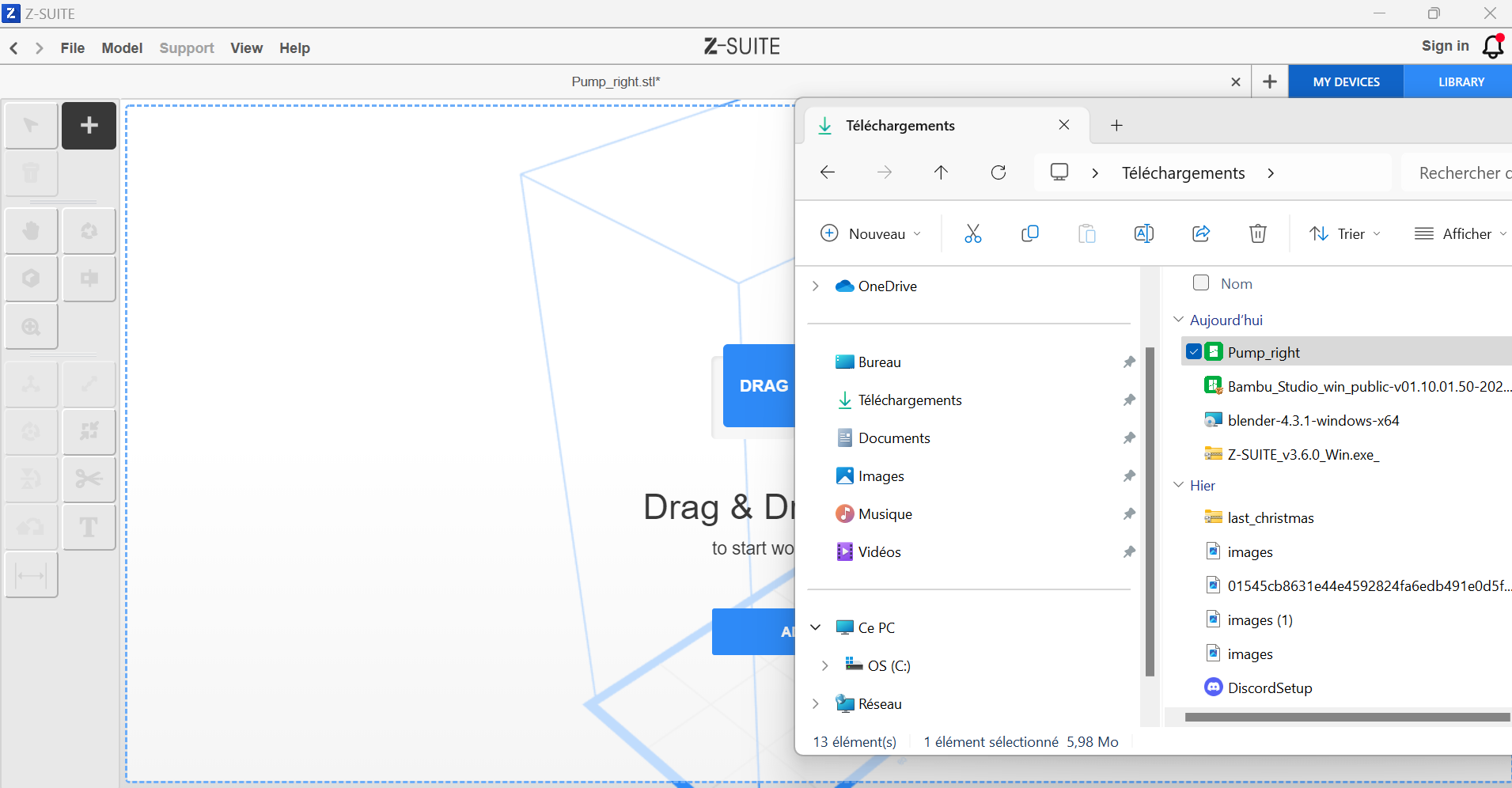
2. **Importer le fichier**
    
    
    - Cliquez sur « Ajouter un fichier » ou glissez directement votre fichier `.STL` dans le logiciel.
    - Vérifiez que votre modèle est correctement chargé dans l’espace de travail.
    - [![image.png](https://innovation.iha.unistra.fr/uploads/images/gallery/2024-12/scaled-1680-/7s0image.png)](https://innovation.iha.unistra.fr/uploads/images/gallery/2024-12/7s0image.png)
#### Phase 3 : Bien paramétrer le modèle

1. **Orientation du modèle**
    
    
    - Orientez votre modèle pour réduire la surface de contact avec le plateau (utile pour minimiser les supports).
    - Privilégiez une légère inclinaison pour éviter les défauts d’impression (par ex. : 30°). Vous pouvez cliquez sur "Mixed" lorsque le logiciel vous demande de choisir la rotation.
    - [![image.png](https://innovation.iha.unistra.fr/uploads/images/gallery/2024-12/scaled-1680-/Et4image.png)](https://innovation.iha.unistra.fr/uploads/images/gallery/2024-12/Et4image.png)
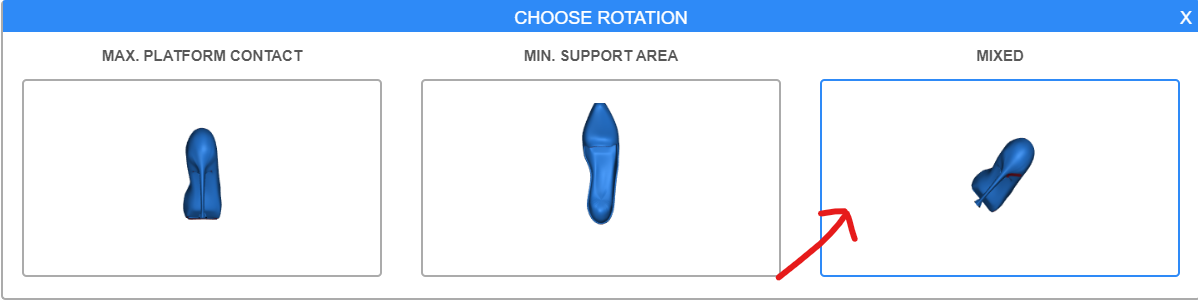
<p class="callout warning">En fonction de l'orientation choisie, la qualité de la pièce peut être impactée : l'orientation "Mixed" permet de manière général un meilleur rendu au détriment d'un temps d'impression plus long</p>

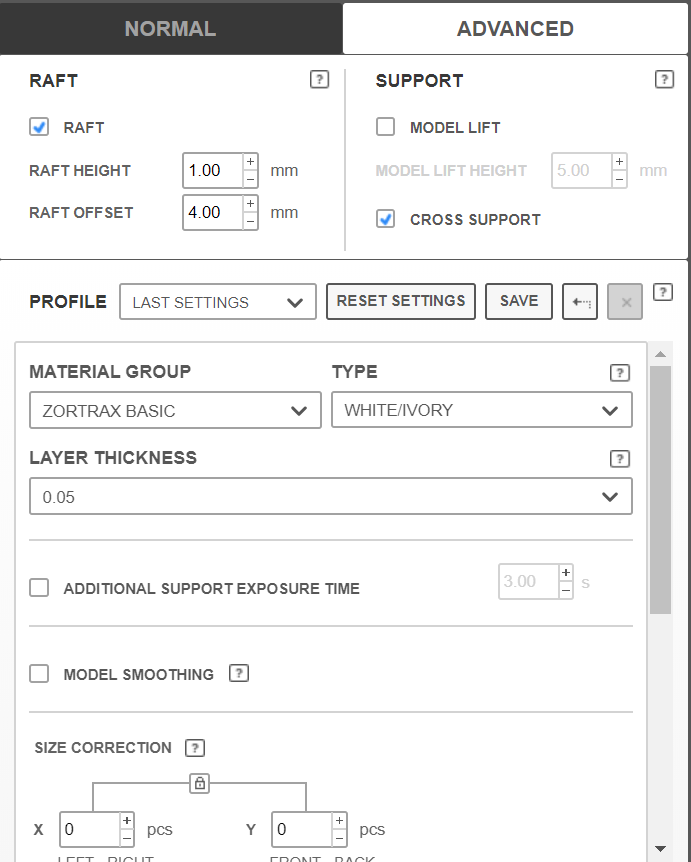
1. **Réglages de résine**
    
    
    - Consultez les recommandations du fabricant de votre résine (durée d’exposition, épaisseur de couche, etc.).
    - Paramétrez ces valeurs dans Z-Suite :
        
        
        - **Épaisseur de couche**.
        - **Temps d’exposition** (par couche et pour la base).
        - [![image.png](https://innovation.iha.unistra.fr/uploads/images/gallery/2024-12/scaled-1680-/dBximage.png)](https://innovation.iha.unistra.fr/uploads/images/gallery/2024-12/dBximage.png)
2. **Génération des supports**
    
    
    - Activez l’option de génération automatique des supports (si l'orientation choisie plus haut nécessite des supports).
    - Ajustez les supports si nécessaire pour bien maintenir les parties suspendues du modèle.
    - [![image.png](https://innovation.iha.unistra.fr/uploads/images/gallery/2024-12/scaled-1680-/iXVimage.png)](https://innovation.iha.unistra.fr/uploads/images/gallery/2024-12/iXVimage.png)
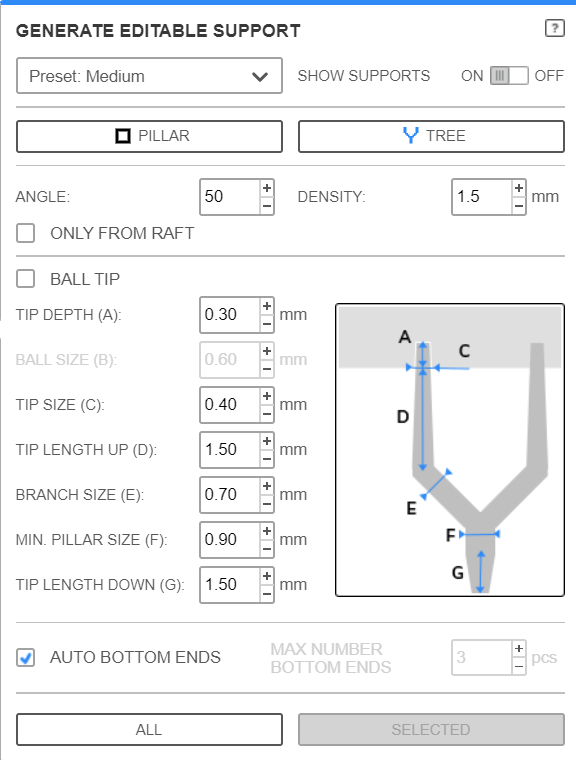
    - Appuyer sur le bouton "All" pour les activer.
3. **Vérifications finales**
    
    
    - Utilisez l’aperçu pour vérifier chaque couche de votre modèle.
    - [![image.png](https://innovation.iha.unistra.fr/uploads/images/gallery/2024-12/scaled-1680-/C56image.png)](https://innovation.iha.unistra.fr/uploads/images/gallery/2024-12/C56image.png)

    - Sauvegardez le fichier en format compatible (`.zcodex`) avec votre imprimante sur la clé.[![image.png](https://innovation.iha.unistra.fr/uploads/images/gallery/2024-12/scaled-1680-/TMFimage.png)](https://innovation.iha.unistra.fr/uploads/images/gallery/2024-12/TMFimage.png)

#### Phase 4 : Lancer l’impression sur l’imprimante

Vérifier que le bac à résine est vide avant de lancer une impression. Si celui-ci n'est pas vide, vérifier que la résine est encore "fraîche" et que celle-ci est exploitable.

1. **Préparer l’imprimante**
    
    
    - Si le bac à résine est vide, nettoyez le plateau d’impression pour assurer une bonne adhésion à l'aide d'un chiffon doux et d'alcool isopropylique.
    - Si le bac à résine est vide, secouez le bidon de résine et remplissez le bac avec le produit.
    - <p class="callout warning">Ne pas mettre trop de résine dans le bac, en mettre au minimum 100 mL, au maximum 250 mL.</p>
2. **Transférer le fichier**
    
    
    - Chargez le fichier sur l’imprimante via une clé USB.
3. **Étalonnez la machine**
    - Rendez vous dans "Outils" puis cliquez sur "Étalonnage"
    - Suivez la procédure d'étalonnage indiquée par la machine (il faudra pour cela vous munir d'une clé allen).
4. **Lancer l’impression**
    
    
    - Accédez au menu de l’imprimante et sélectionnez votre fichier.
    - Vérifiez les paramètres affichés, puis démarrez l’impression.
5. **Suivi et fin d’impression**
    
    
    - Surveillez les premières minutes pour vous assurer que la base adhère correctement au plateau.
    - Une fois l’impression terminée, retirez le modèle avec soin.

#### Après l’impression : Post-traitement

1. **Nettoyage**
    
    
    - Dégagez les supports avec précaution.
    - Plongez le support avec la pièce dans le bain à ultrason en vérifiant que l'alcool isopropylique du bain à ultrason est encore "propre".
    - Allumer le bain à ultrason pour une durée de 300 secondes. N'hésitez pas à bouger la pièce de temps en temps durant ce laps de temps afin d'être sûr d'éliminer les restes de résine.
2. **Durcissement**
    
    
    - Placez le modèle sous une lampe UV ou dans une machine de post-curing pour finaliser le durcissement.

Et voilà, votre impression résine est terminée !

<p class="callout warning">Si la résine qui reste dans le bac n'est pas utilisée au courant des jours qui viennent, merci de la filtrer et de la remettre dans le bidon d'origine. Pour ce faire, aidez vous de l'entonnoir ainsi que d'un filtre jetable vendu avec le bidon de résine.</p>

### 4. Maintenance et actions de nettoyage

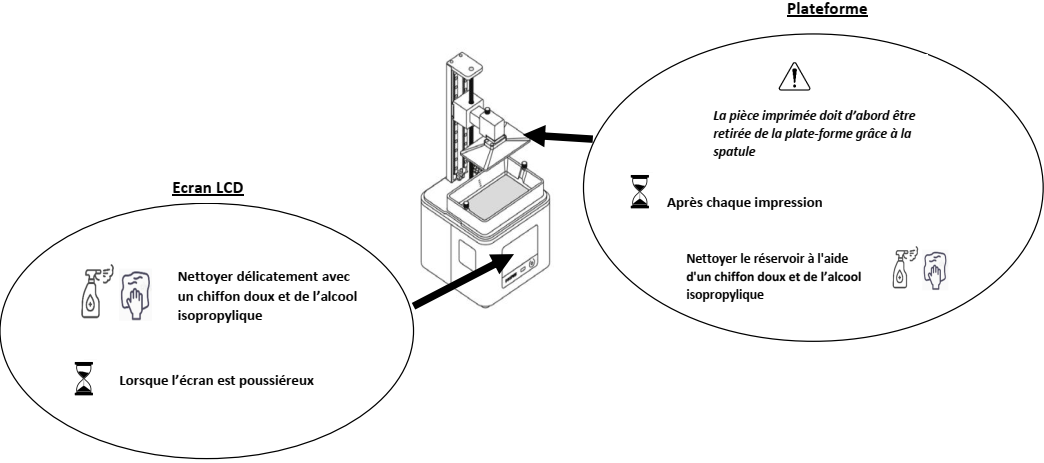
#### Nettoyage de la machine

[![image.png](https://innovation.iha.unistra.fr/uploads/images/gallery/2024-06/scaled-1680-/3HZimage.png)](https://innovation.iha.unistra.fr/uploads/images/gallery/2024-06/3HZimage.png)
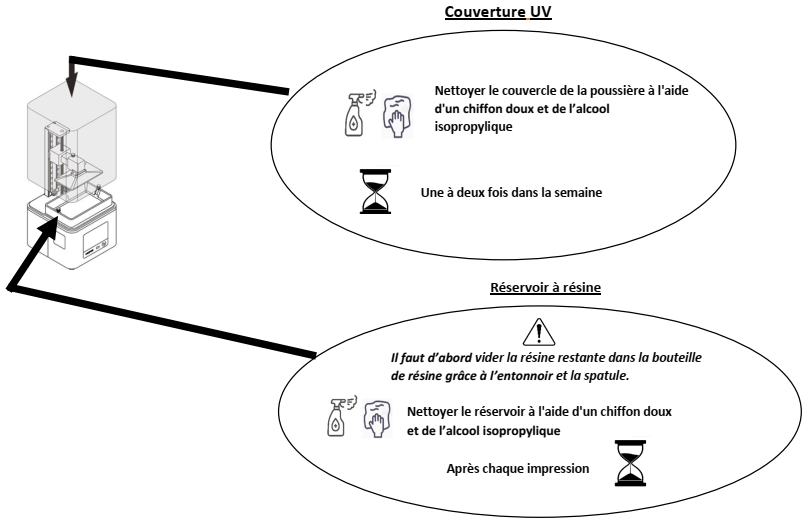
[![image.png](https://innovation.iha.unistra.fr/uploads/images/gallery/2024-06/scaled-1680-/image.png)](https://innovation.iha.unistra.fr/uploads/images/gallery/2024-06/image.png)
#### Changement du filtre

Suivez la procédure indiquée sur la vidéo ci-dessous pour effectuer le changement du filtre :

[https://youtu.be/64ypxE3UjRE?si=QiGtU7\_0rRW1qmrS](https://youtu.be/64ypxE3UjRE?si=QiGtU7_0rRW1qmrS)

Le filtre est à changer dès que vous constatez que celui-ci se désagrège, au bout de quelques impressions.

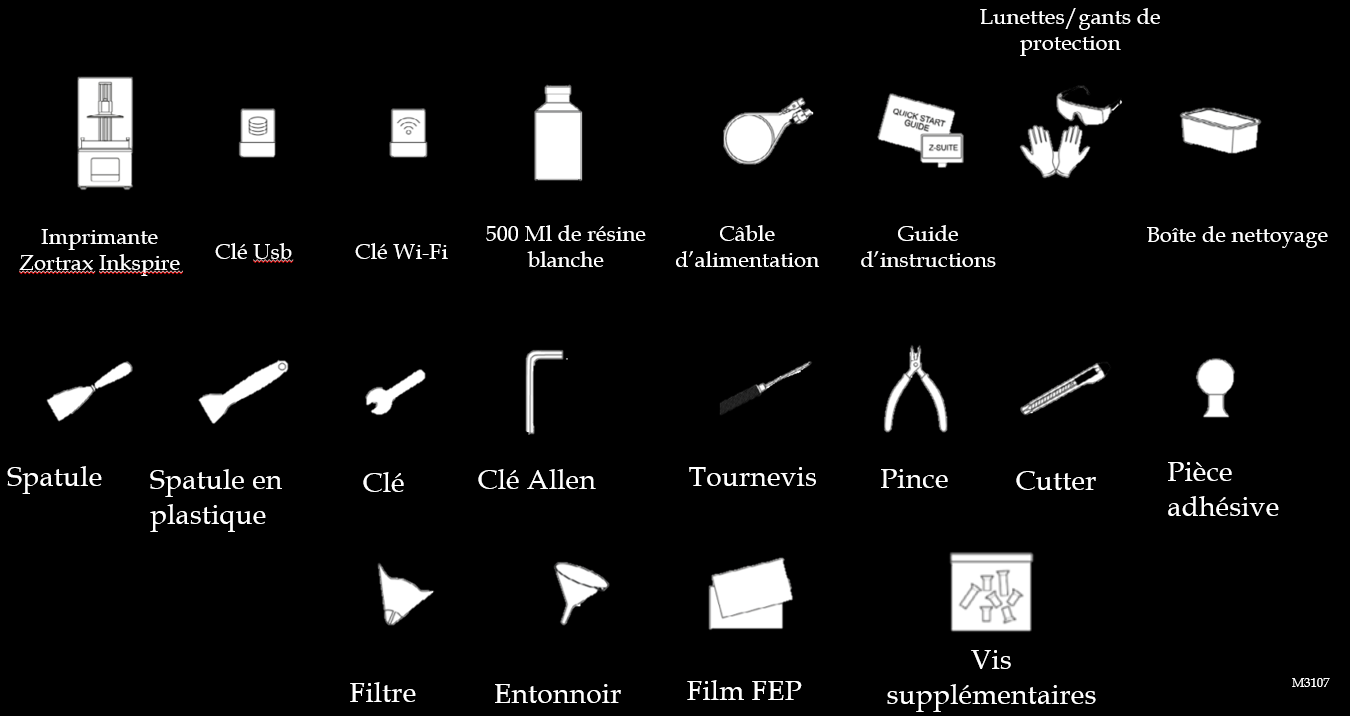
### 5. Matériel inclus

[![image.png](https://innovation.iha.unistra.fr/uploads/images/gallery/2024-06/scaled-1680-/jVoimage.png)](https://innovation.iha.unistra.fr/uploads/images/gallery/2024-06/jVoimage.png)
### 6. Arbre des défaillances

- Si l'impression est transparente et/ou peu rigide : 
    - Vous avez probablement oublié de mélanger la résine et imprimé avec principalement du solvant
    - <p class="callout success">solution : bien secouer le bidon de résine avant usage</p>
- Si l'impression est peu rigide 
    - <p class="callout success">solution : exposer la pièce 24h aux UV du soleil ou dans la machine de durcissement en la retournant pour que toutes les faces soient exposées</p>

# Graveuse Laser


# Découpe laser NWS-TECH CUT-X 600

##### I - Introduction

Bienvenue dans ce tutoriel dédié à l’utilisation de la machine de découpe laser NWS-Tech CUT-X 600 (60W). Que vous soyez débutant ou utilisateur expérimenté, ce guide vous accompagnera étape par étape pour maîtriser cette technologie de précision et en tirer le meilleur parti.

Les machines de découpe laser, comme la NWS-Tech, sont des outils puissants et polyvalents, capables de travailler avec une large variété de matériaux, tels que le bois, l'acrylique, le métal ou encore le cuir. Grâce à leur précision et à leur rapidité, elles permettent de réaliser des créations impressionnantes pour des projets personnels ou professionnels.

Préparez-vous à libérer votre créativité tout en apprenant à utiliser efficacement votre découpe laser. Suivez le guide !

##### II - Préparation des fichiers

Pour préparer vos fichiers, vous disposez de plusieurs solution.

Soit vous réaliser vous mêmes vos fichiers de découpe laser. Dans ce cas je vous renvoie vers le tuto [Formation au logiciel Inkscape](https://innovation.iha.unistra.fr/books/2-fablab-formation-machines-logiciels/chapter/formation-au-logiciel-inkscape "Formation au logiciel Inkscape"). (Sur le logiciel RDWorkd V8, le logiciel que l'on utilisera pour la découpe laser il y a possibilité de réaliser des fichiers simple de découpe/gravure)

Soit vous avez votre propre fichier que vous importerez dans le logiciel.

Le logiciel donc que nous allons utilisez s'appel RDWorks V8. Ce logiciel nous permettra de paramétrer notre fichier afin de lui indiquer les différentes puissante utilisées pour la découpe ou la gravure en fonction de différentes couleurs. Comme dit précédemment, une petite partie de création de fichier est disponible sur le logiciel.

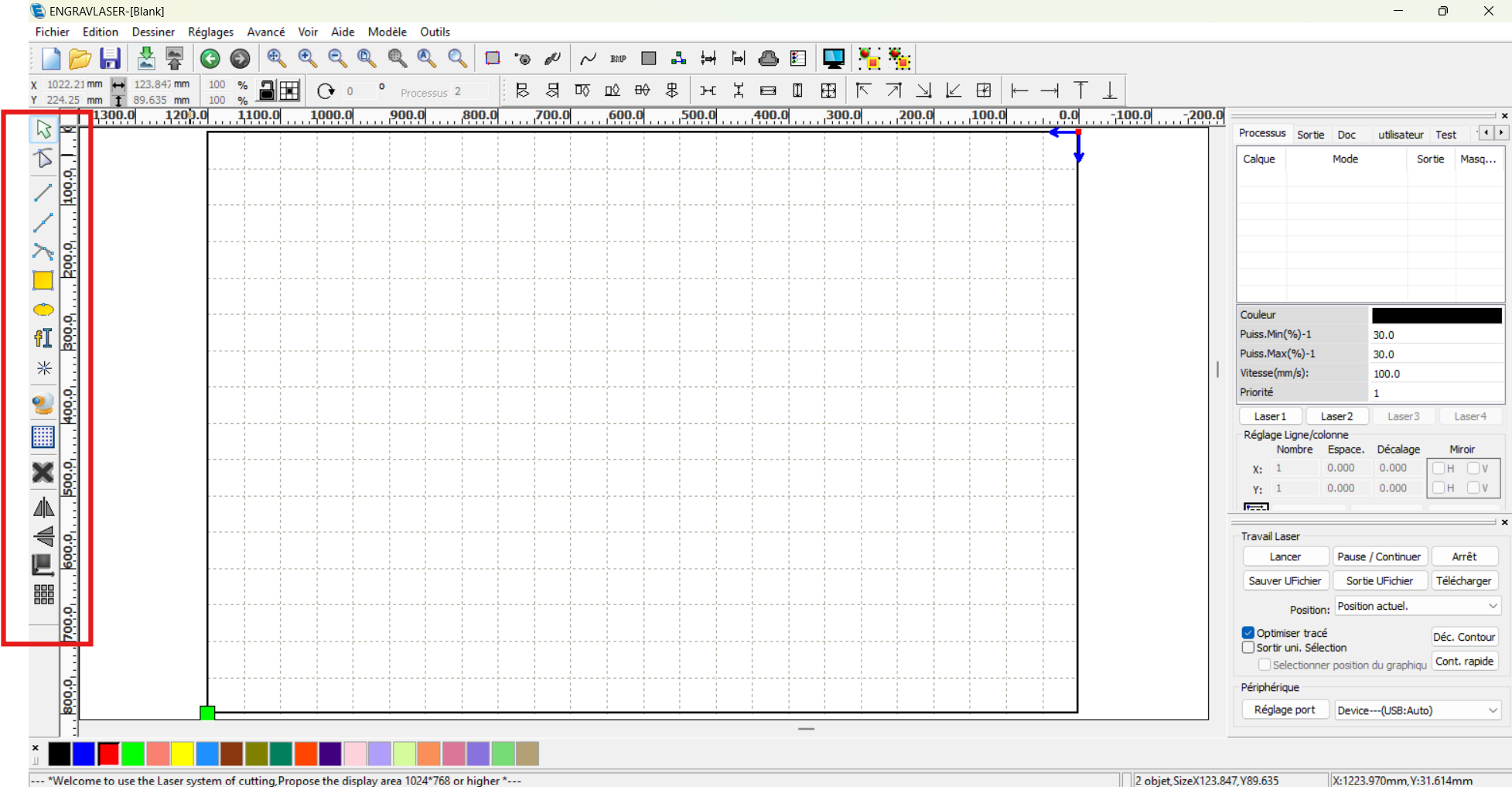
Voici à quoi ressemble le logiciel quand vous le lancer :

[![image.png](https://innovation.iha.unistra.fr/uploads/images/gallery/2024-12/scaled-1680-/I6cimage.png)](https://innovation.iha.unistra.fr/uploads/images/gallery/2024-12/I6cimage.png)
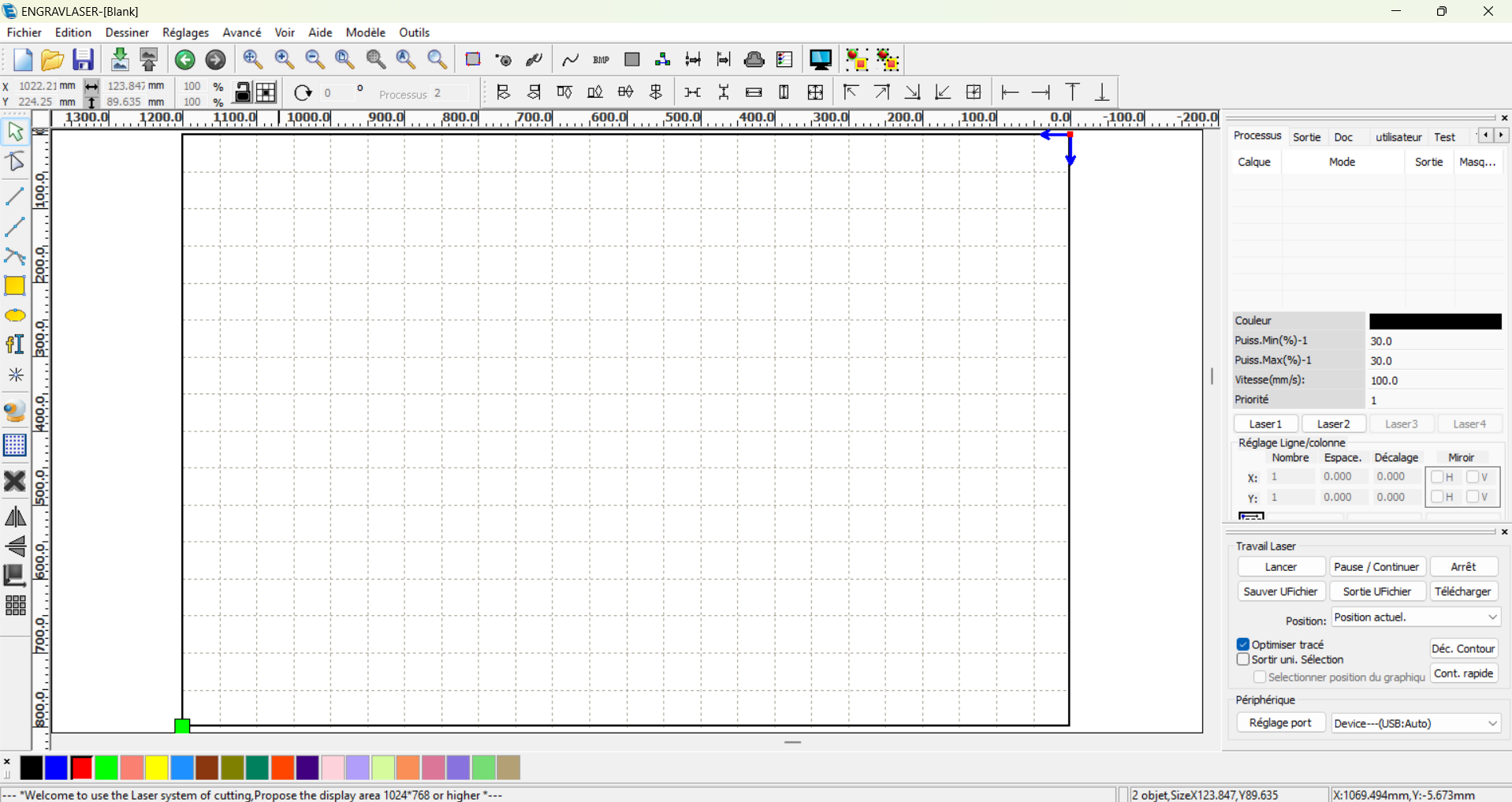
Si la langue n'est pas dans la langue que vous souhaitez. Vous pouvez le changer, en allant dans "Help&gt;language" et sélectionner la langue souhaitez.

En encadré rouge, vous retrouverez tout les outils pour réaliser ou éditer votre modèle si vous n'en avez pas trouver ou réaliser en amont.

[![image.png](https://innovation.iha.unistra.fr/uploads/images/gallery/2024-12/scaled-1680-/08Timage.png)](https://innovation.iha.unistra.fr/uploads/images/gallery/2024-12/08Timage.png)
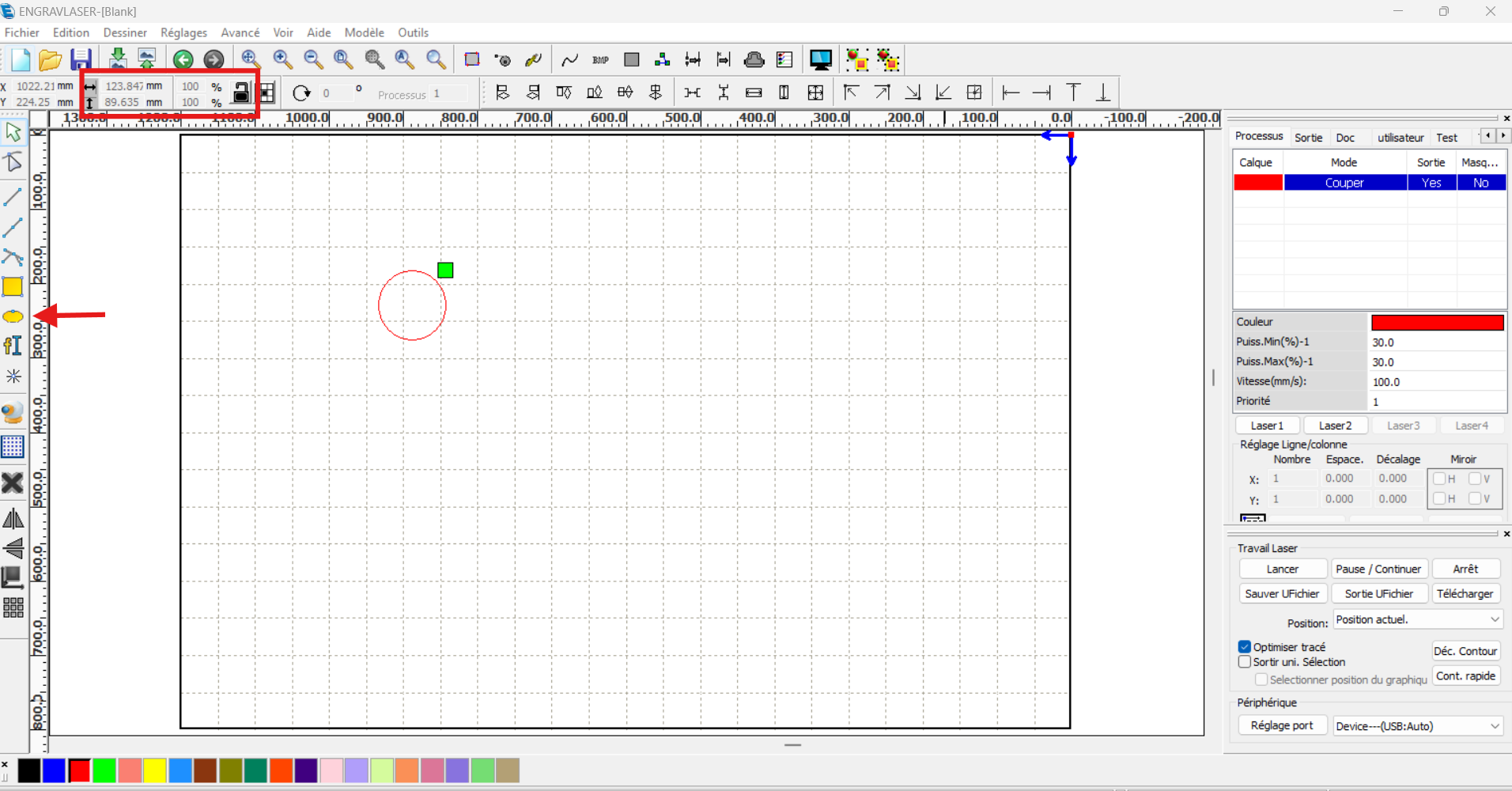
Pour cette exemple je vais réaliser un petit jeton.

Je sélectionne donc en premier l'outil ellipse, et réaliser un cercle sur ma surface de travail. Je peux modifier la taille directement en entrant les valeurs manuellement (voir encadré rouge photo ci-dessous). Si je souhaite que les valeurs évoluent proportionnellement, il me suffit de mettre le cadenas en position fermer en cliquant dessus).

[![image.png](https://innovation.iha.unistra.fr/uploads/images/gallery/2024-12/scaled-1680-/JIdimage.png)](https://innovation.iha.unistra.fr/uploads/images/gallery/2024-12/JIdimage.png)
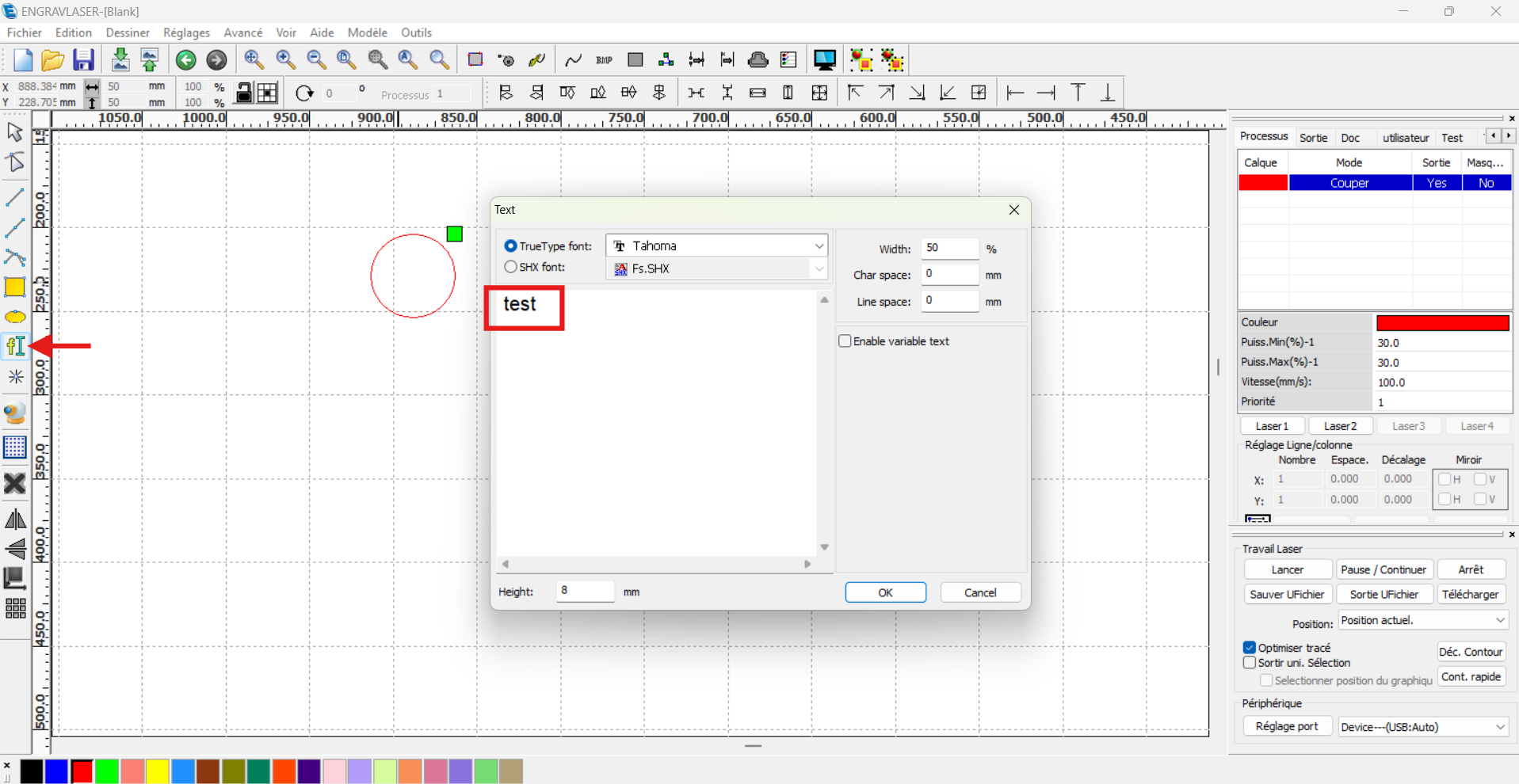
Maintenant, je souhaite écrire un texte sur mon jeton.

Il me suffit de cliquer sur l'outil Texte et cette onglet apparait. Plus qu'a changer mon texte qui est situé dans l'encadrer rouge et appuyer sur le bouton "OK".

[![image.png](https://innovation.iha.unistra.fr/uploads/images/gallery/2024-12/scaled-1680-/x3vimage.png)](https://innovation.iha.unistra.fr/uploads/images/gallery/2024-12/x3vimage.png)
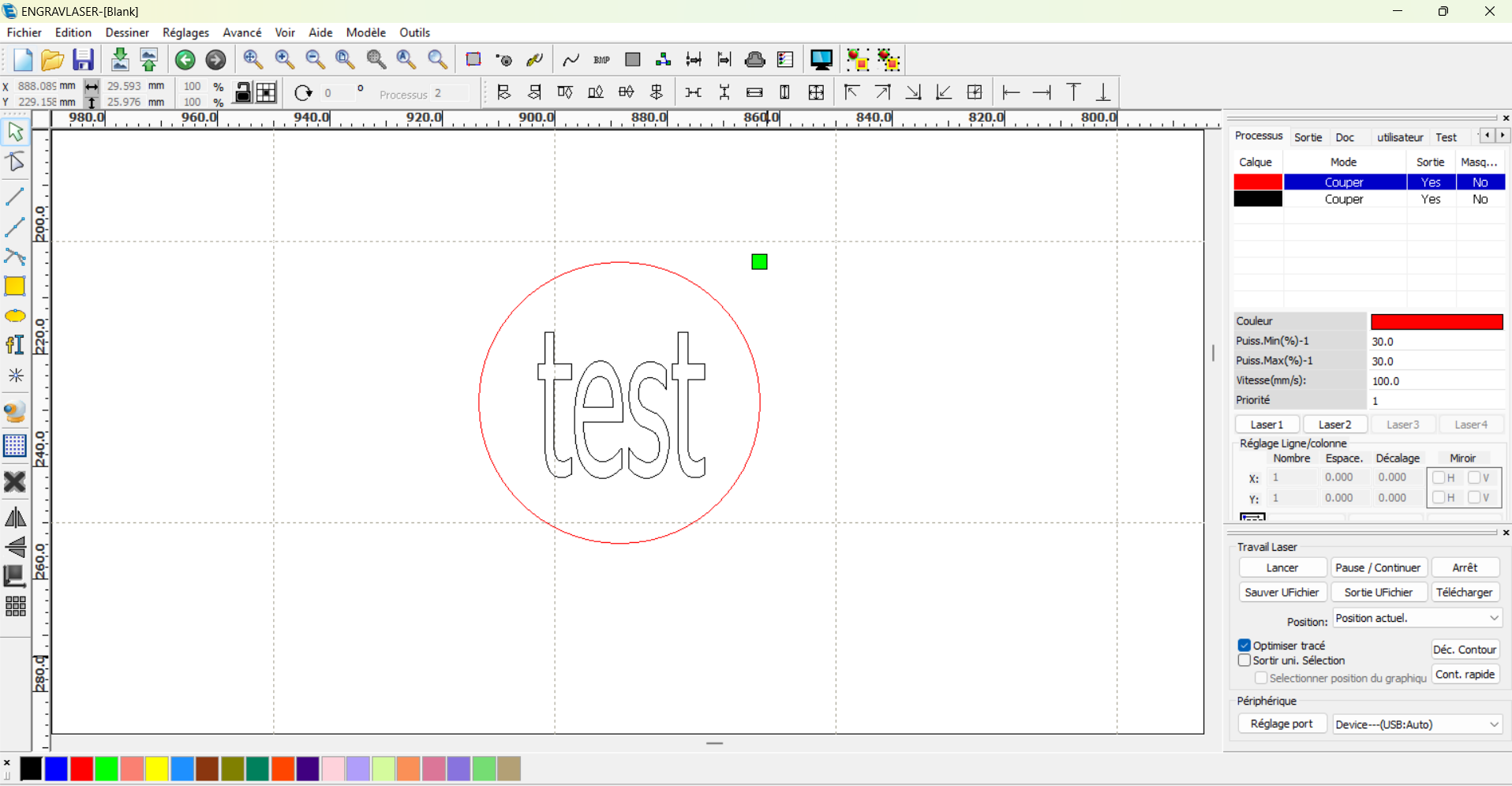
Mon cercle est en rouge et mon texte également. Ce qui veut dire que mon texte sera également découper. En l'occurence, je souhaite que mon texte ne soit pas découper mais graver. Pour ce faire, je vais lui attribuer une nouvelle couleur. Si nous regardons en bas à gauche il y a différentes couleurs. Je vais sélectionner mon texte et cliquer sur une couleur différente du rouge. Pour mon cas, ce sera du noir. Voici le rendu pour le moment.

[![image.png](https://innovation.iha.unistra.fr/uploads/images/gallery/2024-12/scaled-1680-/XOZimage.png)](https://innovation.iha.unistra.fr/uploads/images/gallery/2024-12/XOZimage.png)
Maintenant que votre modèle est prêt., nous pouvons le configurer. Si l'on regarde dans l'encadré rouge ci-dessous, nous avons nos différentes couleurs et la tâche qui lui est attribué. Nous voyons que les deux couleurs sont configurés pour la découpe. J'ai dis un peu plus tôt que je souhaite que la couleur noir corresponde à de la gravure. Je double-clic sur la couleur noir.

[![image.png](https://innovation.iha.unistra.fr/uploads/images/gallery/2024-12/scaled-1680-/Xa4image.png)](https://innovation.iha.unistra.fr/uploads/images/gallery/2024-12/Xa4image.png)
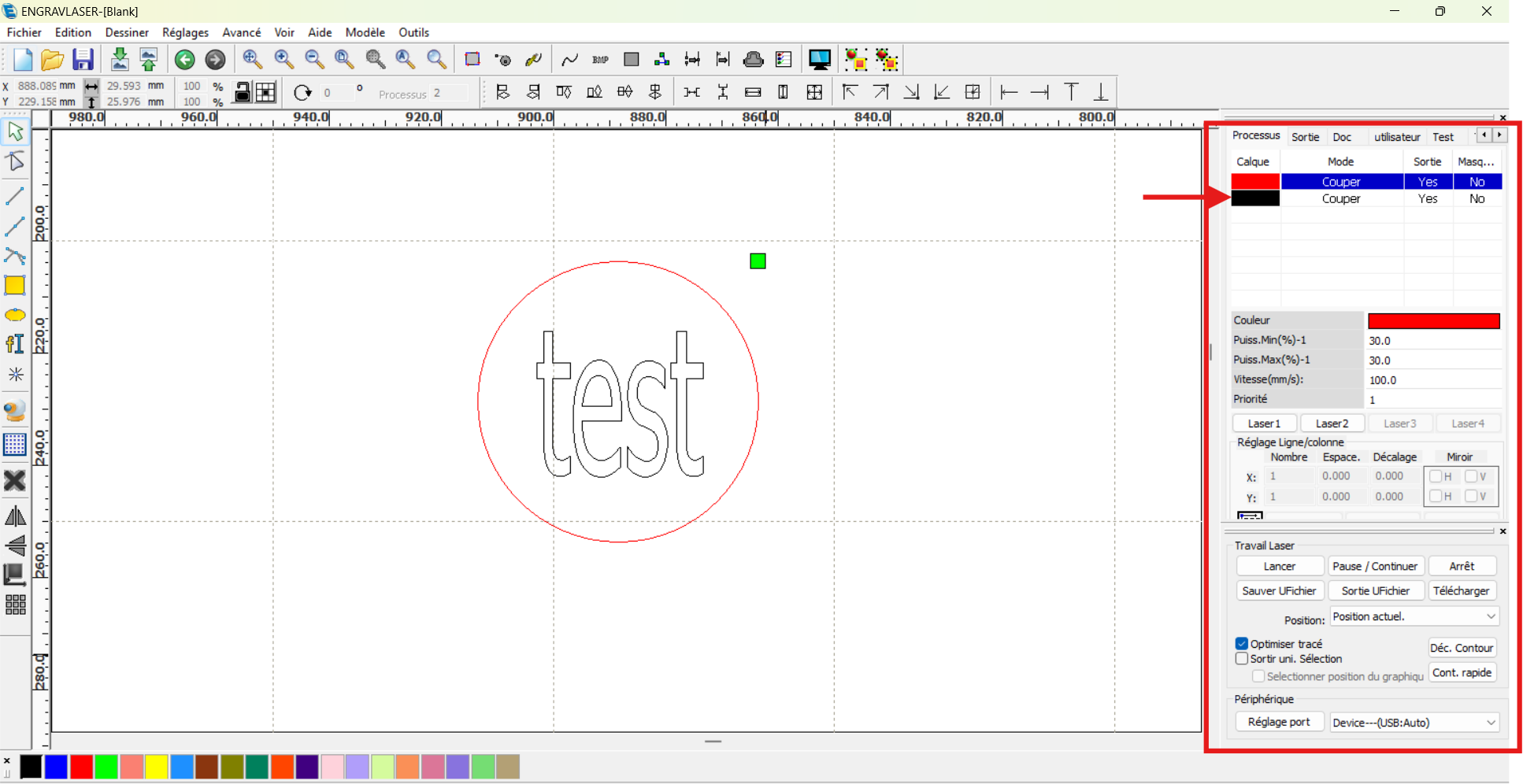
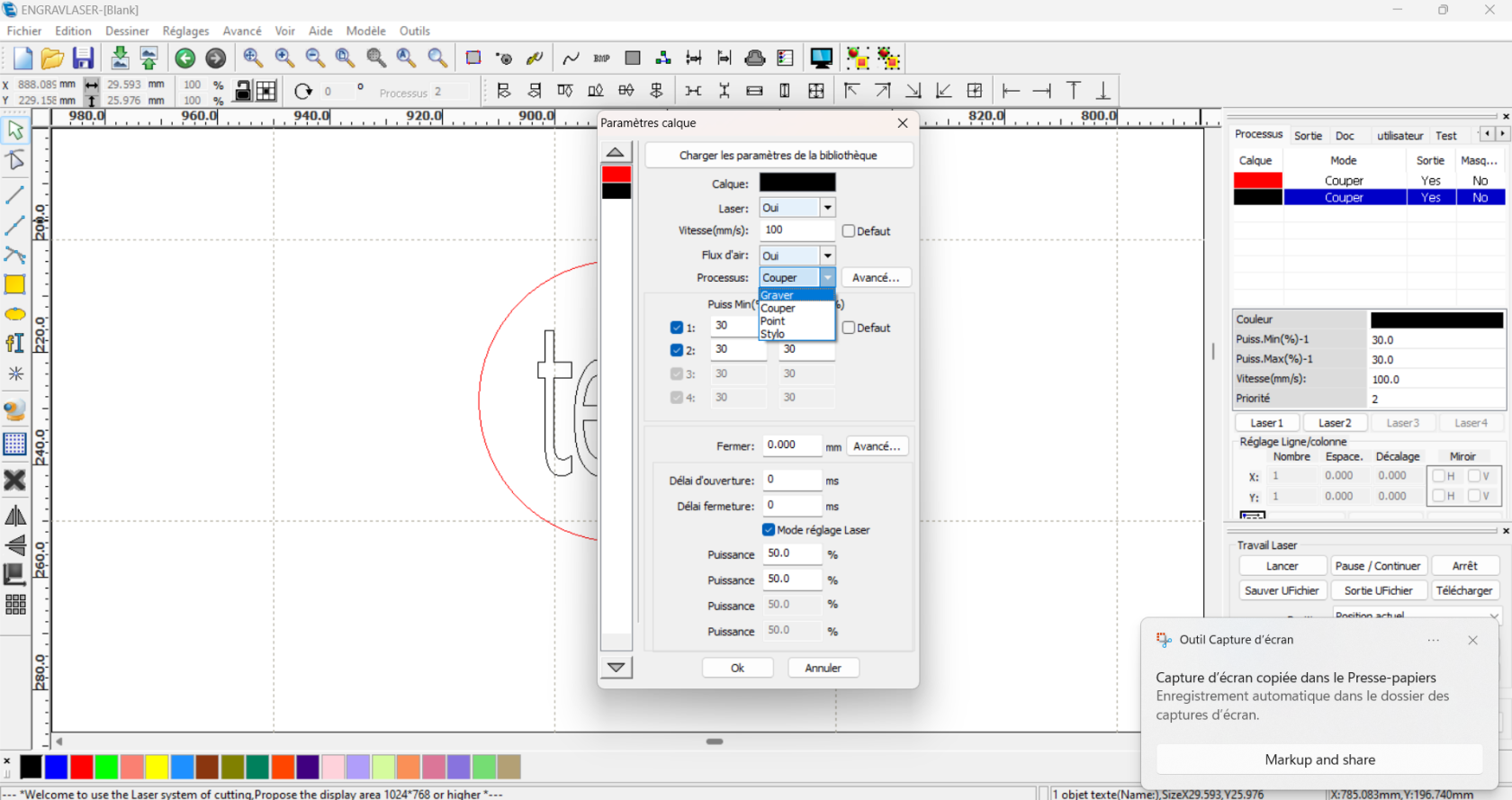
Vous arrivez sur cette onglet. Il faut cliquer le menu déroulant et cliquer sur "graver" puis "OK"

[![image.png](https://innovation.iha.unistra.fr/uploads/images/gallery/2024-12/scaled-1680-/KzSimage.png)](https://innovation.iha.unistra.fr/uploads/images/gallery/2024-12/KzSimage.png)
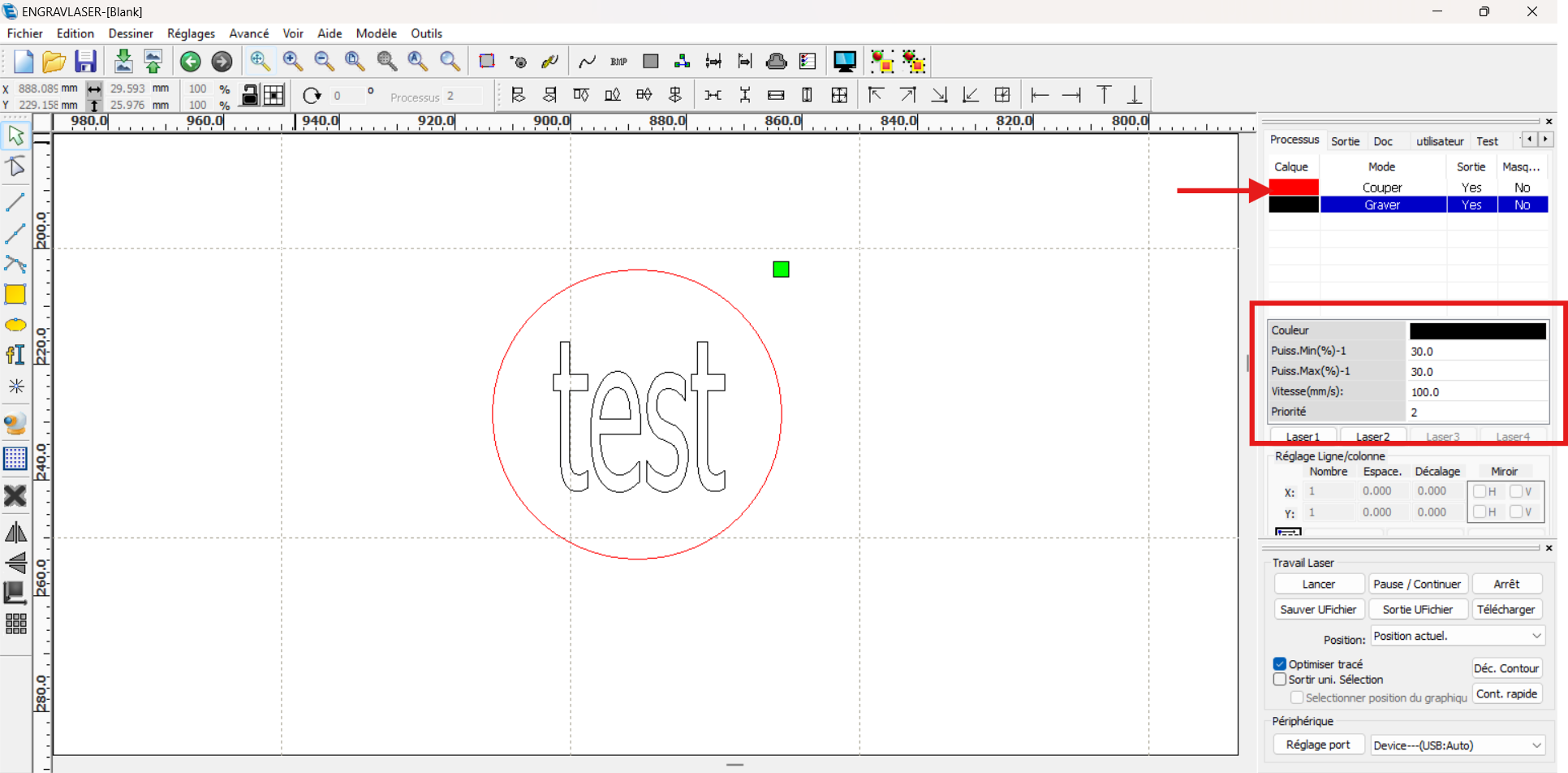
Maintenant, nous pouvons réaliser le paramétrage de la puissance et de la vitesse de la découpe et de la gravure. Pour ce faire vous aller double-cliquez sur la couleur dont laquelle vous voulez paramétrer la puissance et la vitesse. Et ensuite (encadré rouge) vous pouvez modifier ces différents paramètres. Dans mon cas, je vais utiliser des planches de MDF en 3mm. Je vais réaliser les premiers tests de mon projet avec ces paramètres :

##### <span style="background-color: rgb(255, 255, 255); color: rgb(224, 62, 45);">**<span style="text-decoration: underline;">Attention ne jamais dépasser 90% pour la puissance</span>**</span>

<span style="text-decoration: underline;">Découpe :</span>

- Puissance min et max : 90 %
- Vitesse : 30 mm/s

<span style="text-decoration: underline;">Gravure </span>: (Appliquer le mode SCAN ou GRAVURE)

- Puissance min et max : 20 %
- Vitesse : 200 mm/s

[![image.png](https://innovation.iha.unistra.fr/uploads/images/gallery/2024-12/scaled-1680-/JRAimage.png)](https://innovation.iha.unistra.fr/uploads/images/gallery/2024-12/JRAimage.png)
Maintenant que nous avons réalisé nos paramétrages, nous allons voir comment lancer la découpe.

##### <span style="text-decoration: underline;">III - Utilisation de la machine</span>

<div aria-label="Page 3" class="page" data-loaded="true" data-page-number="3" id="bkmrk-pr%C3%A9paration-du-poste" role="region"><div aria-label="Page 3" class="page" data-loaded="true" data-page-number="3" role="region"><div class="textLayer"><span class="markedContent" id="bkmrk-pr%C3%A9paration-du-poste-1"><span dir="ltr" role="presentation">Préparation du poste de travail</span> </span><span class="markedContent" id="bkmrk-v%C3%A9rifier-que-l%E2%80%99espac">  
<span dir="ltr" role="presentation">Vérifier que l’espace de travail est rangé</span></span></div><div class="textLayer">  
</div></div></div>[![image.png](https://innovation.iha.unistra.fr/uploads/images/gallery/2024-12/scaled-1680-/Eupimage.png)](https://innovation.iha.unistra.fr/uploads/images/gallery/2024-12/Eupimage.png)

<div aria-label="Page 3" class="page" data-loaded="true" data-page-number="3" id="bkmrk-pr%C3%A9paration-de-la-gr" role="region"><div aria-label="Page 3" class="page" data-loaded="true" data-page-number="3" role="region"><div class="textLayer"><span class="markedContent" id="bkmrk-pr%C3%A9paration-de-la-gr-1"><span dir="ltr" role="presentation">Préparation de la graveuse</span> </span><span class="markedContent" id="bkmrk-v%C3%A9rifier-%C3%A0-vue-d%E2%80%99%C5%93il">  
<span dir="ltr" role="presentation">Vérifier à vue d’œil qu’il n’y ait pas de câble endommagé</span> </span><span class="markedContent" id="bkmrk--11">  
</span><span class="markedContent" id="bkmrk--12"></span><span class="markedContent" id="bkmrk--13"></span><span class="markedContent" id="bkmrk--14"></span><div class="endOfContent active">  
</div></div></div></div>[![image.png](https://innovation.iha.unistra.fr/uploads/images/gallery/2024-12/scaled-1680-/HHeimage.png)](https://innovation.iha.unistra.fr/uploads/images/gallery/2024-12/HHeimage.png)

<div aria-label="Page 4" class="page" data-loaded="true" data-page-number="4" id="bkmrk-v%C3%A9rifier-qu%E2%80%99il-n%E2%80%99y-a" role="region"><div aria-label="Page 4" class="page" data-loaded="true" data-page-number="4" role="region"><div class="textLayer"><span class="markedContent" id="bkmrk-v%C3%A9rifier-qu%E2%80%99il-n%E2%80%99y-a-1">  
<span dir="ltr" role="presentation">Vérifier qu’il n’y ait pas de produits dangereux dans la zone du laser ou de matières </span>  
<span dir="ltr" role="presentation">inflammables</span></span></div><div class="textLayer">  
</div></div></div>[![image.png](https://innovation.iha.unistra.fr/uploads/images/gallery/2024-12/scaled-1680-/vi0image.png)](https://innovation.iha.unistra.fr/uploads/images/gallery/2024-12/vi0image.png)

<div aria-label="Page 4" class="page" data-loaded="true" data-page-number="4" id="bkmrk-%C2%A0v%C3%A9rifier-que-tous-l" role="region"><div aria-label="Page 4" class="page" data-loaded="true" data-page-number="4" role="region"><div class="textLayer"><span class="markedContent" id="bkmrk-%C2%A0-6"> </span><span class="markedContent" id="bkmrk--17">  
</span><span class="markedContent" id="bkmrk-v%C3%A9rifier-que-tous-le">  
<span dir="ltr" role="presentation">Vérifier que tous les câbles sont branchés à l’arrière de la graveuse</span> </span><span class="markedContent" id="bkmrk--18">  
</span><span class="markedContent" id="bkmrk--19"></span><span class="markedContent" id="bkmrk--20"></span><span class="markedContent" id="bkmrk--21"></span><span class="markedContent" id="bkmrk--22"></span><div class="endOfContent">  
</div></div></div></div>[![image.png](https://innovation.iha.unistra.fr/uploads/images/gallery/2024-12/scaled-1680-/bVsimage.png)](https://innovation.iha.unistra.fr/uploads/images/gallery/2024-12/bVsimage.png) <span class="markedContent" id="bkmrk--23">  
</span><span class="markedContent" id="bkmrk-mettre-le-bouton-d%E2%80%99a-1">  
<span dir="ltr" role="presentation">Mettre le bouton d’alimentation principale de la graveuse sur MARCHE</span> </span><span class="markedContent" id="bkmrk--24">  
</span>

[![image.png](https://innovation.iha.unistra.fr/uploads/images/gallery/2024-12/scaled-1680-/Bjjimage.png)](https://innovation.iha.unistra.fr/uploads/images/gallery/2024-12/Bjjimage.png)

<span class="markedContent" id="bkmrk-ins%C3%A9rer-la-cl%C3%A9-du-sh-1">  
<span dir="ltr" role="presentation">Insérer la clé du SHUTTER électronique</span> </span><span class="markedContent" id="bkmrk--26"></span><span class="markedContent" id="bkmrk--27"></span><span class="markedContent" id="bkmrk--28"></span><span class="markedContent" id="bkmrk--29"></span><span class="markedContent" id="bkmrk--30"></span>

[![image.png](https://innovation.iha.unistra.fr/uploads/images/gallery/2024-12/scaled-1680-/qVwimage.png)](https://innovation.iha.unistra.fr/uploads/images/gallery/2024-12/qVwimage.png)

Vérifier si le bouton d’arrêt d’urgence est déverrouillé

<div aria-label="Page 4" class="page" data-loaded="true" data-page-number="4" id="bkmrk--32" role="region"><div class="textLayer">  
</div></div>[![image.png](https://innovation.iha.unistra.fr/uploads/images/gallery/2024-12/scaled-1680-/XG2image.png)](https://innovation.iha.unistra.fr/uploads/images/gallery/2024-12/XG2image.png)

<span class="markedContent" id="bkmrk--34"></span><span class="markedContent" id="bkmrk-appuyer-sur-le-bouto-1">  
<span dir="ltr" role="presentation">Appuyer sur le bouton START </span></span><span class="markedContent" id="bkmrk--35">  
</span><span class="markedContent" id="bkmrk--36"></span><span class="markedContent" id="bkmrk--37"></span>

[![image.png](https://innovation.iha.unistra.fr/uploads/images/gallery/2024-12/scaled-1680-/ImPimage.png)](https://innovation.iha.unistra.fr/uploads/images/gallery/2024-12/ImPimage.png)

La machine est maintenant allumée. Nous allons pouvoir dans un premier temps introduire notre matériaux dans le cadre de la machine.

[![1000010053.jpg](https://innovation.iha.unistra.fr/uploads/images/gallery/2024-12/scaled-1680-/1000010053.jpg)](https://innovation.iha.unistra.fr/uploads/images/gallery/2024-12/1000010053.jpg)

Nous sommes maintenant sur l'écran d'accueil.

[![1000010054.jpg](https://innovation.iha.unistra.fr/uploads/images/gallery/2024-12/scaled-1680-/1000010054.jpg)](https://innovation.iha.unistra.fr/uploads/images/gallery/2024-12/1000010054.jpg)

Déplacez votre laser au centre de votre matériau à l'aide des flèches directionnels puis appuyez sur le bouton au centre de la flèche directionnel "Z/U". Vous êtes maintenant sur le menu. si dessous. Descendez sur l'icône "Auto- focus", appuyez sur "Enter" et attendez que l'Auto focus se réalise.

*L'auto-focus sur une découpe laser permet d'ajuster automatiquement la distance entre la lentille laser et la surface du matériau. Cela garantit une mise au point optimale pour des découpes précises et uniformes, en s'adaptant à l'épaisseur du matériau.*

[![1000010055.jpg](https://innovation.iha.unistra.fr/uploads/images/gallery/2024-12/scaled-1680-/1000010055.jpg)](https://innovation.iha.unistra.fr/uploads/images/gallery/2024-12/1000010055.jpg)

Une fois l'auto-focus réalisée, vous pouvez réaliser votre pièce

<span style="text-decoration: underline;">Méthode 1 :</span> Si vous êtes reliés directement au PC, allez directement à l'étape "Fabrication de la pièce".

<span style="text-decoration: underline;">Méthode 2 :</span> Si vous utilisez une clef US, appuyez sur le bouton "file". Tout les fichiers enregistré dans la mémoire de la machine se trouve ici.

[![1000010059.jpg](https://innovation.iha.unistra.fr/uploads/images/gallery/2024-12/scaled-1680-/1000010059.jpg)](https://innovation.iha.unistra.fr/uploads/images/gallery/2024-12/1000010059.jpg)

Notre fichier est sur la clé USB. Pour le chercher il faut aller sur la droite dans "fich. USB+".

[![1000010060.jpg](https://innovation.iha.unistra.fr/uploads/images/gallery/2024-12/scaled-1680-/1000010060.jpg)](https://innovation.iha.unistra.fr/uploads/images/gallery/2024-12/1000010060.jpg)

Cliquez sur "Lire fichier USB" afin d'afficher tout les fichiers présent sur la clé USB.

[![1000010061.jpg](https://innovation.iha.unistra.fr/uploads/images/gallery/2024-12/scaled-1680-/1000010061.jpg)](https://innovation.iha.unistra.fr/uploads/images/gallery/2024-12/1000010061.jpg)

Sélectionner le fichier que vous voulez utiliser puis appuyez sur "Vers mémoire" pour importer notre fichier dans la mémoire de la machine.

[![1000010062.jpg](https://innovation.iha.unistra.fr/uploads/images/gallery/2024-12/scaled-1680-/1000010062.jpg)](https://innovation.iha.unistra.fr/uploads/images/gallery/2024-12/1000010062.jpg)

Maintenant que votre fichier se trouve dans la mémoire dans l'appareil vous pouvez le sélectionner en allant dans "file".

[![1000010063.jpg](https://innovation.iha.unistra.fr/uploads/images/gallery/2024-12/scaled-1680-/1000010063.jpg)](https://innovation.iha.unistra.fr/uploads/images/gallery/2024-12/1000010063.jpg)

Vous aurez cette vue. Vous pourrez modifier manuellement les paramètres de puissance et de vitesse.

[![1000010064.jpg](https://innovation.iha.unistra.fr/uploads/images/gallery/2024-12/scaled-1680-/1000010064.jpg)](https://innovation.iha.unistra.fr/uploads/images/gallery/2024-12/1000010064.jpg)

<span style="text-decoration: underline;">**Fabrication de la pièce :**</span>

Une fois le tout paramétrer correctement. Placez vous à l'endroit ou vous souhaitez réaliser votre découpe/gravure à l'aide des flèches directionnel de la machine.

Une fois cela réalisé, appuyez sur le bouton "Origin".

*La mise à l'origine sur une découpe laser consiste à définir le point de départ (dans le coin en haut à droite chez nous) de la tête laser sur le plan de travail. Cela permet de synchroniser les coordonnées du fichier de découpe avec la position réelle de la machine, garantissant une précision dans l'exécution des projets.*

Afin de vérifier si notre découpe/gravure rentre dans l'espace que nous souhaitons. Nous pouvons appuyer sur le bouton "Frame".

Cela fera le contour de notre modèle et nous pourrons vérifier visuellement si notre découpe dépasse ou non de notre espace.

*Si vous êtes connecter directement à la machine via un câble USB.* Cliquez sur "Lancer".


Félicitations ! Vous avez maintenant toutes les clés en main pour utiliser votre machine de découpe laser NWS-Tech efficacement et en toute sécurité. Que ce soit pour découper, graver ou donner vie à vos projets créatifs, vous savez comment préparer vos fichiers, régler votre machine, et optimiser vos découpes.

N'oubliez pas que la pratique et l'expérimentation sont essentielles pour maîtriser pleinement cet outil. Explorez de nouveaux matériaux, testez différentes configurations, et laissez libre cours à votre imagination. Enfin, un entretien régulier de votre machine vous permettra de garantir des performances constantes et durables.

Merci d'avoir suivi ce tutoriel, et bon découpage !

### Sources

[https://nws-tech.fr/machines-laser-fabriquees-france-nws-laser/machines-decoupe-laser/laser-decoupe-bois-plexi/cut-x-600-machine-decoupe/](https://nws-tech.fr/machines-laser-fabriquees-france-nws-laser/machines-decoupe-laser/laser-decoupe-bois-plexi/cut-x-600-machine-decoupe/)

# Mode opératoire : Fabrication d'un support de stockage de téléphone

# Machine de traction


# Mode opératoire

Bonjour, voici le mode opératoire de la machine de traction. Il est présent sous différentes formes. Il est présent sous forme de Logigramme mais aussi sous forme de tableau. Une vidéo est associé pour le logigramme et pour le tableau

Voilà les deux modes opératoires :

Logigramme :

[![logigramme_traction.png](https://innovation.iha.unistra.fr/uploads/images/gallery/2026-06/scaled-1680-/logigramme-traction.png)](https://innovation.iha.unistra.fr/uploads/images/gallery/2026-06/logigramme-traction.png)

Vidéo avec le Logigramme :

[https://youtube.com/shorts/YCmWo1G3LpA?feature=share](https://youtube.com/shorts/YCmWo1G3LpA?feature=share)

Mode opératoire sous forme de tableau :

[![Capture 1 .png](https://innovation.iha.unistra.fr/uploads/images/gallery/2026-06/scaled-1680-/capture-1.png)](https://innovation.iha.unistra.fr/uploads/images/gallery/2026-06/capture-1.png)[![Capture 2 .png](https://innovation.iha.unistra.fr/uploads/images/gallery/2026-06/scaled-1680-/capture-2.png)](https://innovation.iha.unistra.fr/uploads/images/gallery/2026-06/capture-2.png)[![Capture 3.png](https://innovation.iha.unistra.fr/uploads/images/gallery/2026-06/scaled-1680-/capture-3.png)](https://innovation.iha.unistra.fr/uploads/images/gallery/2026-06/capture-3.png)

Vidéo pour le mode opératoire sous forme de tableau :

[https://youtube.com/shorts/KzS5Qr\_aJkQ](https://youtube.com/shorts/KzS5Qr_aJkQ)

# Tutoriel complet – Imprimantes 3D Bambu Lab (A1 mini, A1, X1 Carbon)

## <span style="font-size: 13pt; font-family: Calibri,sans-serif; color: #4f81bd; background-color: transparent; font-weight: bold; font-style: normal; font-variant: normal; text-decoration: underline; -webkit-text-decoration-skip: none; text-decoration-skip-ink: none; vertical-align: baseline; white-space: pre-wrap;">1. Introduction à l’impression 3D FDM</span>

<span style="font-size: 11pt; font-family: Cambria,serif; color: #000000; background-color: transparent; font-weight: 400; font-style: normal; font-variant: normal; text-decoration: none; vertical-align: baseline; white-space: pre-wrap;">L’impression 3D FDM (Fused Deposition Modeling) fonctionne par dépôt de filament fondu couche par couche. L’imprimante chauffe le filament, le fait passer à travers une buse (nozzle) et le dépose sur un plateau pour créer un objet 3D. </span>

<span style="font-size: 13pt; font-family: Calibri,sans-serif; color: #4f81bd; background-color: transparent; font-weight: bold; font-style: normal; font-variant: normal; text-decoration: underline; -webkit-text-decoration-skip: none; text-decoration-skip-ink: none; vertical-align: baseline; white-space: pre-wrap;">2. Présentation des imprimantes du FabLab</span>

<div align="left" dir="ltr" id="bkmrk-mod%C3%A8le-taille-max-%28m" style="margin-left: -5.75pt;"><table style="border: none; border-collapse: collapse;"><colgroup><col width="144"></col><col width="144"></col><col width="144"></col><col width="145"></col></colgroup><tbody><tr style="height: 0pt;"><td style="vertical-align: top; padding: 0pt 5.75pt 0pt 5.75pt; overflow: hidden; overflow-wrap: break-word;"><span style="font-size: 11pt; font-family: Cambria,serif; color: #000000; background-color: transparent; font-weight: 400; font-style: normal; font-variant: normal; text-decoration: none; vertical-align: baseline; white-space: pre-wrap;">Modèle</span>

</td><td style="vertical-align: top; padding: 0pt 5.75pt 0pt 5.75pt; overflow: hidden; overflow-wrap: break-word;"><span style="font-size: 11pt; font-family: Cambria,serif; color: #000000; background-color: transparent; font-weight: 400; font-style: normal; font-variant: normal; text-decoration: none; vertical-align: baseline; white-space: pre-wrap;">Taille max (mm)</span>

</td><td style="vertical-align: top; padding: 0pt 5.75pt 0pt 5.75pt; overflow: hidden; overflow-wrap: break-word;"><span style="font-size: 11pt; font-family: Cambria,serif; color: #000000; background-color: transparent; font-weight: 400; font-style: normal; font-variant: normal; text-decoration: none; vertical-align: baseline; white-space: pre-wrap;">Buse</span>

</td><td style="vertical-align: top; padding: 0pt 5.75pt 0pt 5.75pt; overflow: hidden; overflow-wrap: break-word;"><span style="font-size: 11pt; font-family: Cambria,serif; color: #000000; background-color: transparent; font-weight: 400; font-style: normal; font-variant: normal; text-decoration: none; vertical-align: baseline; white-space: pre-wrap;">Particularités</span>

</td></tr><tr style="height: 0pt;"><td style="vertical-align: top; padding: 0pt 5.75pt 0pt 5.75pt; overflow: hidden; overflow-wrap: break-word;"><span style="font-size: 11pt; font-family: Cambria,serif; color: #000000; background-color: transparent; font-weight: 400; font-style: normal; font-variant: normal; text-decoration: none; vertical-align: baseline; white-space: pre-wrap;">Bambu Lab A1 mini</span>

</td><td style="vertical-align: top; padding: 0pt 5.75pt 0pt 5.75pt; overflow: hidden; overflow-wrap: break-word;"><span style="font-size: 11pt; font-family: Cambria,serif; color: #000000; background-color: transparent; font-weight: 400; font-style: normal; font-variant: normal; text-decoration: none; vertical-align: baseline; white-space: pre-wrap;">180 × 180 × 180</span>

</td><td style="vertical-align: top; padding: 0pt 5.75pt 0pt 5.75pt; overflow: hidden; overflow-wrap: break-word;"><span style="font-size: 11pt; font-family: Cambria,serif; color: #000000; background-color: transparent; font-weight: 400; font-style: normal; font-variant: normal; text-decoration: none; vertical-align: baseline; white-space: pre-wrap;">0.4 mm</span>

</td><td style="vertical-align: top; padding: 0pt 5.75pt 0pt 5.75pt; overflow: hidden; overflow-wrap: break-word;"><span style="font-size: 11pt; font-family: Cambria,serif; color: #000000; background-color: transparent; font-weight: 400; font-style: normal; font-variant: normal; text-decoration: none; vertical-align: baseline; white-space: pre-wrap;">Compacte, silencieuse, idéale pour les petites pièces</span>

</td></tr><tr style="height: 0pt;"><td style="vertical-align: top; padding: 0pt 5.75pt 0pt 5.75pt; overflow: hidden; overflow-wrap: break-word;"><span style="font-size: 11pt; font-family: Cambria,serif; color: #000000; background-color: transparent; font-weight: 400; font-style: normal; font-variant: normal; text-decoration: none; vertical-align: baseline; white-space: pre-wrap;">Bambu Lab A1</span>

</td><td style="vertical-align: top; padding: 0pt 5.75pt 0pt 5.75pt; overflow: hidden; overflow-wrap: break-word;"><span style="font-size: 11pt; font-family: Cambria,serif; color: #000000; background-color: transparent; font-weight: 400; font-style: normal; font-variant: normal; text-decoration: none; vertical-align: baseline; white-space: pre-wrap;">256 × 256 × 256</span>

</td><td style="vertical-align: top; padding: 0pt 5.75pt 0pt 5.75pt; overflow: hidden; overflow-wrap: break-word;"><span style="font-size: 11pt; font-family: Cambria,serif; color: #000000; background-color: transparent; font-weight: 400; font-style: normal; font-variant: normal; text-decoration: none; vertical-align: baseline; white-space: pre-wrap;">0.4 mm</span>

</td><td style="vertical-align: top; padding: 0pt 5.75pt 0pt 5.75pt; overflow: hidden; overflow-wrap: break-word;"><span style="font-size: 11pt; font-family: Cambria,serif; color: #000000; background-color: transparent; font-weight: 400; font-style: normal; font-variant: normal; text-decoration: none; vertical-align: baseline; white-space: pre-wrap;">Fiable et rapide</span>

</td></tr><tr style="height: 0pt;"><td style="vertical-align: top; padding: 0pt 5.75pt 0pt 5.75pt; overflow: hidden; overflow-wrap: break-word;"><span style="font-size: 11pt; font-family: Cambria,serif; color: #000000; background-color: transparent; font-weight: 400; font-style: normal; font-variant: normal; text-decoration: none; vertical-align: baseline; white-space: pre-wrap;">Bambu Lab X1 Carbon</span>

</td><td style="vertical-align: top; padding: 0pt 5.75pt 0pt 5.75pt; overflow: hidden; overflow-wrap: break-word;"><span style="font-size: 11pt; font-family: Cambria,serif; color: #000000; background-color: transparent; font-weight: 400; font-style: normal; font-variant: normal; text-decoration: none; vertical-align: baseline; white-space: pre-wrap;">256 × 256 × 256</span>

</td><td style="vertical-align: top; padding: 0pt 5.75pt 0pt 5.75pt; overflow: hidden; overflow-wrap: break-word;"><span style="font-size: 11pt; font-family: Cambria,serif; color: #000000; background-color: transparent; font-weight: 400; font-style: normal; font-variant: normal; text-decoration: none; vertical-align: baseline; white-space: pre-wrap;">0.4 mm</span>

</td><td style="vertical-align: top; padding: 0pt 5.75pt 0pt 5.75pt; overflow: hidden; overflow-wrap: break-word;"><span style="font-size: 11pt; font-family: Cambria,serif; color: #000000; background-color: transparent; font-weight: 400; font-style: normal; font-variant: normal; text-decoration: none; vertical-align: baseline; white-space: pre-wrap;">Multimatériaux/ Multi Couleurs(AMS), Capteurs LIDAR, Meilleur précision</span>

  
</td></tr><tr><td style="vertical-align: top; padding: 0pt 5.75pt; overflow: hidden; overflow-wrap: break-word;"><span style="font-size: 11pt; font-family: Cambria,serif; color: #000000; background-color: transparent; font-weight: 400; font-style: normal; font-variant: normal; text-decoration: none; vertical-align: baseline; white-space: pre-wrap;">Bambu Lab A2L</span>

</td><td style="vertical-align: top; padding: 0pt 5.75pt; overflow: hidden; overflow-wrap: break-word;"><span style="font-size: 11pt; font-family: Cambria,serif; color: #000000; background-color: transparent; font-weight: 400; font-style: normal; font-variant: normal; text-decoration: none; vertical-align: baseline; white-space: pre-wrap;">330 x 320 x 325</span>

</td><td style="vertical-align: top; padding: 0pt 5.75pt; overflow: hidden; overflow-wrap: break-word;"><span style="font-size: 11pt; font-family: Cambria,serif; color: #000000; background-color: transparent; font-weight: 400; font-style: normal; font-variant: normal; text-decoration: none; vertical-align: baseline; white-space: pre-wrap;">0.4</span>

</td><td style="vertical-align: top; padding: 0pt 5.75pt; overflow: hidden; overflow-wrap: break-word;"><span style="font-size: 11pt; font-family: Cambria,serif; color: #000000; background-color: transparent; font-weight: 400; font-style: normal; font-variant: normal; text-decoration: none; vertical-align: baseline; white-space: pre-wrap;">Grand format</span>

</td></tr></tbody></table>

</div>
**<span id="bkmrk--2" style="font-weight: normal;"><span style="font-size: 13pt; font-family: Calibri, sans-serif; color: rgb(79, 129, 189); background-color: transparent; font-weight: bold; font-style: normal; font-variant: normal; text-decoration-line: underline; text-decoration-skip-ink: none; white-space-collapse: preserve;"><span style="border-width: initial; border-style: none; display: inline-block; overflow: hidden; width: 347px; height: 170px;">![](https://innovation.iha.unistra.fr/uploads/images/gallery/2025-10/embedded-image-pgjq28yl.png)</span></span></span>**

## <span style="font-size: 13pt; font-family: Calibri,sans-serif; color: #4f81bd; background-color: transparent; font-weight: bold; font-style: normal; font-variant: normal; text-decoration: underline; -webkit-text-decoration-skip: none; text-decoration-skip-ink: none; vertical-align: baseline; white-space: pre-wrap;">3. Choisir son modèle 3D</span>

<span style="font-size: 11pt; font-family: Cambria,serif; color: #000000; background-color: transparent; font-weight: 400; font-style: normal; font-variant: normal; text-decoration: none; vertical-align: baseline; white-space: pre-wrap;">Pour utiliser les imprimantes 3D, vous avez le choix de créer votre propre modèle ou bien de prendre des modèles déjà faits par d’autres utilisateurs sur internet</span>

<span style="font-size: 11pt; font-family: Cambria,serif; color: #000000; background-color: transparent; font-weight: 400; font-style: normal; font-variant: normal; text-decoration: underline; -webkit-text-decoration-skip: none; text-decoration-skip-ink: none; vertical-align: baseline; white-space: pre-wrap;">Créer son propre modèle 3D : </span>

<span style="font-size: 11pt; font-family: Cambria,serif; color: #000000; background-color: transparent; font-weight: 400; font-style: normal; font-variant: normal; text-decoration: none; vertical-align: baseline; white-space: pre-wrap;">Utiliser des logiciels de CAO comme Onshape, Blender, Fusion 360 ou bien encore Solidworks. </span>

<span style="font-size: 11pt; font-family: Cambria,serif; color: #000000; background-color: transparent; font-weight: 400; font-style: normal; font-variant: normal; text-decoration: none; vertical-align: baseline; white-space: pre-wrap;">Lien du tutoriel pour l’utilisation de Onshape : </span>

[<span style="font-size: 11pt; font-family: Cambria,serif; color: #1155cc; background-color: transparent; font-weight: 400; font-style: normal; font-variant: normal; text-decoration: none; vertical-align: baseline; white-space: pre-wrap;">https://innovation.iha.unistra.fr/books/2-fablab-formation-machines-logiciels/page/modelisation-3d-onshape</span>](https://innovation.iha.unistra.fr/books/2-fablab-formation-machines-logiciels/page/modelisation-3d-onshape-utilisation-de-base)

<span style="font-size: 11pt; font-family: Cambria,serif; color: #000000; background-color: transparent; font-weight: 400; font-style: normal; font-variant: normal; text-decoration: none; vertical-align: baseline; white-space: pre-wrap;">Exportez votre modèle au format “.stl”.</span>

<span style="font-size: 11pt; font-family: Cambria,serif; color: #000000; background-color: transparent; font-weight: 400; font-style: normal; font-variant: normal; text-decoration: underline; -webkit-text-decoration-skip: none; text-decoration-skip-ink: none; vertical-align: baseline; white-space: pre-wrap;">Trouver un modèle 3D existant </span><span style="font-size: 11pt; font-family: Cambria,serif; color: #000000; background-color: transparent; font-weight: 400; font-style: normal; font-variant: normal; text-decoration: none; vertical-align: baseline; white-space: pre-wrap;">:</span>

<span style="font-size: 11pt; font-family: Cambria,serif; color: #000000; background-color: transparent; font-weight: 400; font-style: normal; font-variant: normal; text-decoration: none; vertical-align: baseline; white-space: pre-wrap;">Il existe différents sites : </span>

- <span style="font-size: 11pt; font-family: Cambria,serif; color: #000000; background-color: transparent; font-weight: 400; font-style: normal; font-variant: normal; text-decoration: none; vertical-align: baseline; white-space: pre-wrap;">https://www.thingiverse.com/</span>
- <span style="font-size: 11pt; font-family: Cambria,serif; color: #000000; background-color: transparent; font-weight: 400; font-style: normal; font-variant: normal; text-decoration: none; vertical-align: baseline; white-space: pre-wrap;">https://www.printables.com/</span>
- [<span style="font-size: 11pt; font-family: Cambria,serif; color: #1155cc; background-color: transparent; font-weight: 400; font-style: normal; font-variant: normal; text-decoration: none; vertical-align: baseline; white-space: pre-wrap;">https://makerworld.com/fr</span>](https://makerworld.com/fr)

<span style="font-size: 11pt; font-family: Cambria,serif; color: #000000; background-color: transparent; font-weight: 400; font-style: normal; font-variant: normal; text-decoration: none; vertical-align: baseline; white-space: pre-wrap;">Télécharger votre modèle au format ”.stl”</span>

## <span style="font-size: 13pt; font-family: Calibri,sans-serif; color: #4f81bd; background-color: transparent; font-weight: bold; font-style: normal; font-variant: normal; text-decoration: underline; -webkit-text-decoration-skip: none; text-decoration-skip-ink: none; vertical-align: baseline; white-space: pre-wrap;">4. Paramétrage du modèle 3D avec Bambu Studio</span>

<span style="font-size: 11pt; font-family: Cambria,serif; color: #000000; background-color: transparent; font-weight: 400; font-style: normal; font-variant: normal; text-decoration: none; vertical-align: baseline; white-space: pre-wrap;">Bambu Studio est le logiciel utilisé pour préparer vos impressions 3D avant de les lancer sur les imprimantes du FabLab.</span>

<span style="font-size: 11pt; font-family: Cambria,serif; color: #000000; background-color: transparent; font-weight: 400; font-style: normal; font-variant: normal; text-decoration: none; vertical-align: baseline; white-space: pre-wrap;">Il permet de convertir un modèle 3D (.stl) en un fichier compréhensible par l’imprimante 3D (G-code).</span>

<span style="font-size: 11pt; font-family: Cambria,serif; color: #000000; background-color: transparent; font-weight: 400; font-style: normal; font-variant: normal; text-decoration: none; vertical-align: baseline; white-space: pre-wrap;">Grâce à ce logiciel, vous pouvez choisir votre machine, ajuster la qualité d’impression, ajouter des supports, définir le type de filament et vérifier la durée ou le coût estimé de la pièce.</span>

<span style="font-size: 11pt; font-family: Cambria,serif; color: #000000; background-color: transparent; font-weight: 400; font-style: normal; font-variant: normal; text-decoration: none; vertical-align: baseline; white-space: pre-wrap;">Bambu Studio est spécialement conçu pour les imprimantes Bambu Lab (A1 mini, A1, X1 Carbon) et permet un envoi direct vers les machines connectées au réseau du FabLab.</span>

<span style="font-size: 11pt; font-family: Cambria,serif; color: #000000; background-color: transparent; font-weight: 400; font-style: normal; font-variant: normal; text-decoration: none; vertical-align: baseline; white-space: pre-wrap;">1. Installation et configuration</span>

<span style="font-size: 11pt; font-family: Cambria,serif; color: #000000; background-color: transparent; font-weight: 400; font-style: normal; font-variant: normal; text-decoration: none; vertical-align: baseline; white-space: pre-wrap;">Lien pour télécharger le logiciel :</span>

[<span style="font-size: 11pt; font-family: Cambria,serif; color: #1155cc; background-color: transparent; font-weight: 400; font-style: normal; font-variant: normal; text-decoration: underline; -webkit-text-decoration-skip: none; text-decoration-skip-ink: none; vertical-align: baseline; white-space: pre-wrap;">https://bambulab.com/fr-fr/download/studio</span>](https://bambulab.com/fr-fr/download/studio)

<span style="font-size: 11pt; font-family: Cambria,serif; color: #000000; background-color: transparent; font-weight: 400; font-style: normal; font-variant: normal; text-decoration: none; vertical-align: baseline; white-space: pre-wrap;">Ouvrez le logiciel : </span>

<span id="bkmrk--5" style="font-weight: normal;"><span style="font-size: 11pt; font-family: Cambria, serif; color: rgb(0, 0, 0); background-color: transparent; font-weight: 400; font-style: normal; font-variant: normal; white-space-collapse: preserve;"><span style="border-width: initial; border-style: none; display: inline-block; overflow: hidden; width: 576px; height: 348px;">![](https://innovation.iha.unistra.fr/uploads/images/gallery/2025-10/embedded-image-l07rbg5b.png)</span></span></span>

<span style="font-size: 11pt; font-family: Cambria,serif; color: #000000; background-color: transparent; font-weight: 400; font-style: normal; font-variant: normal; text-decoration: none; vertical-align: baseline; white-space: pre-wrap;">Configuration du logiciel (Nécessaire suite à l’installation du logiciel) : </span>

<span style="font-size: 11pt; font-family: Cambria,serif; color: #000000; background-color: transparent; font-weight: 400; font-style: italic; font-variant: normal; text-decoration: none; vertical-align: baseline; white-space: pre-wrap;">NB : Si le logiciel est déjà installé et configuré ou que vous utilisez l’ordinateur du Fablab, vous pouvez passer cette étape.</span>

<span style="font-size: 11pt; font-family: Cambria,serif; color: #000000; background-color: transparent; font-weight: 400; font-style: normal; font-variant: normal; text-decoration: none; vertical-align: baseline; white-space: pre-wrap;">Sélectionner les imprimantes disponibles au Fablab : </span>

- <span style="font-size: 11pt; font-family: Cambria,serif; color: #000000; background-color: transparent; font-weight: 400; font-style: normal; font-variant: normal; text-decoration: none; vertical-align: baseline; white-space: pre-wrap;">Bambu Lab A1 Mini</span>
- <span style="font-size: 11pt; font-family: Cambria,serif; color: #000000; background-color: transparent; font-weight: 400; font-style: normal; font-variant: normal; text-decoration: none; vertical-align: baseline; white-space: pre-wrap;">Bambu Lab A1</span>
- <span style="font-size: 11pt; font-family: Cambria,serif; color: #000000; background-color: transparent; font-weight: 400; font-style: normal; font-variant: normal; text-decoration: none; vertical-align: baseline; white-space: pre-wrap;">Bambu Lab X1 Carbon</span>

<span style="font-size: 11pt; font-family: Cambria,serif; color: #000000; background-color: transparent; font-weight: 400; font-style: normal; font-variant: normal; text-decoration: none; vertical-align: baseline; white-space: pre-wrap;">Cliquez sur “Confirmer” </span>

<span id="bkmrk--8" style="font-weight: normal;"><span style="font-size: 11pt; font-family: Cambria, serif; color: rgb(0, 0, 0); background-color: transparent; font-weight: 400; font-style: normal; font-variant: normal; white-space-collapse: preserve;"><span style="border-width: initial; border-style: none; display: inline-block; overflow: hidden; width: 576px; height: 467px;">![](https://innovation.iha.unistra.fr/uploads/images/gallery/2025-10/embedded-image-s3nnuwwy.png)</span></span></span>

<span style="font-size: 11pt; font-family: Cambria,serif; color: #000000; background-color: transparent; font-weight: 400; font-style: normal; font-variant: normal; text-decoration: none; vertical-align: baseline; white-space: pre-wrap;">Sélectionner les différents filaments que vous allez utiliser : </span>

- <span style="font-size: 11pt; font-family: Cambria,serif; color: #000000; background-color: transparent; font-weight: 400; font-style: normal; font-variant: normal; text-decoration: none; vertical-align: baseline; white-space: pre-wrap;">Generic PLA</span>
- <span style="font-size: 11pt; font-family: Cambria,serif; color: #000000; background-color: transparent; font-weight: 400; font-style: normal; font-variant: normal; text-decoration: none; vertical-align: baseline; white-space: pre-wrap;">Generic PETG</span>

<span style="font-size: 11pt; font-family: Cambria,serif; color: #000000; background-color: transparent; font-weight: 400; font-style: normal; font-variant: normal; text-decoration: none; vertical-align: baseline; white-space: pre-wrap;">Cliquez sur “Confirmer”</span>

<span style="font-size: 11pt; font-family: Cambria,serif; color: #000000; background-color: transparent; font-weight: 400; font-style: normal; font-variant: normal; text-decoration: none; vertical-align: baseline; white-space: pre-wrap;"><span id="bkmrk--10" style="font-weight: normal;"><span style="font-size: 11pt; font-family: Cambria, serif; background-color: transparent; font-weight: 400; font-style: normal; font-variant: normal;"><span style="border-width: initial; border-style: none; display: inline-block; overflow: hidden; width: 576px; height: 465px;">![](https://innovation.iha.unistra.fr/uploads/images/gallery/2025-10/embedded-image-p2lyjqhd.png)</span></span></span></span>

<span style="font-size: 11pt; font-family: Cambria,serif; color: #000000; background-color: transparent; font-weight: 400; font-style: normal; font-variant: normal; text-decoration: none; vertical-align: baseline; white-space: pre-wrap;">2 Importer le modèle (.stl) en le glissant dans le logiciel depuis l’explorateur de fichier ou en allant dans Fichier &gt; Importer &gt; Importer des 3MF/STL/…</span>

<span style="font-size: 11pt; font-family: Cambria,serif; color: #000000; background-color: transparent; font-weight: 400; font-style: normal; font-variant: normal; text-decoration: none; vertical-align: baseline; white-space: pre-wrap;">3. Sélectionner l’imprimante que vous voulez utiliser</span>

<span style="font-size: 11pt; font-family: Cambria,serif; color: #000000; background-color: transparent; font-weight: 400; font-style: normal; font-variant: normal; text-decoration: none; vertical-align: baseline; white-space: pre-wrap;"><span id="bkmrk--12" style="font-weight: normal;"><span style="font-size: 11pt; font-family: Cambria, serif; background-color: transparent; font-weight: 400; font-style: normal; font-variant: normal;"><span style="border-width: initial; border-style: none; display: inline-block; overflow: hidden; width: 484px; height: 271px;">![](https://innovation.iha.unistra.fr/uploads/images/gallery/2025-10/embedded-image-ce0rdx5a.png)</span></span></span></span>

<span style="font-size: 11pt; font-family: Cambria,serif; color: #000000; background-color: transparent; font-weight: 400; font-style: normal; font-variant: normal; text-decoration: none; vertical-align: baseline; white-space: pre-wrap;">  
</span><span style="font-size: 11pt; font-family: Cambria,serif; color: #000000; background-color: transparent; font-weight: 400; font-style: normal; font-variant: normal; text-decoration: none; vertical-align: baseline; white-space: pre-wrap;">4. Choisir le type de plaque que vous souhaitez utiliser. Par défaut, pour du PLA et PETG, vous prendrez la “Bambu Lab Textured PEI Plate”.</span>

<span id="bkmrk--14" style="font-weight: normal;"><span style="font-size: 11pt; font-family: Cambria, serif; color: rgb(0, 0, 0); background-color: transparent; font-weight: 400; font-style: normal; font-variant: normal; white-space-collapse: preserve;"><span style="border-width: initial; border-style: none; display: inline-block; overflow: hidden; width: 576px; height: 264px;">![](https://innovation.iha.unistra.fr/uploads/images/gallery/2025-10/embedded-image-ik8x5jum.png)</span></span></span>

<span style="font-size: 11pt; font-family: Cambria,serif; color: #000000; background-color: transparent; font-weight: 400; font-style: normal; font-variant: normal; text-decoration: none; vertical-align: baseline; white-space: pre-wrap;"><span id="bkmrk--16" style="font-weight: normal;"><span style="border-width: initial; border-style: none; display: inline-block; overflow: hidden; width: 400px; height: 400px;">![](https://innovation.iha.unistra.fr/uploads/images/gallery/2025-10/embedded-image-cuqnxfnk.png)</span></span></span>

<span style="font-size: 11pt; font-family: Cambria,serif; color: #000000; background-color: transparent; font-weight: 400; font-style: normal; font-variant: normal; text-decoration: none; vertical-align: baseline; white-space: pre-wrap;">5. Positionner votre modèle sur le plateau</span>

<span style="font-size: 11pt; font-family: Cambria,serif; color: #000000; background-color: transparent; font-weight: 400; font-style: normal; font-variant: normal; text-decoration: none; vertical-align: baseline; white-space: pre-wrap;"><span id="bkmrk--18" style="font-weight: normal;"><span style="font-size: 11pt; font-family: Cambria, serif; background-color: transparent; font-weight: 400; font-style: normal; font-variant: normal;"><span style="border-width: initial; border-style: none; display: inline-block; overflow: hidden; width: 576px; height: 324px;">![8.JPG](https://innovation.iha.unistra.fr/uploads/images/gallery/2025-10/embedded-image-juo2u1o1.jpeg)</span></span></span></span>

<span style="font-size: 11pt; font-family: Cambria,serif; color: #000000; background-color: transparent; font-weight: 400; font-style: normal; font-variant: normal; text-decoration: none; vertical-align: baseline; white-space: pre-wrap;">En bas à droite il y a plusieurs informations sur notre pièce telles que la taille en mm, le volume de votre pièce ainsi que le nombre de triangles que possède votre modèle 3D.</span>

<span style="font-size: 11pt; font-family: Cambria,serif; color: #000000; background-color: transparent; font-weight: 400; font-style: normal; font-variant: normal; text-decoration: none; vertical-align: baseline; white-space: pre-wrap;"><span id="bkmrk--20" style="font-weight: normal;"><span style="font-size: 11pt; font-family: Cambria, serif; background-color: transparent; font-weight: 400; font-style: normal; font-variant: normal;"><span style="border-width: initial; border-style: none; display: inline-block; overflow: hidden; width: 384px; height: 80px;">![](https://innovation.iha.unistra.fr/uploads/images/gallery/2025-10/embedded-image-if3bjwsx.png)</span></span></span></span>

<span style="font-size: 11pt; font-family: Cambria,serif; color: #000000; background-color: transparent; font-weight: 400; font-style: normal; font-variant: normal; text-decoration: none; vertical-align: baseline; white-space: pre-wrap;">Sur la partie haute du logiciel, vous aurez des outils de paramétrages : </span>

<span style="font-size: 11pt; font-family: Cambria,serif; color: #000000; background-color: transparent; font-weight: 400; font-style: normal; font-variant: normal; text-decoration: none; vertical-align: baseline; white-space: pre-wrap;"><span id="bkmrk--22" style="font-weight: normal;"><span style="font-size: 10.5pt; font-family: Roboto, sans-serif; color: rgb(68, 68, 68); background-color: transparent; font-weight: 400; font-style: normal; font-variant: normal;"><span style="border-width: initial; border-style: none; display: inline-block; overflow: hidden; width: 576px; height: 48px;">![1.JPG](https://innovation.iha.unistra.fr/uploads/images/gallery/2025-10/embedded-image-emp1bysv.jpeg)</span></span></span></span>

<span style="font-size: 11pt; font-family: Cambria,serif; color: #000000; background-color: transparent; font-weight: 400; font-style: normal; font-variant: normal; text-decoration: none; vertical-align: baseline; white-space: pre-wrap;"> </span>![2.JPG](https://innovation.iha.unistra.fr/uploads/images/gallery/2025-10/embedded-image-csv3bkug.jpeg) <span style="background-color: transparent; color: rgb(0, 0, 0); font-family: Cambria, serif; font-size: 11pt; font-style: normal; font-variant-ligatures: normal; font-variant-caps: normal; font-weight: 400; white-space-collapse: preserve;">: Permet d’importer un fichier 3D (.stl, .obj, etc.) dans le plateau de travail.</span>

<span style="font-size: 11pt; font-family: Cambria,serif; color: #000000; background-color: transparent; font-weight: 400; font-style: normal; font-variant: normal; text-decoration: none; vertical-align: baseline; white-space: pre-wrap;">![3.JPG](https://innovation.iha.unistra.fr/uploads/images/gallery/2025-10/embedded-image-evz9qy3m.jpeg) : Ajoute un nouveau plateau virtuel pour préparer plusieurs impressions en une seule session.</span>

<span style="font-size: 11pt; font-family: Cambria,serif; color: #000000; background-color: transparent; font-weight: 400; font-style: normal; font-variant: normal; text-decoration: none; vertical-align: baseline; white-space: pre-wrap;">![4.JPG](https://innovation.iha.unistra.fr/uploads/images/gallery/2025-10/embedded-image-h73h51os.jpeg) : Oriente automatiquement la pièce pour optimiser l’adhérence au plateau et réduire les supports.</span>

<span style="font-size: 11pt; font-family: Cambria,serif; color: #000000; background-color: transparent; font-weight: 400; font-style: normal; font-variant: normal; text-decoration: none; vertical-align: baseline; white-space: pre-wrap;">![5.JPG](https://innovation.iha.unistra.fr/uploads/images/gallery/2025-10/embedded-image-qrzurjws.jpeg) : Replace automatiquement toutes les pièces sur le plateau pour gagner de la place et éviter les chevauchements.</span>

<span style="font-size: 11pt; font-family: Cambria,serif; color: #000000; background-color: transparent; font-weight: 400; font-style: normal; font-variant: normal; text-decoration: none; vertical-align: baseline; white-space: pre-wrap;">![6.JPG](https://innovation.iha.unistra.fr/uploads/images/gallery/2025-10/embedded-image-oyzaoomw.jpeg) : Permet d’ajuster l’épaisseur des couches selon les zones du modèle (plus fines pour les détails, plus épaisses pour les parties simples).</span>

<span style="font-size: 11pt; font-family: Cambria,serif; color: #000000; background-color: transparent; font-weight: 400; font-style: normal; font-variant: normal; text-decoration: none; vertical-align: baseline; white-space: pre-wrap;">![7.JPG](https://innovation.iha.unistra.fr/uploads/images/gallery/2025-10/embedded-image-e2ukg44o.jpeg) Déplace la pièce sur les axes X, Y et Z pour changer sa position sur le plateau.</span>

<span style="font-size: 11pt; font-family: Cambria,serif; color: #000000; background-color: transparent; font-weight: 400; font-style: normal; font-variant: normal; text-decoration: none; vertical-align: baseline; white-space: pre-wrap;">![8.JPG](https://innovation.iha.unistra.fr/uploads/images/gallery/2025-10/embedded-image-gphhqifs.jpeg) : Pivote le modèle pour l’orienter comme vous le voulez</span>

<span style="font-size: 11pt; font-family: Cambria,serif; color: #000000; background-color: transparent; font-weight: 400; font-style: normal; font-variant: normal; text-decoration: none; vertical-align: baseline; white-space: pre-wrap;">![](https://innovation.iha.unistra.fr/uploads/images/gallery/2025-10/embedded-image-my8o2eew.png) : Redimensionne la pièce en pourcentage ou en millimètres.</span>

<span style="font-size: 11pt; font-family: Cambria,serif; color: #000000; background-color: transparent; font-weight: 400; font-style: normal; font-variant: normal; text-decoration: none; vertical-align: baseline; white-space: pre-wrap;">![9.JPG](https://innovation.iha.unistra.fr/uploads/images/gallery/2025-10/embedded-image-3yzavln9.jpeg) : Aligne automatiquement une face du modèle contre le plateau, pour une meilleure stabilité.</span>

<span style="font-size: 11pt; font-family: Cambria,serif; color: #000000; background-color: transparent; font-weight: 400; font-style: normal; font-variant: normal; text-decoration: none; vertical-align: baseline; white-space: pre-wrap;">![10.JPG](https://innovation.iha.unistra.fr/uploads/images/gallery/2025-10/embedded-image-dk92duyt.jpeg) : Couper le modèle en plusieurs parties (utile pour les grandes pièces à imprimer séparément).</span>

<span style="font-size: 11pt; font-family: Cambria,serif; color: #000000; background-color: transparent; font-weight: 400; font-style: normal; font-variant: normal; text-decoration: none; vertical-align: baseline; white-space: pre-wrap;">![14.JPG](https://innovation.iha.unistra.fr/uploads/images/gallery/2025-10/embedded-image-x07gklu6.jpeg) : Crée directement du texte en 3D sur le plateau.</span>

<span style="font-size: 11pt; font-family: Cambria,serif; color: #000000; background-color: transparent; font-weight: 400; font-style: normal; font-variant: normal; text-decoration: none; vertical-align: baseline; white-space: pre-wrap;">![15.JPG](https://innovation.iha.unistra.fr/uploads/images/gallery/2025-10/embedded-image-s3fyvlob.jpeg) : Sert à colorier des zones du modèle pour les imprimer avec plusieurs couleurs ou matériaux (jusqu’à 4 avec AMS).</span>

<span style="font-size: 11pt; font-family: Cambria,serif; color: #000000; background-color: transparent; font-weight: 400; font-style: normal; font-variant: normal; text-decoration: none; vertical-align: baseline; white-space: pre-wrap;">6. Sélectionner le filament utilisé.</span>

<span style="font-size: 11pt; font-family: Cambria,serif; color: #000000; background-color: transparent; font-weight: 400; font-style: normal; font-variant: normal; text-decoration: none; vertical-align: baseline; white-space: pre-wrap;">Comment choisir son filament ?</span>

<span style="font-size: 11pt; font-family: Cambria,serif; color: #000000; background-color: transparent; font-weight: bold; font-style: normal; font-variant: normal; text-decoration: none; vertical-align: baseline; white-space: pre-wrap;">PLA (Acide Polylactique)</span>

<span style="font-size: 11pt; font-family: Cambria,serif; color: #000000; background-color: transparent; font-weight: 400; font-style: normal; font-variant: normal; text-decoration: none; vertical-align: baseline; white-space: pre-wrap;">Le PLA est le filament le plus courant et le plus simple à imprimer. D’origine biodégradable (à base d’amidon de maïs ou de canne à sucre), il offre une excellente qualité visuelle et une grande précision dimensionnelle.</span>

<span style="font-size: 11pt; font-family: Cambria,serif; color: #000000; background-color: transparent; font-weight: bold; font-style: normal; font-variant: normal; text-decoration: none; vertical-align: baseline; white-space: pre-wrap;">Température d’extrusion </span><span style="font-size: 11pt; font-family: Cambria,serif; color: #000000; background-color: transparent; font-weight: 400; font-style: normal; font-variant: normal; text-decoration: none; vertical-align: baseline; white-space: pre-wrap;">: 190 à 230 °C</span>

<span style="font-size: 11pt; font-family: Cambria,serif; color: #000000; background-color: transparent; font-weight: bold; font-style: normal; font-variant: normal; text-decoration: none; vertical-align: baseline; white-space: pre-wrap;">Température du plateau</span><span style="font-size: 11pt; font-family: Cambria,serif; color: #000000; background-color: transparent; font-weight: 400; font-style: normal; font-variant: normal; text-decoration: none; vertical-align: baseline; white-space: pre-wrap;"> : 20 à 60 °C</span>

<span style="font-size: 11pt; font-family: Cambria,serif; color: #000000; background-color: transparent; font-weight: bold; font-style: normal; font-variant: normal; text-decoration: none; vertical-align: baseline; white-space: pre-wrap;">Température de ramollissement</span><span style="font-size: 11pt; font-family: Cambria,serif; color: #000000; background-color: transparent; font-weight: 400; font-style: normal; font-variant: normal; text-decoration: none; vertical-align: baseline; white-space: pre-wrap;"> : ~60 °C</span>

<span style="font-size: 11pt; font-family: Cambria,serif; color: #000000; background-color: transparent; font-weight: 400; font-style: normal; font-variant: normal; text-decoration: none; vertical-align: baseline; white-space: pre-wrap;">NB : Ce sont des températures moyennes, il faut bien se référer à la notice du fabricant</span>

### <span style="font-size: 11pt; font-family: Cambria,serif; color: #000000; background-color: transparent; font-weight: 400; font-style: normal; font-variant: normal; text-decoration: none; vertical-align: baseline; white-space: pre-wrap;"> </span><span style="font-size: 11pt; font-family: Cambria,serif; color: #000000; background-color: transparent; font-weight: bold; font-style: normal; font-variant: normal; text-decoration: none; vertical-align: baseline; white-space: pre-wrap;">Avantages :</span>

- <span style="font-size: 11pt; font-family: Cambria,serif; color: #000000; background-color: transparent; font-weight: 400; font-style: normal; font-variant: normal; text-decoration: none; vertical-align: baseline; white-space: pre-wrap;">Facile à imprimer, peu de warping (décollement)</span>
- <span style="font-size: 11pt; font-family: Cambria,serif; color: #000000; background-color: transparent; font-weight: 400; font-style: normal; font-variant: normal; text-decoration: none; vertical-align: baseline; white-space: pre-wrap;">Compatible avec presque toutes les imprimantes</span>
- <span style="font-size: 11pt; font-family: Cambria,serif; color: #000000; background-color: transparent; font-weight: 400; font-style: normal; font-variant: normal; text-decoration: none; vertical-align: baseline; white-space: pre-wrap;">Surface lisse et brillante</span>
- <span style="font-size: 11pt; font-family: Cambria,serif; color: #000000; background-color: transparent; font-weight: 400; font-style: normal; font-variant: normal; text-decoration: none; vertical-align: baseline; white-space: pre-wrap;">Biodégradable et peu odorant</span>
- <span style="font-size: 11pt; font-family: Cambria,serif; color: #000000; background-color: transparent; font-weight: 400; font-style: normal; font-variant: normal; text-decoration: none; vertical-align: baseline; white-space: pre-wrap;">Convient bien pour le prototypage, la décoration et les pièces esthétiques</span>

### <span style="font-size: 13pt; font-family: Cambria,serif; color: #000000; background-color: transparent; font-weight: bold; font-style: normal; font-variant: normal; text-decoration: none; vertical-align: baseline; white-space: pre-wrap;"> </span><span style="font-size: 11pt; font-family: Cambria,serif; color: #000000; background-color: transparent; font-weight: bold; font-style: normal; font-variant: normal; text-decoration: none; vertical-align: baseline; white-space: pre-wrap;">Inconvénients :</span>

- <span style="font-size: 11pt; font-family: Cambria,serif; color: #000000; background-color: transparent; font-weight: 400; font-style: normal; font-variant: normal; text-decoration: none; vertical-align: baseline; white-space: pre-wrap;">Fragile et cassant (faible résistance mécanique et thermique)</span>
- <span style="font-size: 11pt; font-family: Cambria,serif; color: #000000; background-color: transparent; font-weight: 400; font-style: normal; font-variant: normal; text-decoration: none; vertical-align: baseline; white-space: pre-wrap;">Déformation possible au-delà de 60 °C</span>
- <span style="font-size: 11pt; font-family: Cambria,serif; color: #000000; background-color: transparent; font-weight: 400; font-style: normal; font-variant: normal; text-decoration: none; vertical-align: baseline; white-space: pre-wrap;">Moins adapté aux pièces fonctionnelles</span>

### <span style="font-size: 11pt; font-family: Cambria,serif; color: #000000; background-color: transparent; font-weight: bold; font-style: normal; font-variant: normal; text-decoration: none; vertical-align: baseline; white-space: pre-wrap;">Applications</span>

<span style="font-size: 11pt; font-family: Cambria,serif; color: #000000; background-color: transparent; font-weight: 400; font-style: normal; font-variant: normal; text-decoration: none; vertical-align: baseline; white-space: pre-wrap;">Objets décoratifs, prototypes, figurines, pièces visuelles non soumises à contrainte, etc.</span>

### <span style="font-size: 13pt; font-family: Cambria,serif; color: #000000; background-color: transparent; font-weight: bold; font-style: normal; font-variant: normal; text-decoration: none; vertical-align: baseline; white-space: pre-wrap;">PETG (Polyéthylène Téréphtalate Glycol)</span>

<span style="font-size: 11pt; font-family: Cambria,serif; color: #000000; background-color: transparent; font-weight: 400; font-style: normal; font-variant: normal; text-decoration: none; vertical-align: baseline; white-space: pre-wrap;">Le PETG est un filament hybride combinant la facilité d’impression du PLA avec la résistance mécanique de l’ABS. Il est légèrement flexible, résistant à l’humidité et offre une excellente durabilité.</span>

<span style="font-size: 11pt; font-family: Cambria,serif; color: #000000; background-color: transparent; font-weight: bold; font-style: normal; font-variant: normal; text-decoration: none; vertical-align: baseline; white-space: pre-wrap;">Température d’extrusion :</span><span style="font-size: 11pt; font-family: Cambria,serif; color: #000000; background-color: transparent; font-weight: 400; font-style: normal; font-variant: normal; text-decoration: none; vertical-align: baseline; white-space: pre-wrap;"> 220 à 250 °C</span><span style="font-size: 11pt; font-family: Cambria,serif; color: #000000; background-color: transparent; font-weight: 400; font-style: normal; font-variant: normal; text-decoration: none; vertical-align: baseline; white-space: pre-wrap;">  
</span><span style="font-size: 11pt; font-family: Cambria,serif; color: #000000; background-color: transparent; font-weight: 400; font-style: normal; font-variant: normal; text-decoration: none; vertical-align: baseline; white-space: pre-wrap;"> </span><span style="font-size: 11pt; font-family: Cambria,serif; color: #000000; background-color: transparent; font-weight: bold; font-style: normal; font-variant: normal; text-decoration: none; vertical-align: baseline; white-space: pre-wrap;">Température du plateau :</span><span style="font-size: 11pt; font-family: Cambria,serif; color: #000000; background-color: transparent; font-weight: 400; font-style: normal; font-variant: normal; text-decoration: none; vertical-align: baseline; white-space: pre-wrap;"> 60 à 80 °C</span><span style="font-size: 11pt; font-family: Cambria,serif; color: #000000; background-color: transparent; font-weight: 400; font-style: normal; font-variant: normal; text-decoration: none; vertical-align: baseline; white-space: pre-wrap;">  
</span><span style="font-size: 11pt; font-family: Cambria,serif; color: #000000; background-color: transparent; font-weight: 400; font-style: normal; font-variant: normal; text-decoration: none; vertical-align: baseline; white-space: pre-wrap;"> </span><span style="font-size: 11pt; font-family: Cambria,serif; color: #000000; background-color: transparent; font-weight: bold; font-style: normal; font-variant: normal; text-decoration: none; vertical-align: baseline; white-space: pre-wrap;">Température de ramollissement :</span><span style="font-size: 11pt; font-family: Cambria,serif; color: #000000; background-color: transparent; font-weight: 400; font-style: normal; font-variant: normal; text-decoration: none; vertical-align: baseline; white-space: pre-wrap;"> ~80 °C</span>

<span style="font-size: 11pt; font-family: Cambria,serif; color: #000000; background-color: transparent; font-weight: 400; font-style: normal; font-variant: normal; text-decoration: none; vertical-align: baseline; white-space: pre-wrap;">NB : Ce sont des températures moyennes, il faut bien se référer à la notice du fabricant</span>

<span style="font-size: 11pt; font-family: Cambria,serif; color: #000000; background-color: transparent; font-weight: bold; font-style: normal; font-variant: normal; text-decoration: none; vertical-align: baseline; white-space: pre-wrap;">Avantages</span>

- <span style="font-size: 11pt; font-family: Cambria,serif; color: #000000; background-color: transparent; font-weight: 400; font-style: normal; font-variant: normal; text-decoration: none; vertical-align: baseline; white-space: pre-wrap;">Bonne résistance mécanique et chimique</span><span style="font-size: 11pt; font-family: Cambria,serif; color: #000000; background-color: transparent; font-weight: 400; font-style: normal; font-variant: normal; text-decoration: none; vertical-align: baseline; white-space: pre-wrap;">  
      
    </span>
- <span style="font-size: 11pt; font-family: Cambria,serif; color: #000000; background-color: transparent; font-weight: 400; font-style: normal; font-variant: normal; text-decoration: none; vertical-align: baseline; white-space: pre-wrap;">Peu de warping et bonne adhérence intercouche</span><span style="font-size: 11pt; font-family: Cambria,serif; color: #000000; background-color: transparent; font-weight: 400; font-style: normal; font-variant: normal; text-decoration: none; vertical-align: baseline; white-space: pre-wrap;">  
      
    </span>
- <span style="font-size: 11pt; font-family: Cambria,serif; color: #000000; background-color: transparent; font-weight: 400; font-style: normal; font-variant: normal; text-decoration: none; vertical-align: baseline; white-space: pre-wrap;">Surface brillante et possibilité de transparence</span><span style="font-size: 11pt; font-family: Cambria,serif; color: #000000; background-color: transparent; font-weight: 400; font-style: normal; font-variant: normal; text-decoration: none; vertical-align: baseline; white-space: pre-wrap;">  
      
    </span>
- <span style="font-size: 11pt; font-family: Cambria,serif; color: #000000; background-color: transparent; font-weight: 400; font-style: normal; font-variant: normal; text-decoration: none; vertical-align: baseline; white-space: pre-wrap;">Bon compromis entre solidité et facilité d’impression</span><span style="font-size: 11pt; font-family: Cambria,serif; color: #000000; background-color: transparent; font-weight: 400; font-style: normal; font-variant: normal; text-decoration: none; vertical-align: baseline; white-space: pre-wrap;">  
      
    </span>
- <span style="font-size: 11pt; font-family: Cambria,serif; color: #000000; background-color: transparent; font-weight: 400; font-style: normal; font-variant: normal; text-decoration: none; vertical-align: baseline; white-space: pre-wrap;">Légèrement flexible, donc moins cassant que le PLA</span><span style="font-size: 11pt; font-family: Cambria,serif; color: #000000; background-color: transparent; font-weight: 400; font-style: normal; font-variant: normal; text-decoration: none; vertical-align: baseline; white-space: pre-wrap;">  
      
    </span>

<span style="font-size: 11pt; font-family: Cambria,serif; color: #000000; background-color: transparent; font-weight: bold; font-style: normal; font-variant: normal; text-decoration: none; vertical-align: baseline; white-space: pre-wrap;">Inconvénients</span>

- <span style="font-size: 11pt; font-family: Cambria,serif; color: #000000; background-color: transparent; font-weight: 400; font-style: normal; font-variant: normal; text-decoration: none; vertical-align: baseline; white-space: pre-wrap;">Tendance au stringing (formation de fils entre les pièces)</span><span style="font-size: 11pt; font-family: Cambria,serif; color: #000000; background-color: transparent; font-weight: 400; font-style: normal; font-variant: normal; text-decoration: none; vertical-align: baseline; white-space: pre-wrap;">  
      
    </span>
- <span style="font-size: 11pt; font-family: Cambria,serif; color: #000000; background-color: transparent; font-weight: 400; font-style: normal; font-variant: normal; text-decoration: none; vertical-align: baseline; white-space: pre-wrap;">Adhérence parfois excessive au plateau</span><span style="font-size: 11pt; font-family: Cambria,serif; color: #000000; background-color: transparent; font-weight: 400; font-style: normal; font-variant: normal; text-decoration: none; vertical-align: baseline; white-space: pre-wrap;">  
      
    </span>

<span style="font-size: 11pt; font-family: Cambria,serif; color: #000000; background-color: transparent; font-weight: bold; font-style: normal; font-variant: normal; text-decoration: none; vertical-align: baseline; white-space: pre-wrap;">Applications</span><span style="font-size: 11pt; font-family: Cambria,serif; color: #000000; background-color: transparent; font-weight: bold; font-style: normal; font-variant: normal; text-decoration: none; vertical-align: baseline; white-space: pre-wrap;">  
</span><span style="font-size: 11pt; font-family: Cambria,serif; color: #000000; background-color: transparent; font-weight: 400; font-style: normal; font-variant: normal; text-decoration: none; vertical-align: baseline; white-space: pre-wrap;">Pièces techniques, contenants, supports, objets fonctionnels soumis à des efforts modérés, etc.</span>

### <span style="font-size: 13pt; font-family: Cambria,serif; color: #000000; background-color: transparent; font-weight: bold; font-style: normal; font-variant: normal; text-decoration: none; vertical-align: baseline; white-space: pre-wrap;">ABS (Acrylonitrile Butadiène Styrène)</span>

<span style="font-size: 11pt; font-family: Cambria,serif; color: #000000; background-color: transparent; font-weight: 400; font-style: normal; font-variant: normal; text-decoration: none; vertical-align: baseline; white-space: pre-wrap;">L’ABS est un filament technique solide, résistant à la chaleur et adapté aux pièces fonctionnelles. Il demande cependant une bonne maîtrise de l’impression et un environnement ventilé.</span>

<span style="font-size: 11pt; font-family: Cambria,serif; color: #000000; background-color: transparent; font-weight: bold; font-style: normal; font-variant: normal; text-decoration: none; vertical-align: baseline; white-space: pre-wrap;">Température d’extrusion :</span><span style="font-size: 11pt; font-family: Cambria,serif; color: #000000; background-color: transparent; font-weight: 400; font-style: normal; font-variant: normal; text-decoration: none; vertical-align: baseline; white-space: pre-wrap;"> 230 à 270 °C </span><span style="font-size: 11pt; font-family: Cambria,serif; color: #000000; background-color: transparent; font-weight: 400; font-style: normal; font-variant: normal; text-decoration: none; vertical-align: baseline; white-space: pre-wrap;">  
</span><span style="font-size: 11pt; font-family: Cambria,serif; color: #000000; background-color: transparent; font-weight: 400; font-style: normal; font-variant: normal; text-decoration: none; vertical-align: baseline; white-space: pre-wrap;"> </span><span style="font-size: 11pt; font-family: Cambria,serif; color: #000000; background-color: transparent; font-weight: bold; font-style: normal; font-variant: normal; text-decoration: none; vertical-align: baseline; white-space: pre-wrap;">Température du plateau :</span><span style="font-size: 11pt; font-family: Cambria,serif; color: #000000; background-color: transparent; font-weight: 400; font-style: normal; font-variant: normal; text-decoration: none; vertical-align: baseline; white-space: pre-wrap;"> 90 à 110 °C</span><span style="font-size: 11pt; font-family: Cambria,serif; color: #000000; background-color: transparent; font-weight: 400; font-style: normal; font-variant: normal; text-decoration: none; vertical-align: baseline; white-space: pre-wrap;">  
</span><span style="font-size: 11pt; font-family: Cambria,serif; color: #000000; background-color: transparent; font-weight: 400; font-style: normal; font-variant: normal; text-decoration: none; vertical-align: baseline; white-space: pre-wrap;"> </span><span style="font-size: 11pt; font-family: Cambria,serif; color: #000000; background-color: transparent; font-weight: bold; font-style: normal; font-variant: normal; text-decoration: none; vertical-align: baseline; white-space: pre-wrap;">Température de ramollissement :</span><span style="font-size: 11pt; font-family: Cambria,serif; color: #000000; background-color: transparent; font-weight: 400; font-style: normal; font-variant: normal; text-decoration: none; vertical-align: baseline; white-space: pre-wrap;"> ~100 °C</span>

<span style="font-size: 11pt; font-family: Cambria,serif; color: #000000; background-color: transparent; font-weight: 400; font-style: normal; font-variant: normal; text-decoration: none; vertical-align: baseline; white-space: pre-wrap;">NB : Ce sont des températures moyennes, il faut bien se référer à la notice du fabricant</span>

<span style="font-size: 11pt; font-family: Cambria,serif; color: #000000; background-color: transparent; font-weight: bold; font-style: normal; font-variant: normal; text-decoration: none; vertical-align: baseline; white-space: pre-wrap;">Avantages</span>

- <span style="font-size: 11pt; font-family: Cambria,serif; color: #000000; background-color: transparent; font-weight: 400; font-style: normal; font-variant: normal; text-decoration: none; vertical-align: baseline; white-space: pre-wrap;">Excellente résistance mécanique et thermique</span><span style="font-size: 11pt; font-family: Cambria,serif; color: #000000; background-color: transparent; font-weight: 400; font-style: normal; font-variant: normal; text-decoration: none; vertical-align: baseline; white-space: pre-wrap;">  
      
    </span>
- <span style="font-size: 11pt; font-family: Cambria,serif; color: #000000; background-color: transparent; font-weight: 400; font-style: normal; font-variant: normal; text-decoration: none; vertical-align: baseline; white-space: pre-wrap;">Bonne résistance aux chocs</span><span style="font-size: 11pt; font-family: Cambria,serif; color: #000000; background-color: transparent; font-weight: 400; font-style: normal; font-variant: normal; text-decoration: none; vertical-align: baseline; white-space: pre-wrap;">  
      
    </span>
- <span style="font-size: 11pt; font-family: Cambria,serif; color: #000000; background-color: transparent; font-weight: 400; font-style: normal; font-variant: normal; text-decoration: none; vertical-align: baseline; white-space: pre-wrap;">Peut être poncé, percé ou collé facilement</span><span style="font-size: 11pt; font-family: Cambria,serif; color: #000000; background-color: transparent; font-weight: 400; font-style: normal; font-variant: normal; text-decoration: none; vertical-align: baseline; white-space: pre-wrap;">  
      
    </span>
- <span style="font-size: 11pt; font-family: Cambria,serif; color: #000000; background-color: transparent; font-weight: 400; font-style: normal; font-variant: normal; text-decoration: none; vertical-align: baseline; white-space: pre-wrap;">Soluble dans l’acétone pour lissage ou assemblage</span><span style="font-size: 11pt; font-family: Cambria,serif; color: #000000; background-color: transparent; font-weight: 400; font-style: normal; font-variant: normal; text-decoration: none; vertical-align: baseline; white-space: pre-wrap;">  
      
    </span>
- <span style="font-size: 11pt; font-family: Cambria,serif; color: #000000; background-color: transparent; font-weight: 400; font-style: normal; font-variant: normal; text-decoration: none; vertical-align: baseline; white-space: pre-wrap;">Idéal pour les prototypes fonctionnels</span><span style="font-size: 11pt; font-family: Cambria,serif; color: #000000; background-color: transparent; font-weight: 400; font-style: normal; font-variant: normal; text-decoration: none; vertical-align: baseline; white-space: pre-wrap;">  
      
    </span>

<span style="font-size: 11pt; font-family: Cambria,serif; color: #000000; background-color: transparent; font-weight: bold; font-style: normal; font-variant: normal; text-decoration: none; vertical-align: baseline; white-space: pre-wrap;">Inconvénients</span>

- <span style="font-size: 11pt; font-family: Cambria,serif; color: #000000; background-color: transparent; font-weight: 400; font-style: normal; font-variant: normal; text-decoration: none; vertical-align: baseline; white-space: pre-wrap;">Fort warping et retrait à l’impression</span><span style="font-size: 11pt; font-family: Cambria,serif; color: #000000; background-color: transparent; font-weight: 400; font-style: normal; font-variant: normal; text-decoration: none; vertical-align: baseline; white-space: pre-wrap;">  
      
    </span>
- <span style="font-size: 11pt; font-family: Cambria,serif; color: #000000; background-color: transparent; font-weight: 400; font-style: normal; font-variant: normal; text-decoration: none; vertical-align: baseline; white-space: pre-wrap;">Dégage des COV (impression en enceinte fermée recommandée)</span><span style="font-size: 11pt; font-family: Cambria,serif; color: #000000; background-color: transparent; font-weight: 400; font-style: normal; font-variant: normal; text-decoration: none; vertical-align: baseline; white-space: pre-wrap;">  
      
    </span>
- <span style="font-size: 11pt; font-family: Cambria,serif; color: #000000; background-color: transparent; font-weight: 400; font-style: normal; font-variant: normal; text-decoration: none; vertical-align: baseline; white-space: pre-wrap;">Plus difficile à imprimer que le PLA ou PETG</span><span style="font-size: 11pt; font-family: Cambria,serif; color: #000000; background-color: transparent; font-weight: 400; font-style: normal; font-variant: normal; text-decoration: none; vertical-align: baseline; white-space: pre-wrap;">  
      
    </span>

<span style="font-size: 11pt; font-family: Cambria,serif; color: #000000; background-color: transparent; font-weight: bold; font-style: normal; font-variant: normal; text-decoration: none; vertical-align: baseline; white-space: pre-wrap;">Applications</span><span style="font-size: 11pt; font-family: Cambria,serif; color: #000000; background-color: transparent; font-weight: bold; font-style: normal; font-variant: normal; text-decoration: none; vertical-align: baseline; white-space: pre-wrap;">  
</span><span style="font-size: 11pt; font-family: Cambria,serif; color: #000000; background-color: transparent; font-weight: 400; font-style: normal; font-variant: normal; text-decoration: none; vertical-align: baseline; white-space: pre-wrap;">Pièces mécaniques, boîtiers, prototypes techniques, maquettes industrielles, éléments de structure.</span>

### <span style="font-size: 13pt; font-family: Cambria,serif; color: #000000; background-color: transparent; font-weight: bold; font-style: normal; font-variant: normal; text-decoration: none; vertical-align: baseline; white-space: pre-wrap;">TPU (Thermoplastique Polyuréthane)</span>

<span style="font-size: 11pt; font-family: Cambria,serif; color: #000000; background-color: transparent; font-weight: 400; font-style: normal; font-variant: normal; text-decoration: none; vertical-align: baseline; white-space: pre-wrap;">Le TPU est un filament flexible et résistant, idéal pour les pièces souples ou amortissantes. Il se distingue par son élasticité et sa bonne résistance à l’usure.</span>

<span style="font-size: 11pt; font-family: Cambria,serif; color: #000000; background-color: transparent; font-weight: bold; font-style: normal; font-variant: normal; text-decoration: none; vertical-align: baseline; white-space: pre-wrap;">Température d’extrusion :</span><span style="font-size: 11pt; font-family: Cambria,serif; color: #000000; background-color: transparent; font-weight: 400; font-style: normal; font-variant: normal; text-decoration: none; vertical-align: baseline; white-space: pre-wrap;"> 210 à 240 °C</span><span style="font-size: 11pt; font-family: Cambria,serif; color: #000000; background-color: transparent; font-weight: 400; font-style: normal; font-variant: normal; text-decoration: none; vertical-align: baseline; white-space: pre-wrap;">  
</span><span style="font-size: 11pt; font-family: Cambria,serif; color: #000000; background-color: transparent; font-weight: 400; font-style: normal; font-variant: normal; text-decoration: none; vertical-align: baseline; white-space: pre-wrap;"> </span><span style="font-size: 11pt; font-family: Cambria,serif; color: #000000; background-color: transparent; font-weight: bold; font-style: normal; font-variant: normal; text-decoration: none; vertical-align: baseline; white-space: pre-wrap;">Température du plateau :</span><span style="font-size: 11pt; font-family: Cambria,serif; color: #000000; background-color: transparent; font-weight: 400; font-style: normal; font-variant: normal; text-decoration: none; vertical-align: baseline; white-space: pre-wrap;"> 20 à 60 °C</span><span style="font-size: 11pt; font-family: Cambria,serif; color: #000000; background-color: transparent; font-weight: 400; font-style: normal; font-variant: normal; text-decoration: none; vertical-align: baseline; white-space: pre-wrap;">  
</span><span style="font-size: 11pt; font-family: Cambria,serif; color: #000000; background-color: transparent; font-weight: 400; font-style: normal; font-variant: normal; text-decoration: none; vertical-align: baseline; white-space: pre-wrap;"> </span><span style="font-size: 11pt; font-family: Cambria,serif; color: #000000; background-color: transparent; font-weight: bold; font-style: normal; font-variant: normal; text-decoration: none; vertical-align: baseline; white-space: pre-wrap;">Température de ramollissement :</span><span style="font-size: 11pt; font-family: Cambria,serif; color: #000000; background-color: transparent; font-weight: 400; font-style: normal; font-variant: normal; text-decoration: none; vertical-align: baseline; white-space: pre-wrap;"> ~70 °C</span>

<span style="font-size: 11pt; font-family: Cambria,serif; color: #000000; background-color: transparent; font-weight: 400; font-style: normal; font-variant: normal; text-decoration: none; vertical-align: baseline; white-space: pre-wrap;">NB : Ce sont des températures moyennes, il faut bien se référer à la notice du fabricant</span>

<span style="font-size: 11pt; font-family: Cambria,serif; color: #000000; background-color: transparent; font-weight: bold; font-style: normal; font-variant: normal; text-decoration: none; vertical-align: baseline; white-space: pre-wrap;">Avantages</span>

- <span style="font-size: 11pt; font-family: Cambria,serif; color: #000000; background-color: transparent; font-weight: 400; font-style: normal; font-variant: normal; text-decoration: none; vertical-align: baseline; white-space: pre-wrap;">Très flexible et élastique</span><span style="font-size: 11pt; font-family: Cambria,serif; color: #000000; background-color: transparent; font-weight: 400; font-style: normal; font-variant: normal; text-decoration: none; vertical-align: baseline; white-space: pre-wrap;">  
      
    </span>
- <span style="font-size: 11pt; font-family: Cambria,serif; color: #000000; background-color: transparent; font-weight: 400; font-style: normal; font-variant: normal; text-decoration: none; vertical-align: baseline; white-space: pre-wrap;">Excellente résistance à l’abrasion et aux chocs</span><span style="font-size: 11pt; font-family: Cambria,serif; color: #000000; background-color: transparent; font-weight: 400; font-style: normal; font-variant: normal; text-decoration: none; vertical-align: baseline; white-space: pre-wrap;">  
      
    </span>
- <span style="font-size: 11pt; font-family: Cambria,serif; color: #000000; background-color: transparent; font-weight: 400; font-style: normal; font-variant: normal; text-decoration: none; vertical-align: baseline; white-space: pre-wrap;">Bonne adhérence intercouche</span><span style="font-size: 11pt; font-family: Cambria,serif; color: #000000; background-color: transparent; font-weight: 400; font-style: normal; font-variant: normal; text-decoration: none; vertical-align: baseline; white-space: pre-wrap;">  
      
    </span>
- <span style="font-size: 11pt; font-family: Cambria,serif; color: #000000; background-color: transparent; font-weight: 400; font-style: normal; font-variant: normal; text-decoration: none; vertical-align: baseline; white-space: pre-wrap;">Résistance chimique et peu odorant</span><span style="font-size: 11pt; font-family: Cambria,serif; color: #000000; background-color: transparent; font-weight: 400; font-style: normal; font-variant: normal; text-decoration: none; vertical-align: baseline; white-space: pre-wrap;">  
      
    </span>

<span style="font-size: 11pt; font-family: Cambria,serif; color: #000000; background-color: transparent; font-weight: bold; font-style: normal; font-variant: normal; text-decoration: none; vertical-align: baseline; white-space: pre-wrap;">Inconvénients</span>

- <span style="font-size: 11pt; font-family: Cambria,serif; color: #000000; background-color: transparent; font-weight: 400; font-style: normal; font-variant: normal; text-decoration: none; vertical-align: baseline; white-space: pre-wrap;">Impression lente (risque de bouchage dans les extrudeurs)</span><span style="font-size: 11pt; font-family: Cambria,serif; color: #000000; background-color: transparent; font-weight: 400; font-style: normal; font-variant: normal; text-decoration: none; vertical-align: baseline; white-space: pre-wrap;">  
      
    </span>
- <span style="font-size: 11pt; font-family: Cambria,serif; color: #000000; background-color: transparent; font-weight: 400; font-style: normal; font-variant: normal; text-decoration: none; vertical-align: baseline; white-space: pre-wrap;">Détails fins difficiles à obtenir</span><span style="font-size: 11pt; font-family: Cambria,serif; color: #000000; background-color: transparent; font-weight: 400; font-style: normal; font-variant: normal; text-decoration: none; vertical-align: baseline; white-space: pre-wrap;">  
      
    </span>
- <span style="font-size: 11pt; font-family: Cambria,serif; color: #000000; background-color: transparent; font-weight: 400; font-style: normal; font-variant: normal; text-decoration: none; vertical-align: baseline; white-space: pre-wrap;">Nécessite un bon réglage du flux et de la vitesse d’impression</span><span style="font-size: 11pt; font-family: Cambria,serif; color: #000000; background-color: transparent; font-weight: 400; font-style: normal; font-variant: normal; text-decoration: none; vertical-align: baseline; white-space: pre-wrap;">  
      
    </span>

<span style="font-size: 11pt; font-family: Cambria,serif; color: #000000; background-color: transparent; font-weight: bold; font-style: normal; font-variant: normal; text-decoration: none; vertical-align: baseline; white-space: pre-wrap;">Applications</span><span style="font-size: 11pt; font-family: Cambria,serif; color: #000000; background-color: transparent; font-weight: bold; font-style: normal; font-variant: normal; text-decoration: none; vertical-align: baseline; white-space: pre-wrap;">  
</span><span style="font-size: 11pt; font-family: Cambria,serif; color: #000000; background-color: transparent; font-weight: 400; font-style: normal; font-variant: normal; text-decoration: none; vertical-align: baseline; white-space: pre-wrap;"> Joints, semelles, poignées, coques amortissantes, pièces antivibrations, accessoires souples.</span>

### <span style="font-size: 13pt; font-family: Cambria,serif; color: #000000; background-color: transparent; font-weight: bold; font-style: normal; font-variant: normal; text-decoration: none; vertical-align: baseline; white-space: pre-wrap;">ASA (Acrylonitrile Styrène Acrylate)</span>

<span style="font-size: 11pt; font-family: Cambria,serif; color: #000000; background-color: transparent; font-weight: 400; font-style: normal; font-variant: normal; text-decoration: none; vertical-align: baseline; white-space: pre-wrap;">L’ASA est un filament proche de l’ABS mais plus résistant aux UV et aux intempéries. Il est idéal pour les pièces destinées à un usage extérieur.</span>

<span style="font-size: 11pt; font-family: Cambria,serif; color: #000000; background-color: transparent; font-weight: bold; font-style: normal; font-variant: normal; text-decoration: none; vertical-align: baseline; white-space: pre-wrap;">Température d’extrusion :</span><span style="font-size: 11pt; font-family: Cambria,serif; color: #000000; background-color: transparent; font-weight: 400; font-style: normal; font-variant: normal; text-decoration: none; vertical-align: baseline; white-space: pre-wrap;"> 240 à 260 °C</span><span style="font-size: 11pt; font-family: Cambria,serif; color: #000000; background-color: transparent; font-weight: 400; font-style: normal; font-variant: normal; text-decoration: none; vertical-align: baseline; white-space: pre-wrap;">  
</span><span style="font-size: 11pt; font-family: Cambria,serif; color: #000000; background-color: transparent; font-weight: 400; font-style: normal; font-variant: normal; text-decoration: none; vertical-align: baseline; white-space: pre-wrap;"> </span><span style="font-size: 11pt; font-family: Cambria,serif; color: #000000; background-color: transparent; font-weight: bold; font-style: normal; font-variant: normal; text-decoration: none; vertical-align: baseline; white-space: pre-wrap;">Température du plateau :</span><span style="font-size: 11pt; font-family: Cambria,serif; color: #000000; background-color: transparent; font-weight: 400; font-style: normal; font-variant: normal; text-decoration: none; vertical-align: baseline; white-space: pre-wrap;"> 90 à 110 °C</span><span style="font-size: 11pt; font-family: Cambria,serif; color: #000000; background-color: transparent; font-weight: 400; font-style: normal; font-variant: normal; text-decoration: none; vertical-align: baseline; white-space: pre-wrap;">  
</span><span style="font-size: 11pt; font-family: Cambria,serif; color: #000000; background-color: transparent; font-weight: 400; font-style: normal; font-variant: normal; text-decoration: none; vertical-align: baseline; white-space: pre-wrap;"> </span><span style="font-size: 11pt; font-family: Cambria,serif; color: #000000; background-color: transparent; font-weight: bold; font-style: normal; font-variant: normal; text-decoration: none; vertical-align: baseline; white-space: pre-wrap;">Température de ramollissement :</span><span style="font-size: 11pt; font-family: Cambria,serif; color: #000000; background-color: transparent; font-weight: 400; font-style: normal; font-variant: normal; text-decoration: none; vertical-align: baseline; white-space: pre-wrap;"> ~100 °C</span>

<span style="font-size: 11pt; font-family: Cambria,serif; color: #000000; background-color: transparent; font-weight: 400; font-style: normal; font-variant: normal; text-decoration: none; vertical-align: baseline; white-space: pre-wrap;">NB : Ce sont des températures moyennes, il faut bien se référer à la notice du fabricant</span>

<span style="font-size: 11pt; font-family: Cambria,serif; color: #000000; background-color: transparent; font-weight: bold; font-style: normal; font-variant: normal; text-decoration: none; vertical-align: baseline; white-space: pre-wrap;">Avantages</span>

- <span style="font-size: 11pt; font-family: Cambria,serif; color: #000000; background-color: transparent; font-weight: 400; font-style: normal; font-variant: normal; text-decoration: none; vertical-align: baseline; white-space: pre-wrap;">Excellente résistance aux UV et aux intempéries</span><span style="font-size: 11pt; font-family: Cambria,serif; color: #000000; background-color: transparent; font-weight: 400; font-style: normal; font-variant: normal; text-decoration: none; vertical-align: baseline; white-space: pre-wrap;">  
      
    </span>
- <span style="font-size: 11pt; font-family: Cambria,serif; color: #000000; background-color: transparent; font-weight: 400; font-style: normal; font-variant: normal; text-decoration: none; vertical-align: baseline; white-space: pre-wrap;">Bonne stabilité dimensionnelle</span><span style="font-size: 11pt; font-family: Cambria,serif; color: #000000; background-color: transparent; font-weight: 400; font-style: normal; font-variant: normal; text-decoration: none; vertical-align: baseline; white-space: pre-wrap;">  
      
    </span>
- <span style="font-size: 11pt; font-family: Cambria,serif; color: #000000; background-color: transparent; font-weight: 400; font-style: normal; font-variant: normal; text-decoration: none; vertical-align: baseline; white-space: pre-wrap;">Résistance mécanique proche de l’ABS</span><span style="font-size: 11pt; font-family: Cambria,serif; color: #000000; background-color: transparent; font-weight: 400; font-style: normal; font-variant: normal; text-decoration: none; vertical-align: baseline; white-space: pre-wrap;">  
      
    </span>
- <span style="font-size: 11pt; font-family: Cambria,serif; color: #000000; background-color: transparent; font-weight: 400; font-style: normal; font-variant: normal; text-decoration: none; vertical-align: baseline; white-space: pre-wrap;">Finition mate et homogène</span><span style="font-size: 11pt; font-family: Cambria,serif; color: #000000; background-color: transparent; font-weight: 400; font-style: normal; font-variant: normal; text-decoration: none; vertical-align: baseline; white-space: pre-wrap;">  
      
    </span>

<span style="font-size: 11pt; font-family: Cambria,serif; color: #000000; background-color: transparent; font-weight: bold; font-style: normal; font-variant: normal; text-decoration: none; vertical-align: baseline; white-space: pre-wrap;">Inconvénients</span>

- <span style="font-size: 11pt; font-family: Cambria,serif; color: #000000; background-color: transparent; font-weight: 400; font-style: normal; font-variant: normal; text-decoration: none; vertical-align: baseline; white-space: pre-wrap;">Warping possible sans enceinte chauffée</span><span style="font-size: 11pt; font-family: Cambria,serif; color: #000000; background-color: transparent; font-weight: 400; font-style: normal; font-variant: normal; text-decoration: none; vertical-align: baseline; white-space: pre-wrap;">  
      
    </span>
- <span style="font-size: 11pt; font-family: Cambria,serif; color: #000000; background-color: transparent; font-weight: 400; font-style: normal; font-variant: normal; text-decoration: none; vertical-align: baseline; white-space: pre-wrap;">Odeur légère à l’impression</span><span style="font-size: 11pt; font-family: Cambria,serif; color: #000000; background-color: transparent; font-weight: 400; font-style: normal; font-variant: normal; text-decoration: none; vertical-align: baseline; white-space: pre-wrap;">  
      
    </span>
- <span style="font-size: 11pt; font-family: Cambria,serif; color: #000000; background-color: transparent; font-weight: 400; font-style: normal; font-variant: normal; text-decoration: none; vertical-align: baseline; white-space: pre-wrap;">Prix supérieur au PLA ou PETG</span><span style="font-size: 11pt; font-family: Cambria,serif; color: #000000; background-color: transparent; font-weight: 400; font-style: normal; font-variant: normal; text-decoration: none; vertical-align: baseline; white-space: pre-wrap;">  
      
    </span>

<span style="font-size: 11pt; font-family: Cambria,serif; color: #000000; background-color: transparent; font-weight: bold; font-style: normal; font-variant: normal; text-decoration: none; vertical-align: baseline; white-space: pre-wrap;">Applications</span><span style="font-size: 11pt; font-family: Cambria,serif; color: #000000; background-color: transparent; font-weight: bold; font-style: normal; font-variant: normal; text-decoration: none; vertical-align: baseline; white-space: pre-wrap;">  
</span><span style="font-size: 11pt; font-family: Cambria,serif; color: #000000; background-color: transparent; font-weight: 400; font-style: normal; font-variant: normal; text-decoration: none; vertical-align: baseline; white-space: pre-wrap;"> Pièces extérieures, signalétique, pièces automobiles, composants techniques exposés à la chaleur ou au soleil.</span>

<span style="font-size: 11pt; font-family: Cambria,serif; color: #000000; background-color: transparent; font-weight: bold; font-style: normal; font-variant: normal; text-decoration: underline; -webkit-text-decoration-skip: none; text-decoration-skip-ink: none; vertical-align: baseline; white-space: pre-wrap;">Attention </span><span style="font-size: 11pt; font-family: Cambria,serif; color: #000000; background-color: transparent; font-weight: bold; font-style: normal; font-variant: normal; text-decoration: none; vertical-align: baseline; white-space: pre-wrap;">:</span><span style="font-size: 11pt; font-family: Cambria,serif; color: #000000; background-color: transparent; font-weight: 400; font-style: normal; font-variant: normal; text-decoration: none; vertical-align: baseline; white-space: pre-wrap;"> au Fablab, nous utilisons principalement du PLA et du PETG. Pour une utilisation de tout autre filament, merci de contacter un responsable.</span>

<span id="bkmrk--29" style="font-weight: normal;"><span style="font-size: 11pt; font-family: Cambria, serif; color: rgb(0, 0, 0); background-color: transparent; font-weight: 400; font-style: normal; font-variant: normal; white-space-collapse: preserve;"><span style="border-width: initial; border-style: none; display: inline-block; overflow: hidden; width: 576px; height: 263px;">![](https://innovation.iha.unistra.fr/uploads/images/gallery/2025-10/embedded-image-33keb5t5.png)</span></span></span>

<span style="font-size: 11pt; font-family: Cambria,serif; color: #000000; background-color: transparent; font-weight: 400; font-style: normal; font-variant: normal; text-decoration: none; vertical-align: baseline; white-space: pre-wrap;">  
</span>

<span style="font-size: 11pt; font-family: Cambria,serif; color: #000000; background-color: transparent; font-weight: 400; font-style: normal; font-variant: normal; text-decoration: none; vertical-align: baseline; white-space: pre-wrap;">7. Éditer les réglages du filament : </span>

<span style="font-size: 11pt; font-family: Cambria,serif; color: #000000; background-color: transparent; font-weight: 400; font-style: normal; font-variant: normal; text-decoration: none; vertical-align: baseline; white-space: pre-wrap;"><span id="bkmrk--32" style="font-weight: normal;"><span style="font-size: 11pt; font-family: Cambria, serif; background-color: transparent; font-weight: 400; font-style: normal; font-variant: normal;"><span style="border-width: initial; border-style: none; display: inline-block; overflow: hidden; width: 576px; height: 131px;">![](https://innovation.iha.unistra.fr/uploads/images/gallery/2025-10/embedded-image-enemjtus.png)</span></span></span></span>

<span style="font-size: 11pt; font-family: Cambria,serif; color: #000000; background-color: transparent; font-weight: 400; font-style: italic; font-variant: normal; text-decoration: none; vertical-align: baseline; white-space: pre-wrap;">NB : Toutes les températures d’utilisation sont indiquées sur la bobine du filament. </span>

<span style="font-size: 11pt; font-family: Cambria,serif; color: #000000; background-color: transparent; font-weight: 400; font-style: normal; font-variant: normal; text-decoration: none; vertical-align: baseline; white-space: pre-wrap;">7. A. Dans “Rang de T°C recommandé“, indiquez les valeurs inscrites sur la bobine dans “Print temp” ou “PT”</span>

<span style="font-size: 11pt; font-family: Cambria,serif; color: #000000; background-color: transparent; font-weight: 400; font-style: italic; font-variant: normal; text-decoration: none; vertical-align: baseline; white-space: pre-wrap;"><span id="bkmrk--34" style="font-weight: normal;"><span style="font-size: 11pt; font-family: Cambria, serif; background-color: transparent; font-weight: 400; font-style: normal; font-variant: normal;"><span style="border-width: initial; border-style: none; display: inline-block; overflow: hidden; width: 576px; height: 21px;">![](https://innovation.iha.unistra.fr/uploads/images/gallery/2025-10/embedded-image-emqirvck.png)</span></span></span></span>

<span style="font-size: 11pt; font-family: Cambria,serif; color: #000000; background-color: transparent; font-weight: 400; font-style: italic; font-variant: normal; text-decoration: none; vertical-align: baseline; white-space: pre-wrap;">Exemple : </span>

[![image.png](https://innovation.iha.unistra.fr/uploads/images/gallery/2025-10/scaled-1680-/Ijkimage.png)](https://innovation.iha.unistra.fr/uploads/images/gallery/2025-10/Ijkimage.png)

<span style="font-size: 11pt; font-family: Cambria,serif; color: #000000; background-color: transparent; font-weight: 400; font-style: italic; font-variant: normal; text-decoration: none; vertical-align: baseline; white-space: pre-wrap;">Print temp : 200-230°C donc dans “Rang de T°C recommandé“ : </span>

- <span style="font-size: 11pt; font-family: Cambria,serif; color: #000000; background-color: transparent; font-weight: 400; font-style: italic; font-variant: normal; text-decoration: none; vertical-align: baseline; white-space: pre-wrap;">Minimum : 200 </span>
- <span style="font-size: 11pt; font-family: Cambria,serif; color: #000000; background-color: transparent; font-weight: 400; font-style: italic; font-variant: normal; text-decoration: none; vertical-align: baseline; white-space: pre-wrap;">Maximum : 230</span>

<span style="font-size: 11pt; font-family: Cambria,serif; color: #000000; background-color: transparent; font-weight: 400; font-style: normal; font-variant: normal; text-decoration: none; vertical-align: baseline; white-space: pre-wrap;">7. B. Dans “Buse” , indiquer une valeur comprise dans la plage de valeur indiquée dans “Rang de T°C recommandé”.</span>

<span style="font-size: 11pt; font-family: Cambria,serif; color: #000000; background-color: transparent; font-weight: 400; font-style: italic; font-variant: normal; text-decoration: none; vertical-align: baseline; white-space: pre-wrap;"><span id="bkmrk--39" style="font-weight: normal;"><span style="font-size: 11pt; font-family: Cambria, serif; background-color: transparent; font-weight: 400; font-style: italic; font-variant: normal;"><span style="border-width: initial; border-style: none; display: inline-block; overflow: hidden; width: 576px; height: 29px;">![](https://innovation.iha.unistra.fr/uploads/images/gallery/2025-10/embedded-image-gwagfv5d.png)</span></span></span></span>

<span style="font-size: 11pt; font-family: Cambria,serif; color: #000000; background-color: transparent; font-weight: 400; font-style: italic; font-variant: normal; text-decoration: none; vertical-align: baseline; white-space: pre-wrap;"><span style="font-weight: normal;"><span style="font-size: 11pt; font-family: Cambria, serif; background-color: transparent; font-weight: 400; font-style: italic; font-variant: normal;"><span style="border-width: initial; border-style: none; display: inline-block; overflow: hidden; width: 576px; height: 29px;"><span style="font-size: 11pt; font-family: Cambria,serif; color: #000000; background-color: transparent; font-weight: 400; font-style: italic; font-variant: normal; text-decoration: none; vertical-align: baseline; white-space: pre-wrap;">NB : S'il fait plutôt chaud, l’on mettra une valeur plus proche du minimum et inversement.</span></span></span></span></span>

<span style="font-size: 11pt; font-family: Cambria,serif; color: #000000; background-color: transparent; font-weight: 400; font-style: italic; font-variant: normal; text-decoration: none; vertical-align: baseline; white-space: pre-wrap;">Exemple : Une valeur entre 200 et 230 pour une température ambiante moyenne -&gt; 215</span>

<span style="font-size: 11pt; font-family: Cambria,serif; color: #000000; background-color: transparent; font-weight: 400; font-style: normal; font-variant: normal; text-decoration: none; vertical-align: baseline; white-space: pre-wrap;">7. C. Dans “Textured PEI Plate” (Plateau de l’imprimante 3D pour du PLA, PETG et ABS), indiquez la valeur maximum inscrite sur la bobine dans “Bed temp” ou “BT”.</span>

<span style="font-size: 11pt; font-family: Cambria,serif; color: #000000; background-color: transparent; font-weight: 400; font-style: normal; font-variant: normal; text-decoration: none; vertical-align: baseline; white-space: pre-wrap;"><span id="bkmrk--42" style="font-weight: normal;"><span style="font-size: 11pt; font-family: Cambria, serif; background-color: transparent; font-weight: 400; font-style: normal; font-variant: normal;"><span style="border-width: initial; border-style: none; display: inline-block; overflow: hidden; width: 576px; height: 27px;">![](https://innovation.iha.unistra.fr/uploads/images/gallery/2025-10/embedded-image-lbt1mtxp.png)</span></span></span></span>

<span style="font-size: 11pt; font-family: Cambria,serif; color: #000000; background-color: transparent; font-weight: 400; font-style: normal; font-variant: normal; text-decoration: none; vertical-align: baseline; white-space: pre-wrap;">Exemple : </span>

[![image.png](https://innovation.iha.unistra.fr/uploads/images/gallery/2025-10/scaled-1680-/Ijkimage.png)](https://innovation.iha.unistra.fr/uploads/images/gallery/2025-10/Ijkimage.png)

<span style="font-size: 11pt; font-family: Cambria,serif; color: #000000; background-color: transparent; font-weight: 400; font-style: italic; font-variant: normal; text-decoration: none; vertical-align: baseline; white-space: pre-wrap;">“Bed temp : 40-60°C” -&gt; Je choisis donc une température de 60 °C</span>

<span style="font-size: 11pt; font-family: Cambria,serif; color: #000000; background-color: transparent; font-weight: 400; font-style: normal; font-variant: normal; text-decoration: none; vertical-align: baseline; white-space: pre-wrap;">7. D. Sauvegarder vos modifications de réglages en cliquant sur la disquette en haut à droite</span>

<span style="font-size: 11pt; font-family: Cambria,serif; color: #000000; background-color: transparent; font-weight: 400; font-style: normal; font-variant: normal; text-decoration: none; vertical-align: baseline; white-space: pre-wrap;"><span id="bkmrk--46" style="font-weight: normal;"><span style="font-size: 11pt; font-family: Cambria, serif; background-color: transparent; font-weight: 400; font-style: normal; font-variant: normal;"><span style="border-width: initial; border-style: none; display: inline-block; overflow: hidden; width: 576px; height: 35px;">![](https://innovation.iha.unistra.fr/uploads/images/gallery/2025-10/embedded-image-gzbk458e.png)</span></span></span></span>

<span style="font-size: 11pt; font-family: Cambria,serif; color: #000000; background-color: transparent; font-weight: 400; font-style: normal; font-variant: normal; text-decoration: none; vertical-align: baseline; white-space: pre-wrap;">8. Régler la qualité d’impression</span>

<span style="font-size: 11pt; font-family: Cambria,serif; color: #000000; background-color: transparent; font-weight: 400; font-style: normal; font-variant: normal; text-decoration: none; vertical-align: baseline; white-space: pre-wrap;">Sélectionner l’épaisseur des couches de votre pièce. </span>

<span style="font-size: 11pt; font-family: Cambria,serif; color: #000000; background-color: transparent; font-weight: 400; font-style: italic; font-variant: normal; text-decoration: none; vertical-align: baseline; white-space: pre-wrap;">NB : Plus l’épaisseur est élevée, moins cela prendra de temps mais plus l’on verra les différentes épaisseurs entre chaque couche. Et inversement, moins l’épaisseur est élevée, moins l’on verra les épaisseurs de couche mais plus cela prendra de temps à imprimer. Prendre du 0,20mm pour un bon compromis.</span>

<span style="font-size: 11pt; font-family: Cambria,serif; color: #000000; background-color: transparent; font-weight: 400; font-style: normal; font-variant: normal; text-decoration: none; vertical-align: baseline; white-space: pre-wrap;">Choisissez bien vos paramètres en fonction de votre projet</span>

<span style="font-size: 11pt; font-family: Cambria,serif; color: #000000; background-color: transparent; font-weight: 400; font-style: normal; font-variant: normal; text-decoration: none; vertical-align: baseline; white-space: pre-wrap;"><span id="bkmrk--48" style="font-weight: normal;"><span style="font-size: 11pt; font-family: Cambria, serif; background-color: transparent; font-weight: 400; font-style: normal; font-variant: normal;"><span style="border-width: initial; border-style: none; display: inline-block; overflow: hidden; width: 504px; height: 446px;">![](https://innovation.iha.unistra.fr/uploads/images/gallery/2025-10/embedded-image-gmbhsmha.png)</span></span></span></span>

<span style="font-size: 11pt; font-family: Cambria,serif; color: #000000; background-color: transparent; font-weight: 400; font-style: normal; font-variant: normal; text-decoration: none; vertical-align: baseline; white-space: pre-wrap;">  
</span><span style="font-size: 11pt; font-family: Cambria,serif; color: #000000; background-color: transparent; font-weight: 400; font-style: normal; font-variant: normal; text-decoration: none; vertical-align: baseline; white-space: pre-wrap;">9. Paramétrer le remplissage de la pièce</span>

<span style="font-size: 11pt; font-family: Cambria,serif; color: #000000; background-color: transparent; font-weight: 400; font-style: normal; font-variant: normal; text-decoration: none; vertical-align: baseline; white-space: pre-wrap;">Allez dans l’onglet “Résistance” et descendre tout en bas de l'onglet dans “Remplissage”</span>

<span style="font-size: 11pt; font-family: Cambria,serif; color: #000000; background-color: transparent; font-weight: 400; font-style: normal; font-variant: normal; text-decoration: none; vertical-align: baseline; white-space: pre-wrap;"><span id="bkmrk--50" style="font-weight: normal;"><span style="font-size: 11pt; font-family: Cambria, serif; background-color: transparent; font-weight: 400; font-style: normal; font-variant: normal;"><span style="border-width: initial; border-style: none; display: inline-block; overflow: hidden; width: 375px; height: 505px;">![](https://innovation.iha.unistra.fr/uploads/images/gallery/2025-10/embedded-image-3yyaqlji.png)</span></span></span></span>

<span style="font-size: 11pt; font-family: Cambria,serif; color: #000000; background-color: transparent; font-weight: bold; font-style: italic; font-variant: normal; text-decoration: none; vertical-align: baseline; white-space: pre-wrap;">Densité de remplissage </span><span style="font-size: 11pt; font-family: Cambria,serif; color: #000000; background-color: transparent; font-weight: 400; font-style: italic; font-variant: normal; text-decoration: none; vertical-align: baseline; white-space: pre-wrap;">: </span><span style="font-size: 10.5pt; font-family: Roboto,sans-serif; color: #444444; background-color: #ffffff; font-weight: 400; font-style: italic; font-variant: normal; text-decoration: none; vertical-align: baseline; white-space: pre-wrap;"> </span><span style="font-size: 11pt; font-family: Cambria,serif; color: #000000; background-color: #ffffff; font-weight: 400; font-style: italic; font-variant: normal; text-decoration: none; vertical-align: baseline; white-space: pre-wrap;">définit le niveau de remplissage intérieur de notre pièce. Plus le pourcentage est grand, plus la pièce sera résistante mais plus elle consomme de filament et sera plus longue à l'impression.</span>

<span style="font-size: 11pt; font-family: Cambria,serif; color: #000000; background-color: #ffffff; font-weight: 400; font-style: italic; font-variant: normal; text-decoration: none; vertical-align: baseline; white-space: pre-wrap;">NB : En moyenne entre 15 % et 30 % selon la résistance souhaitée. En cas de doute, veuillez vous référer à un responsable.</span>

<span style="font-size: 11pt; font-family: Cambria,serif; color: #000000; background-color: transparent; font-weight: bold; font-style: italic; font-variant: normal; text-decoration: none; vertical-align: baseline; white-space: pre-wrap;">Motif de remplissage :</span><span style="font-size: 11pt; font-family: Cambria,serif; color: #000000; background-color: transparent; font-weight: 400; font-style: italic; font-variant: normal; text-decoration: none; vertical-align: baseline; white-space: pre-wrap;"> définit le schéma intérieur de la pièce que la machine va réaliser pour remplir l’intérieur de la pièce imprimée en 3D, influençant à la fois sa solidité, son poids et son temps d’impression.</span>

<span style="font-size: 11pt; font-family: Cambria,serif; color: #000000; background-color: transparent; font-weight: 400; font-style: italic; font-variant: normal; text-decoration: none; vertical-align: baseline; white-space: pre-wrap;">Voici un tableau récapitulatif pour vous aider à choisir le motif à utiliser en fonction de votre projet (liste non exhaustive) : </span>

<div align="left" dir="ltr" id="bkmrk-motif-de-remplissage-1" style="margin-left: 0pt;"><table style="border: none; border-collapse: collapse;"><colgroup><col width="114"></col><col width="89"></col><col width="107"></col><col width="266"></col></colgroup><tbody><tr style="height: 45.660791015625pt;"><td style="vertical-align: middle; padding: 5pt 5pt 5pt 5pt; overflow: hidden; overflow-wrap: break-word; border: solid #000000 0.5pt;"><span style="font-size: 11pt; font-family: Cambria,serif; color: #000000; background-color: transparent; font-weight: bold; font-style: italic; font-variant: normal; text-decoration: none; vertical-align: baseline; white-space: pre-wrap;">Motif de remplissage</span>

</td><td style="vertical-align: middle; padding: 5pt 5pt 5pt 5pt; overflow: hidden; overflow-wrap: break-word; border: solid #000000 0.5pt;"><span style="font-size: 11pt; font-family: Cambria,serif; color: #000000; background-color: transparent; font-weight: bold; font-style: italic; font-variant: normal; text-decoration: none; vertical-align: baseline; white-space: pre-wrap;">Solidité</span>

</td><td style="vertical-align: middle; padding: 5pt 5pt 5pt 5pt; overflow: hidden; overflow-wrap: break-word; border: solid #000000 0.5pt;"><span style="font-size: 11pt; font-family: Cambria,serif; color: #000000; background-color: transparent; font-weight: bold; font-style: italic; font-variant: normal; text-decoration: none; vertical-align: baseline; white-space: pre-wrap;">Temps d’impression</span>

</td><td style="vertical-align: middle; padding: 5pt 5pt 5pt 5pt; overflow: hidden; overflow-wrap: break-word; border: solid #000000 0.5pt;"><span style="font-size: 11pt; font-family: Cambria,serif; color: #000000; background-color: transparent; font-weight: bold; font-style: italic; font-variant: normal; text-decoration: none; vertical-align: baseline; white-space: pre-wrap;">Description</span>

</td></tr><tr style="height: 52pt;"><td style="vertical-align: middle; padding: 5pt 5pt 5pt 5pt; overflow: hidden; overflow-wrap: break-word; border: solid #000000 0.5pt;"><span style="font-size: 11pt; font-family: Cambria,serif; color: #000000; background-color: transparent; font-weight: bold; font-style: italic; font-variant: normal; text-decoration: none; vertical-align: baseline; white-space: pre-wrap;">Gyroide</span>

</td><td style="vertical-align: middle; padding: 5pt 5pt 5pt 5pt; overflow: hidden; overflow-wrap: break-word; border: solid #000000 0.5pt;"><span style="font-size: 11pt; font-family: Cambria,serif; color: #000000; background-color: transparent; font-weight: 400; font-style: italic; font-variant: normal; text-decoration: none; vertical-align: baseline; white-space: pre-wrap;">Très élevée</span>

</td><td style="vertical-align: middle; padding: 5pt 5pt 5pt 5pt; overflow: hidden; overflow-wrap: break-word; border: solid #000000 0.5pt;"><span style="font-size: 11pt; font-family: Cambria,serif; color: #000000; background-color: transparent; font-weight: 400; font-style: italic; font-variant: normal; text-decoration: none; vertical-align: baseline; white-space: pre-wrap;">Moyen</span>

</td><td style="vertical-align: middle; padding: 5pt 5pt 5pt 5pt; overflow: hidden; overflow-wrap: break-word; border: solid #000000 0.5pt;"><span style="font-size: 11pt; font-family: Cambria,serif; color: #000000; background-color: transparent; font-weight: 400; font-style: italic; font-variant: normal; text-decoration: none; vertical-align: baseline; white-space: pre-wrap;">Excellente résistance dans toutes les directions, fluide et homogène. Idéal pour les pièces fonctionnelles.</span>

</td></tr><tr style="height: 49.5pt;"><td style="vertical-align: middle; padding: 5pt 5pt 5pt 5pt; overflow: hidden; overflow-wrap: break-word; border: solid #000000 0.5pt;"><span style="font-size: 11pt; font-family: Cambria,serif; color: #000000; background-color: transparent; font-weight: bold; font-style: italic; font-variant: normal; text-decoration: none; vertical-align: baseline; white-space: pre-wrap;">Cubique / Cubique Adaptatif</span>

</td><td style="vertical-align: middle; padding: 5pt 5pt 5pt 5pt; overflow: hidden; overflow-wrap: break-word; border: solid #000000 0.5pt;"><span style="font-size: 11pt; font-family: Cambria,serif; color: #000000; background-color: transparent; font-weight: 400; font-style: italic; font-variant: normal; text-decoration: none; vertical-align: baseline; white-space: pre-wrap;">Haute</span>

</td><td style="vertical-align: middle; padding: 5pt 5pt 5pt 5pt; overflow: hidden; overflow-wrap: break-word; border: solid #000000 0.5pt;"><span style="font-size: 11pt; font-family: Cambria,serif; color: #000000; background-color: transparent; font-weight: 400; font-style: italic; font-variant: normal; text-decoration: none; vertical-align: baseline; white-space: pre-wrap;"> Moyen à long</span>

</td><td style="vertical-align: middle; padding: 5pt 5pt 5pt 5pt; overflow: hidden; overflow-wrap: break-word; border: solid #000000 0.5pt;"><span style="font-size: 11pt; font-family: Cambria,serif; color: #000000; background-color: transparent; font-weight: 400; font-style: italic; font-variant: normal; text-decoration: none; vertical-align: baseline; white-space: pre-wrap;">Structure 3D régulière très solide, bon compromis entre rigidité et légèreté.</span>

</td></tr><tr style="height: 54.25pt;"><td style="vertical-align: middle; padding: 5pt 5pt 5pt 5pt; overflow: hidden; overflow-wrap: break-word; border: solid #000000 0.5pt;"><span style="font-size: 11pt; font-family: Cambria,serif; color: #000000; background-color: transparent; font-weight: bold; font-style: italic; font-variant: normal; text-decoration: none; vertical-align: baseline; white-space: pre-wrap;">Grille</span>

</td><td style="vertical-align: middle; padding: 5pt 5pt 5pt 5pt; overflow: hidden; overflow-wrap: break-word; border: solid #000000 0.5pt;"><span style="font-size: 11pt; font-family: Cambria,serif; color: #000000; background-color: transparent; font-weight: 400; font-style: italic; font-variant: normal; text-decoration: none; vertical-align: baseline; white-space: pre-wrap;">Moyenne à haute</span>

</td><td style="vertical-align: middle; padding: 5pt 5pt 5pt 5pt; overflow: hidden; overflow-wrap: break-word; border: solid #000000 0.5pt;"><span style="font-size: 11pt; font-family: Cambria,serif; color: #000000; background-color: transparent; font-weight: 400; font-style: italic; font-variant: normal; text-decoration: none; vertical-align: baseline; white-space: pre-wrap;">Moyen</span>

</td><td style="vertical-align: middle; padding: 5pt 5pt 5pt 5pt; overflow: hidden; overflow-wrap: break-word; border: solid #000000 0.5pt;"><span style="font-size: 11pt; font-family: Cambria,serif; color: #000000; background-color: transparent; font-weight: 400; font-style: italic; font-variant: normal; text-decoration: none; vertical-align: baseline; white-space: pre-wrap;">Facile et rapide à imprimer, offre une bonne rigidité dans les deux axes principaux.</span>

</td></tr><tr style="height: 40.75pt;"><td style="vertical-align: middle; padding: 5pt 5pt 5pt 5pt; overflow: hidden; overflow-wrap: break-word; border: solid #000000 0.5pt;"><span style="font-size: 11pt; font-family: Cambria,serif; color: #000000; background-color: transparent; font-weight: bold; font-style: italic; font-variant: normal; text-decoration: none; vertical-align: baseline; white-space: pre-wrap;">Triangle / Tri-hexagone</span>

</td><td style="vertical-align: middle; padding: 5pt 5pt 5pt 5pt; overflow: hidden; overflow-wrap: break-word; border: solid #000000 0.5pt;"><span style="font-size: 11pt; font-family: Cambria,serif; color: #000000; background-color: transparent; font-weight: 400; font-style: italic; font-variant: normal; text-decoration: none; vertical-align: baseline; white-space: pre-wrap;">Moyenne</span>

</td><td style="vertical-align: middle; padding: 5pt 5pt 5pt 5pt; overflow: hidden; overflow-wrap: break-word; border: solid #000000 0.5pt;"><span style="font-size: 11pt; font-family: Cambria,serif; color: #000000; background-color: transparent; font-weight: 400; font-style: italic; font-variant: normal; text-decoration: none; vertical-align: baseline; white-space: pre-wrap;"> Long</span>

</td><td style="vertical-align: middle; padding: 5pt 5pt 5pt 5pt; overflow: hidden; overflow-wrap: break-word; border: solid #000000 0.5pt;"><span style="font-size: 11pt; font-family: Cambria,serif; color: #000000; background-color: transparent; font-weight: 400; font-style: italic; font-variant: normal; text-decoration: none; vertical-align: baseline; white-space: pre-wrap;">Très rigide horizontalement, mais plus lent à imprimer.</span>

</td></tr><tr style="height: 40.75pt;"><td style="vertical-align: middle; padding: 5pt 5pt 5pt 5pt; overflow: hidden; overflow-wrap: break-word; border: solid #000000 0.5pt;"><span style="font-size: 11pt; font-family: Cambria,serif; color: #000000; background-color: transparent; font-weight: bold; font-style: italic; font-variant: normal; text-decoration: none; vertical-align: baseline; white-space: pre-wrap;">Rectiligne</span>

</td><td style="vertical-align: middle; padding: 5pt 5pt 5pt 5pt; overflow: hidden; overflow-wrap: break-word; border: solid #000000 0.5pt;"><span style="font-size: 11pt; font-family: Cambria,serif; color: #000000; background-color: transparent; font-weight: 400; font-style: italic; font-variant: normal; text-decoration: none; vertical-align: baseline; white-space: pre-wrap;">Moyenne</span>

</td><td style="vertical-align: middle; padding: 5pt 5pt 5pt 5pt; overflow: hidden; overflow-wrap: break-word; border: solid #000000 0.5pt;"><span style="font-size: 11pt; font-family: Cambria,serif; color: #000000; background-color: transparent; font-weight: 400; font-style: italic; font-variant: normal; text-decoration: none; vertical-align: baseline; white-space: pre-wrap;"> Rapide</span>

</td><td style="vertical-align: middle; padding: 5pt 5pt 5pt 5pt; overflow: hidden; overflow-wrap: break-word; border: solid #000000 0.5pt;"><span style="font-size: 11pt; font-family: Cambria,serif; color: #000000; background-color: transparent; font-weight: 400; font-style: italic; font-variant: normal; text-decoration: none; vertical-align: baseline; white-space: pre-wrap;">Simple et efficace, bon pour les prototypes ou pièces non fonctionnelles.</span>

</td></tr><tr style="height: 38.5pt;"><td style="vertical-align: middle; padding: 5pt 5pt 5pt 5pt; overflow: hidden; overflow-wrap: break-word; border: solid #000000 0.5pt;"><span style="font-size: 11pt; font-family: Cambria,serif; color: #000000; background-color: transparent; font-weight: bold; font-style: italic; font-variant: normal; text-decoration: none; vertical-align: baseline; white-space: pre-wrap;">Lightning </span>

</td><td style="vertical-align: middle; padding: 5pt 5pt 5pt 5pt; overflow: hidden; overflow-wrap: break-word; border: solid #000000 0.5pt;"><span style="font-size: 11pt; font-family: Cambria,serif; color: #000000; background-color: transparent; font-weight: 400; font-style: italic; font-variant: normal; text-decoration: none; vertical-align: baseline; white-space: pre-wrap;"> Faible</span>

</td><td style="vertical-align: middle; padding: 5pt 5pt 5pt 5pt; overflow: hidden; overflow-wrap: break-word; border: solid #000000 0.5pt;"><span style="font-size: 11pt; font-family: Cambria,serif; color: #000000; background-color: transparent; font-weight: 400; font-style: italic; font-variant: normal; text-decoration: none; vertical-align: baseline; white-space: pre-wrap;">Très rapide</span>

</td><td style="vertical-align: middle; padding: 5pt 5pt 5pt 5pt; overflow: hidden; overflow-wrap: break-word; border: solid #000000 0.5pt;"><span style="font-size: 11pt; font-family: Cambria,serif; color: #000000; background-color: transparent; font-weight: 400; font-style: italic; font-variant: normal; text-decoration: none; vertical-align: baseline; white-space: pre-wrap;">Conçu pour réduire le temps et le filament, parfait pour les maquettes ou tests visuels.</span>

</td></tr></tbody></table>

</div><span style="font-size: 11pt; font-family: Cambria,serif; color: #000000; background-color: transparent; font-weight: 400; font-style: normal; font-variant: normal; text-decoration: none; vertical-align: baseline; white-space: pre-wrap;">10. Paramétrer les supports de la pièce</span>

<span style="font-size: 11pt; font-family: Cambria,serif; color: #000000; background-color: transparent; font-weight: 400; font-style: normal; font-variant: normal; text-decoration: none; vertical-align: baseline; white-space: pre-wrap;">Les supports servent à soutenir les parties d’une pièce imprimée dans le vide, afin d’éviter qu’elles ne s’affaissent pendant l’impression.</span>

<span style="font-size: 11pt; font-family: Cambria,serif; color: #000000; background-color: transparent; font-weight: 400; font-style: normal; font-variant: normal; text-decoration: none; vertical-align: baseline; white-space: pre-wrap;">Allez dans l’onglet “Support” puis dans la catégorie “Support”</span>

<span style="font-size: 11pt; font-family: Cambria,serif; color: #000000; background-color: transparent; font-weight: 400; font-style: normal; font-variant: normal; text-decoration: none; vertical-align: baseline; white-space: pre-wrap;"><span id="bkmrk--54" style="font-weight: normal;"><span style="font-size: 11pt; font-family: Cambria, serif; background-color: transparent; font-weight: 400; font-style: normal; font-variant: normal;"><span style="border-width: initial; border-style: none; display: inline-block; overflow: hidden; width: 260px; height: 177px;">![](https://innovation.iha.unistra.fr/uploads/images/gallery/2025-10/embedded-image-3p6mvz1n.png)</span></span></span></span>

<span style="font-size: 11pt; font-family: Cambria,serif; color: #000000; background-color: transparent; font-weight: bold; font-style: italic; font-variant: normal; text-decoration: none; vertical-align: baseline; white-space: pre-wrap;">Activer les supports </span><span style="font-size: 11pt; font-family: Cambria,serif; color: #000000; background-color: transparent; font-weight: 400; font-style: italic; font-variant: normal; text-decoration: none; vertical-align: baseline; white-space: pre-wrap;">: permet d'activer ou non les supports</span>

<span style="font-size: 11pt; font-family: Cambria,serif; color: #000000; background-color: transparent; font-weight: bold; font-style: italic; font-variant: normal; text-decoration: none; vertical-align: baseline; white-space: pre-wrap;">Type </span><span style="font-size: 11pt; font-family: Cambria,serif; color: #000000; background-color: transparent; font-weight: 400; font-style: italic; font-variant: normal; text-decoration: none; vertical-align: baseline; white-space: pre-wrap;">: Permet de choisir le type de support souhaité. Choisir entre “Classiques ( auto )” ou “Arborescents ( auto )”</span>

<span style="font-size: 11pt; font-family: Cambria,serif; color: #000000; background-color: transparent; font-weight: 400; font-style: italic; font-variant: normal; text-decoration: none; vertical-align: baseline; white-space: pre-wrap;">NB : On utilise les supports normaux pour les surfaces planes ou linéaires, et les supports arborescents pour les formes avec des courbes ou complexes, car ils se retirent plus facilement et consomment moins de matière.</span>

<span style="font-size: 11pt; font-family: Cambria,serif; color: #000000; background-color: transparent; font-weight: 400; font-style: italic; font-variant: normal; text-decoration: underline; -webkit-text-decoration-skip: none; text-decoration-skip-ink: none; vertical-align: baseline; white-space: pre-wrap;">Comment savoir s’il faut activer ou non les supports ?</span>

<span style="font-size: 11pt; font-family: Cambria,serif; color: #000000; background-color: transparent; font-weight: 400; font-style: italic; font-variant: normal; text-decoration: none; vertical-align: baseline; white-space: pre-wrap;">Laissez les supports désactivés et cliquez sur "Trancher plateau". Un message d’erreur en orange s'affiche (voir image ci-dessous). Vous pourrez soit réorienter la pièce en utilisant l’outil “Orientation automatique” et réessayer, soit activer les supports s'il n’y a pas d’autres solutions.</span>

<span style="font-size: 11pt; font-family: Cambria,serif; color: #000000; background-color: transparent; font-weight: 400; font-style: italic; font-variant: normal; text-decoration: none; vertical-align: baseline; white-space: pre-wrap;"><span id="bkmrk--56" style="font-weight: normal;"><span style="font-size: 11pt; font-family: Cambria, serif; background-color: transparent; font-weight: 400; font-style: normal; font-variant: normal;"><span style="border-width: initial; border-style: none; display: inline-block; overflow: hidden; width: 576px; height: 279px;">![](https://innovation.iha.unistra.fr/uploads/images/gallery/2025-10/embedded-image-e9ke7v8c.png)</span></span></span></span>

<span style="font-size: 11pt; font-family: Cambria,serif; color: #000000; background-color: transparent; font-weight: 400; font-style: normal; font-variant: normal; text-decoration: none; vertical-align: baseline; white-space: pre-wrap;">  
</span><span style="font-size: 11pt; font-family: Cambria,serif; color: #000000; background-color: transparent; font-weight: 400; font-style: normal; font-variant: normal; text-decoration: none; vertical-align: baseline; white-space: pre-wrap;">11. Trancher la pièce (Slice)</span>

<span style="font-size: 11pt; font-family: Cambria,serif; color: #000000; background-color: transparent; font-weight: 400; font-style: normal; font-variant: normal; text-decoration: none; vertical-align: baseline; white-space: pre-wrap;">Cliquez sur le bouton “Trancher le plateau” : </span>![](https://innovation.iha.unistra.fr/uploads/images/gallery/2025-10/embedded-image-pvwkluch.png)

<span style="font-size: 11pt; font-family: Cambria,serif; color: #000000; background-color: transparent; font-weight: 400; font-style: normal; font-variant: normal; text-decoration: none; vertical-align: baseline; white-space: pre-wrap;">12. Analyser le temps, le poids et le coût estimé avant l’envoi</span>

<span style="font-size: 11pt; font-family: Cambria,serif; color: #000000; background-color: transparent; font-weight: 400; font-style: normal; font-variant: normal; text-decoration: none; vertical-align: baseline; white-space: pre-wrap;"><span id="bkmrk--58" style="font-weight: normal;"><span style="font-size: 11pt; font-family: Cambria, serif; background-color: transparent; font-weight: 400; font-style: normal; font-variant: normal;"><span style="border-width: initial; border-style: none; display: inline-block; overflow: hidden; width: 444px; height: 357px;">![](https://innovation.iha.unistra.fr/uploads/images/gallery/2025-10/embedded-image-xghntfhq.png)</span></span></span></span>

<span style="font-size: 11pt; font-family: Cambria,serif; color: #000000; background-color: transparent; font-weight: bold; font-style: italic; font-variant: normal; text-decoration: none; vertical-align: baseline; white-space: pre-wrap;">Modèle : </span><span style="font-size: 11pt; font-family: Cambria,serif; color: #000000; background-color: transparent; font-weight: 400; font-style: italic; font-variant: normal; text-decoration: none; vertical-align: baseline; white-space: pre-wrap;">Indique la quantité de filament consommée.</span>

<span style="font-size: 11pt; font-family: Cambria,serif; color: #000000; background-color: transparent; font-weight: 400; font-style: italic; font-variant: normal; text-decoration: none; vertical-align: baseline; white-space: pre-wrap;">NB : La longueur d’une bobine de 1 kg dépend du diamètre du filament et de sa densité (le matériau). Voici les valeurs moyennes les plus courantes :</span>

<div align="left" dir="ltr" id="bkmrk-mat%C3%A9riau-diam%C3%A8tre-de" style="margin-left: 0pt;"><table style="border: none; border-collapse: collapse;"><colgroup><col width="79"></col><col width="79"></col><col width="118"></col><col width="152"></col></colgroup><tbody><tr style="height: 25pt;"><td style="vertical-align: middle; padding: 5pt 5pt 5pt 5pt; overflow: hidden; overflow-wrap: break-word; border: solid #000000 0.5pt;"><span style="font-size: 11pt; font-family: Cambria,serif; color: #000000; background-color: transparent; font-weight: bold; font-style: italic; font-variant: normal; text-decoration: none; vertical-align: baseline; white-space: pre-wrap;">Matériau</span>

</td><td style="vertical-align: middle; padding: 5pt 5pt 5pt 5pt; overflow: hidden; overflow-wrap: break-word; border: solid #000000 0.5pt;"><span style="font-size: 11pt; font-family: Cambria,serif; color: #000000; background-color: transparent; font-weight: bold; font-style: italic; font-variant: normal; text-decoration: none; vertical-align: baseline; white-space: pre-wrap;">Diamètre</span>

</td><td style="vertical-align: middle; padding: 5pt 5pt 5pt 5pt; overflow: hidden; overflow-wrap: break-word; border: solid #000000 0.5pt;"><span style="font-size: 11pt; font-family: Cambria,serif; color: #000000; background-color: transparent; font-weight: bold; font-style: italic; font-variant: normal; text-decoration: none; vertical-align: baseline; white-space: pre-wrap;">Densité (g/cm³)</span>

</td><td style="vertical-align: middle; padding: 5pt 5pt 5pt 5pt; overflow: hidden; overflow-wrap: break-word; border: solid #000000 0.5pt;"><span style="font-size: 11pt; font-family: Cambria,serif; color: #000000; background-color: transparent; font-weight: bold; font-style: italic; font-variant: normal; text-decoration: none; vertical-align: baseline; white-space: pre-wrap;">Longueur pour 1 kg</span>

</td></tr><tr style="height: 25pt;"><td style="vertical-align: middle; padding: 5pt 5pt 5pt 5pt; overflow: hidden; overflow-wrap: break-word; border: solid #000000 0.5pt;"><span style="font-size: 11pt; font-family: Cambria,serif; color: #000000; background-color: transparent; font-weight: bold; font-style: italic; font-variant: normal; text-decoration: none; vertical-align: baseline; white-space: pre-wrap;">PLA</span>

</td><td style="vertical-align: middle; padding: 5pt 5pt 5pt 5pt; overflow: hidden; overflow-wrap: break-word; border: solid #000000 0.5pt;"><span style="font-size: 11pt; font-family: Cambria,serif; color: #000000; background-color: transparent; font-weight: 400; font-style: italic; font-variant: normal; text-decoration: none; vertical-align: baseline; white-space: pre-wrap;">1.75 mm</span>

</td><td style="vertical-align: middle; padding: 5pt 5pt 5pt 5pt; overflow: hidden; overflow-wrap: break-word; border: solid #000000 0.5pt;"><span style="font-size: 11pt; font-family: Cambria,serif; color: #000000; background-color: transparent; font-weight: 400; font-style: italic; font-variant: normal; text-decoration: none; vertical-align: baseline; white-space: pre-wrap;">1.24</span>

</td><td style="vertical-align: middle; padding: 5pt 5pt 5pt 5pt; overflow: hidden; overflow-wrap: break-word; border: solid #000000 0.5pt;"><span style="font-size: 11pt; font-family: Cambria,serif; color: #000000; background-color: transparent; font-weight: 400; font-style: italic; font-variant: normal; text-decoration: none; vertical-align: baseline; white-space: pre-wrap;">≈ </span><span style="font-size: 11pt; font-family: Cambria,serif; color: #000000; background-color: transparent; font-weight: bold; font-style: italic; font-variant: normal; text-decoration: none; vertical-align: baseline; white-space: pre-wrap;">335 m</span>

</td></tr><tr style="height: 25pt;"><td style="vertical-align: middle; padding: 5pt 5pt 5pt 5pt; overflow: hidden; overflow-wrap: break-word; border: solid #000000 0.5pt;"><span style="font-size: 11pt; font-family: Cambria,serif; color: #000000; background-color: transparent; font-weight: bold; font-style: italic; font-variant: normal; text-decoration: none; vertical-align: baseline; white-space: pre-wrap;">PETG</span>

</td><td style="vertical-align: middle; padding: 5pt 5pt 5pt 5pt; overflow: hidden; overflow-wrap: break-word; border: solid #000000 0.5pt;"><span style="font-size: 11pt; font-family: Cambria,serif; color: #000000; background-color: transparent; font-weight: 400; font-style: italic; font-variant: normal; text-decoration: none; vertical-align: baseline; white-space: pre-wrap;">1.75 mm</span>

</td><td style="vertical-align: middle; padding: 5pt 5pt 5pt 5pt; overflow: hidden; overflow-wrap: break-word; border: solid #000000 0.5pt;"><span style="font-size: 11pt; font-family: Cambria,serif; color: #000000; background-color: transparent; font-weight: 400; font-style: italic; font-variant: normal; text-decoration: none; vertical-align: baseline; white-space: pre-wrap;">1.27</span>

</td><td style="vertical-align: middle; padding: 5pt 5pt 5pt 5pt; overflow: hidden; overflow-wrap: break-word; border: solid #000000 0.5pt;"><span style="font-size: 11pt; font-family: Cambria,serif; color: #000000; background-color: transparent; font-weight: 400; font-style: italic; font-variant: normal; text-decoration: none; vertical-align: baseline; white-space: pre-wrap;">≈ </span><span style="font-size: 11pt; font-family: Cambria,serif; color: #000000; background-color: transparent; font-weight: bold; font-style: italic; font-variant: normal; text-decoration: none; vertical-align: baseline; white-space: pre-wrap;">325 m</span>

</td></tr><tr style="height: 25pt;"><td style="vertical-align: middle; padding: 5pt 5pt 5pt 5pt; overflow: hidden; overflow-wrap: break-word; border: solid #000000 0.5pt;"><span style="font-size: 11pt; font-family: Cambria,serif; color: #000000; background-color: transparent; font-weight: bold; font-style: italic; font-variant: normal; text-decoration: none; vertical-align: baseline; white-space: pre-wrap;">ABS</span>

</td><td style="vertical-align: middle; padding: 5pt 5pt 5pt 5pt; overflow: hidden; overflow-wrap: break-word; border: solid #000000 0.5pt;"><span style="font-size: 11pt; font-family: Cambria,serif; color: #000000; background-color: transparent; font-weight: 400; font-style: italic; font-variant: normal; text-decoration: none; vertical-align: baseline; white-space: pre-wrap;">1.75 mm</span>

</td><td style="vertical-align: middle; padding: 5pt 5pt 5pt 5pt; overflow: hidden; overflow-wrap: break-word; border: solid #000000 0.5pt;"><span style="font-size: 11pt; font-family: Cambria,serif; color: #000000; background-color: transparent; font-weight: 400; font-style: italic; font-variant: normal; text-decoration: none; vertical-align: baseline; white-space: pre-wrap;">1.04</span>

</td><td style="vertical-align: middle; padding: 5pt 5pt 5pt 5pt; overflow: hidden; overflow-wrap: break-word; border: solid #000000 0.5pt;"><span style="font-size: 11pt; font-family: Cambria,serif; color: #000000; background-color: transparent; font-weight: 400; font-style: italic; font-variant: normal; text-decoration: none; vertical-align: baseline; white-space: pre-wrap;">≈ </span><span style="font-size: 11pt; font-family: Cambria,serif; color: #000000; background-color: transparent; font-weight: bold; font-style: italic; font-variant: normal; text-decoration: none; vertical-align: baseline; white-space: pre-wrap;">395 m</span>

</td></tr><tr style="height: 25pt;"><td style="vertical-align: middle; padding: 5pt 5pt 5pt 5pt; overflow: hidden; overflow-wrap: break-word; border: solid #000000 0.5pt;"><span style="font-size: 11pt; font-family: Cambria,serif; color: #000000; background-color: transparent; font-weight: bold; font-style: italic; font-variant: normal; text-decoration: none; vertical-align: baseline; white-space: pre-wrap;">TPU</span>

</td><td style="vertical-align: middle; padding: 5pt 5pt 5pt 5pt; overflow: hidden; overflow-wrap: break-word; border: solid #000000 0.5pt;"><span style="font-size: 11pt; font-family: Cambria,serif; color: #000000; background-color: transparent; font-weight: 400; font-style: italic; font-variant: normal; text-decoration: none; vertical-align: baseline; white-space: pre-wrap;">1.75 mm</span>

</td><td style="vertical-align: middle; padding: 5pt 5pt 5pt 5pt; overflow: hidden; overflow-wrap: break-word; border: solid #000000 0.5pt;"><span style="font-size: 11pt; font-family: Cambria,serif; color: #000000; background-color: transparent; font-weight: 400; font-style: italic; font-variant: normal; text-decoration: none; vertical-align: baseline; white-space: pre-wrap;">1.21</span>

</td><td style="vertical-align: middle; padding: 5pt 5pt 5pt 5pt; overflow: hidden; overflow-wrap: break-word; border: solid #000000 0.5pt;"><span style="font-size: 11pt; font-family: Cambria,serif; color: #000000; background-color: transparent; font-weight: 400; font-style: italic; font-variant: normal; text-decoration: none; vertical-align: baseline; white-space: pre-wrap;">≈ </span><span style="font-size: 11pt; font-family: Cambria,serif; color: #000000; background-color: transparent; font-weight: bold; font-style: italic; font-variant: normal; text-decoration: none; vertical-align: baseline; white-space: pre-wrap;">340 m</span>

</td></tr></tbody></table>

</div><span style="font-size: 11pt; font-family: Cambria,serif; color: #000000; background-color: transparent; font-weight: bold; font-style: italic; font-variant: normal; text-decoration: none; vertical-align: baseline; white-space: pre-wrap;">Coût : </span><span style="font-size: 11pt; font-family: Cambria,serif; color: #000000; background-color: transparent; font-weight: 400; font-style: italic; font-variant: normal; text-decoration: none; vertical-align: baseline; white-space: pre-wrap;">Indique le coût en filament du modèle</span>

<span style="font-size: 11pt; font-family: Cambria,serif; color: #000000; background-color: transparent; font-weight: bold; font-style: italic; font-variant: normal; text-decoration: none; vertical-align: baseline; white-space: pre-wrap;">Estimation de temps : </span><span style="font-size: 11pt; font-family: Cambria,serif; color: #000000; background-color: transparent; font-weight: 400; font-style: italic; font-variant: normal; text-decoration: none; vertical-align: baseline; white-space: pre-wrap;">Indique le temps que prendra le modèle à s’imprimer</span>

<span style="font-size: 11pt; font-family: Cambria,serif; color: #000000; background-color: transparent; font-weight: 400; font-style: normal; font-variant: normal; text-decoration: none; vertical-align: baseline; white-space: pre-wrap;">13. Transfert du fichier vers l’imprimante</span>

<span style="font-size: 11pt; font-family: Cambria,serif; color: #000000; background-color: transparent; font-weight: 400; font-style: normal; font-variant: normal; text-decoration: none; vertical-align: baseline; white-space: pre-wrap;">• Depuis chez soi : exporter le fichier G-code sur une clé USB et aller sur l’ordinateur du Fablab.</span>

<span style="font-size: 11pt; font-family: Cambria,serif; color: #000000; background-color: transparent; font-weight: 400; font-style: normal; font-variant: normal; text-decoration: none; vertical-align: baseline; white-space: pre-wrap;">• Depuis le FabLab : laisser le logiciel pour le moment et continuer le tutoriel </span>

## <span style="font-size: 13pt; font-family: Calibri,sans-serif; color: #4f81bd; background-color: transparent; font-weight: bold; font-style: normal; font-variant: normal; text-decoration: none; vertical-align: baseline; white-space: pre-wrap;">5. Changer de filament</span>

<span style="font-size: 11pt; font-family: Cambria,serif; color: #000000; background-color: transparent; font-weight: 400; font-style: normal; font-variant: normal; text-decoration: none; vertical-align: baseline; white-space: pre-wrap;">Pour les Bambu Lab A1 et A1 mini</span>

<details id="bkmrk-1.-aller-dans-le-men"><summary></summary>

<span style="font-size: 11pt; font-family: Cambria,serif; color: #000000; background-color: transparent; font-weight: 400; font-style: normal; font-variant: normal; text-decoration: none; vertical-align: baseline; white-space: pre-wrap;">1. Aller dans le menu Filament sur l’écran de la machine.</span>

<span style="font-size: 11pt; font-family: Cambria,serif; color: #000000; background-color: transparent; font-weight: 400; font-style: normal; font-variant: normal; text-decoration: none; vertical-align: baseline; white-space: pre-wrap;">2. Sélectionner Décharger (Unload) et attendre que la buse chauffe.</span>

<span style="font-size: 11pt; font-family: Cambria,serif; color: #000000; background-color: transparent; font-weight: 400; font-style: normal; font-variant: normal; text-decoration: none; vertical-align: baseline; white-space: pre-wrap;">3. Suivez les étapes indiquées sur l’écran de la machine et retirez le filament manuellement quand c’est demandé.</span><span style="font-size: 11pt; font-family: Cambria,serif; color: #000000; background-color: transparent; font-weight: 400; font-style: normal; font-variant: normal; text-decoration: none; vertical-align: baseline; white-space: pre-wrap;">  
</span><span style="font-size: 11pt; font-family: Cambria,serif; color: #000000; background-color: transparent; font-weight: 400; font-style: normal; font-variant: normal; text-decoration: none; vertical-align: baseline; white-space: pre-wrap;">4. Insérer le nouveau filament </span><span style="font-size: 11pt; font-family: Cambria,serif; color: #000000; background-color: transparent; font-weight: 400; font-style: italic; font-variant: normal; text-decoration: none; vertical-align: baseline; white-space: pre-wrap;">(que vous avez choisi de prendre lors du paramétrage de votre pièce) </span><span style="font-size: 11pt; font-family: Cambria,serif; color: #000000; background-color: transparent; font-weight: 400; font-style: normal; font-variant: normal; text-decoration: none; vertical-align: baseline; white-space: pre-wrap;">jusqu’à arriver en butée.</span><span style="font-size: 11pt; font-family: Cambria,serif; color: #000000; background-color: transparent; font-weight: 400; font-style: normal; font-variant: normal; text-decoration: none; vertical-align: baseline; white-space: pre-wrap;">  
</span><span style="font-size: 11pt; font-family: Cambria,serif; color: #000000; background-color: transparent; font-weight: 400; font-style: normal; font-variant: normal; text-decoration: none; vertical-align: baseline; white-space: pre-wrap;">5. Cliquez sur Charger et pousser le filament quand c’est indiqué à l’écran</span>

<span style="font-size: 11pt; font-family: Cambria,serif; color: #000000; background-color: transparent; font-weight: 400; font-style: normal; font-variant: normal; text-decoration: none; vertical-align: baseline; white-space: pre-wrap;">6. Dans le menu filament, cliquez sur “Modifier” puis indiquez le type et la couleur du filament choisi. </span>

<span style="font-size: 11pt; font-family: Cambria,serif; color: #000000; background-color: transparent; font-weight: 400; font-style: italic; font-variant: normal; text-decoration: none; vertical-align: baseline; white-space: pre-wrap;">NB : Pour le type de filament, choisir “Generic” pour la marque puis le type de filament utilisé (PLA, PETG, etc…)</span>

</details><span style="font-size: 11pt; font-family: Cambria,serif; color: #000000; background-color: transparent; font-weight: 400; font-style: normal; font-variant: normal; text-decoration: none; vertical-align: baseline; white-space: pre-wrap;">Pour la Bambulab X1 Carbon : </span>

<details id="bkmrk-1.-allez-dans-le-men"><summary></summary>

<span style="font-size: 11pt; font-family: Cambria,serif; color: #000000; background-color: transparent; font-weight: 400; font-style: normal; font-variant: normal; text-decoration: none; vertical-align: baseline; white-space: pre-wrap;">1. Allez dans le menu “Filament” sur l’écran de la machine. (</span><span style="font-size: 11pt; font-family: Cambria,serif; color: #000000; background-color: transparent; font-weight: 400; font-style: italic; font-variant: normal; text-decoration: none; vertical-align: baseline; white-space: pre-wrap;">deuxième onglet du menu latéral gauche puis onglet "Filament" du menu horizontal)</span>

<span style="font-size: 11pt; font-family: Cambria,serif; color: #000000; background-color: transparent; font-weight: 400; font-style: italic; font-variant: normal; text-decoration: none; vertical-align: baseline; white-space: pre-wrap;"><span id="bkmrk--62" style="font-weight: normal;"><span style="font-size: 11pt; font-family: Cambria, serif; background-color: transparent; font-weight: 400; font-style: normal; font-variant: normal;"><span style="border-width: initial; border-style: none; display: inline-block; overflow: hidden; width: 576px; height: 360px;">![](https://innovation.iha.unistra.fr/uploads/images/gallery/2025-10/embedded-image-5j4fsnmv.png)</span></span></span></span>

<span style="font-size: 11pt; font-family: Cambria,serif; color: #000000; background-color: transparent; font-weight: 400; font-style: normal; font-variant: normal; text-decoration: none; vertical-align: baseline; white-space: pre-wrap;">2. </span><span style="font-size: 10.5pt; font-family: Roboto,sans-serif; color: #444444; background-color: #ffffff; font-weight: 400; font-style: normal; font-variant: normal; text-decoration: none; vertical-align: baseline; white-space: pre-wrap;"> </span><span style="font-size: 11pt; font-family: Cambria,serif; color: #000000; background-color: transparent; font-weight: 400; font-style: normal; font-variant: normal; text-decoration: none; vertical-align: baseline; white-space: pre-wrap;">Sélectionner la bobine que vous souhaitez changer et cliquez sur "Décharger" en bas à droite. Si la bobine est déjà déchargée, il suffit de la retirer manuellement de l’appareil.</span>

<span style="font-size: 11pt; font-family: Cambria,serif; color: #000000; background-color: transparent; font-weight: 400; font-style: normal; font-variant: normal; text-decoration: none; vertical-align: baseline; white-space: pre-wrap;">3. Suivez les étapes indiquées sur l’écran de la machine et retirez le filament manuellement quand c’est demandé.</span>

<span style="font-size: 11pt; font-family: Cambria,serif; color: #000000; background-color: transparent; font-weight: 400; font-style: normal; font-variant: normal; text-decoration: none; vertical-align: baseline; white-space: pre-wrap;">4. Insérer le nouveau filament </span><span style="font-size: 11pt; font-family: Cambria,serif; color: #000000; background-color: transparent; font-weight: 400; font-style: italic; font-variant: normal; text-decoration: none; vertical-align: baseline; white-space: pre-wrap;">(que vous avez choisi de prendre lors du paramétrage de votre pièce). Le filament sera inséré automatiquement par l’AMS)</span>

<span style="font-size: 11pt; font-family: Cambria,serif; color: #000000; background-color: transparent; font-weight: 400; font-style: normal; font-variant: normal; text-decoration: none; vertical-align: baseline; white-space: pre-wrap;">5. Dans le menu filament, cliquez sur l'icône : </span>![](https://innovation.iha.unistra.fr/uploads/images/gallery/2025-10/embedded-image-j6e9py0a.png)<span style="background-color: transparent; color: rgb(0, 0, 0); font-family: Cambria, serif; font-size: 11pt; font-style: normal; font-variant-ligatures: normal; font-variant-caps: normal; font-weight: 400; white-space-collapse: preserve;">, puis indiquez, la marque, le type et la couleur du filament choisi. </span>

<span style="font-size: 11pt; font-family: Cambria,serif; color: #000000; background-color: transparent; font-weight: 400; font-style: italic; font-variant: normal; text-decoration: none; vertical-align: baseline; white-space: pre-wrap;">NB : Pour la marque de filament, choisir “Generic” puis le type de filament utilisé (PLA, PETG, etc…). Pour la couleur, il vous suffit de regarder votre bobine.</span>

<span style="font-size: 11pt; font-family: Cambria,serif; color: #000000; background-color: transparent; font-weight: 400; font-style: normal; font-variant: normal; text-decoration: none; vertical-align: baseline; white-space: pre-wrap;"><span id="bkmrk--65" style="font-weight: normal;"><span style="font-size: 11pt; font-family: Cambria, serif; background-color: transparent; font-weight: 400; font-style: normal; font-variant: normal;"><span style="border-width: initial; border-style: none; display: inline-block; overflow: hidden; width: 576px; height: 431px;">![](https://innovation.iha.unistra.fr/uploads/images/gallery/2025-10/embedded-image-dgubjtxb.png)</span></span></span></span>

<span style="font-size: 11pt; font-family: Cambria,serif; color: #000000; background-color: transparent; font-weight: 400; font-style: normal; font-variant: normal; text-decoration: none; vertical-align: baseline; white-space: pre-wrap;">6. Cliquez sur confirmer</span>

</details>## <span style="font-size: 13pt; font-family: Calibri,sans-serif; color: #4f81bd; background-color: transparent; font-weight: bold; font-style: normal; font-variant: normal; text-decoration: none; vertical-align: baseline; white-space: pre-wrap;">6. Lancer une impression </span>

<span style="font-size: 11pt; font-family: Cambria,serif; color: #000000; background-color: transparent; font-weight: 400; font-style: normal; font-variant: normal; text-decoration: none; vertical-align: baseline; white-space: pre-wrap;">1. Retournez sur le logiciel et cliquez sur “Imprimer plateau” (Print plate)</span>

<span style="font-size: 11pt; font-family: Cambria,serif; color: #000000; background-color: transparent; font-weight: 400; font-style: normal; font-variant: normal; text-decoration: none; vertical-align: baseline; white-space: pre-wrap;">2. Dans “Imprimante”, sélectionner la bonne imprimante :</span><span style="font-size: 11pt; font-family: Cambria,serif; color: #000000; background-color: transparent; font-weight: 400; font-style: normal; font-variant: normal; text-decoration: none; vertical-align: baseline; white-space: pre-wrap;">  
</span><span style="font-size: 11pt; font-family: Cambria,serif; color: #000000; background-color: transparent; font-weight: 400; font-style: normal; font-variant: normal; text-decoration: none; vertical-align: baseline; white-space: pre-wrap;"> - 3DP-00M-955 → Bambu Lab X1 Carbon</span><span style="font-size: 11pt; font-family: Cambria,serif; color: #000000; background-color: transparent; font-weight: 400; font-style: normal; font-variant: normal; text-decoration: none; vertical-align: baseline; white-space: pre-wrap;">  
</span><span style="font-size: 11pt; font-family: Cambria,serif; color: #000000; background-color: transparent; font-weight: 400; font-style: normal; font-variant: normal; text-decoration: none; vertical-align: baseline; white-space: pre-wrap;"> - 3DP-039-291 → Bambu Lab A1 (droite)</span><span style="font-size: 11pt; font-family: Cambria,serif; color: #000000; background-color: transparent; font-weight: 400; font-style: normal; font-variant: normal; text-decoration: none; vertical-align: baseline; white-space: pre-wrap;">  
</span><span style="font-size: 11pt; font-family: Cambria,serif; color: #000000; background-color: transparent; font-weight: 400; font-style: normal; font-variant: normal; text-decoration: none; vertical-align: baseline; white-space: pre-wrap;"> - 3DP-039-234 → Bambu Lab A1 (gauche)</span><span style="font-size: 11pt; font-family: Cambria,serif; color: #000000; background-color: transparent; font-weight: 400; font-style: normal; font-variant: normal; text-decoration: none; vertical-align: baseline; white-space: pre-wrap;">  
</span><span style="font-size: 11pt; font-family: Cambria,serif; color: #000000; background-color: transparent; font-weight: 400; font-style: normal; font-variant: normal; text-decoration: none; vertical-align: baseline; white-space: pre-wrap;"> - 3DP-030-806 → Bambu Lab A1 mini</span><span style="font-size: 11pt; font-family: Cambria,serif; color: #000000; background-color: transparent; font-weight: 400; font-style: normal; font-variant: normal; text-decoration: none; vertical-align: baseline; white-space: pre-wrap;">  
</span><span style="font-size: 11pt; font-family: Cambria,serif; color: #000000; background-color: transparent; font-weight: 400; font-style: normal; font-variant: normal; text-decoration: none; vertical-align: baseline; white-space: pre-wrap;">2. Activer ou désactiver les options suivantes comme vous souhaitez : Bed leveling, Flow Dynamics Calibration, Enable AMS (X1C), Timelapse.</span>

<span style="font-size: 11pt; font-family: Cambria,serif; color: #000000; background-color: transparent; font-weight: bold; font-style: italic; font-variant: normal; text-decoration: none; vertical-align: baseline; white-space: pre-wrap;">Bed Leveling</span><span style="font-size: 11pt; font-family: Cambria,serif; color: #000000; background-color: transparent; font-weight: 400; font-style: italic; font-variant: normal; text-decoration: none; vertical-align: baseline; white-space: pre-wrap;"> :</span><span style="font-size: 11pt; font-family: Cambria,serif; color: #000000; background-color: transparent; font-weight: 400; font-style: italic; font-variant: normal; text-decoration: none; vertical-align: baseline; white-space: pre-wrap;">  
</span><span style="font-size: 11pt; font-family: Cambria,serif; color: #000000; background-color: transparent; font-weight: 400; font-style: italic; font-variant: normal; text-decoration: none; vertical-align: baseline; white-space: pre-wrap;">Vérifie automatiquement que le plateau est bien plat pour assurer une bonne adhérence de la première couche. À activer si la machine n’a pas été calibrée récemment.</span>

<span style="font-size: 11pt; font-family: Cambria,serif; color: #000000; background-color: transparent; font-weight: bold; font-style: italic; font-variant: normal; text-decoration: none; vertical-align: baseline; white-space: pre-wrap;">Flow Dynamics Calibration</span><span style="font-size: 11pt; font-family: Cambria,serif; color: #000000; background-color: transparent; font-weight: 400; font-style: italic; font-variant: normal; text-decoration: none; vertical-align: baseline; white-space: pre-wrap;"> :</span><span style="font-size: 11pt; font-family: Cambria,serif; color: #000000; background-color: transparent; font-weight: 400; font-style: italic; font-variant: normal; text-decoration: none; vertical-align: baseline; white-space: pre-wrap;">  
</span><span style="font-size: 11pt; font-family: Cambria,serif; color: #000000; background-color: transparent; font-weight: 400; font-style: italic; font-variant: normal; text-decoration: none; vertical-align: baseline; white-space: pre-wrap;">Ajuste le débit du filament pour éviter les sur- ou sous-extrusions. À activer lors de l’utilisation d’un nouveau filament.</span>

<span style="font-size: 11pt; font-family: Cambria,serif; color: #000000; background-color: transparent; font-weight: bold; font-style: italic; font-variant: normal; text-decoration: none; vertical-align: baseline; white-space: pre-wrap;">Enable AMS (X1C uniquement)</span><span style="font-size: 11pt; font-family: Cambria,serif; color: #000000; background-color: transparent; font-weight: 400; font-style: italic; font-variant: normal; text-decoration: none; vertical-align: baseline; white-space: pre-wrap;"> :</span><span style="font-size: 11pt; font-family: Cambria,serif; color: #000000; background-color: transparent; font-weight: 400; font-style: italic; font-variant: normal; text-decoration: none; vertical-align: baseline; white-space: pre-wrap;">  
</span><span style="font-size: 11pt; font-family: Cambria,serif; color: #000000; background-color: transparent; font-weight: 400; font-style: italic; font-variant: normal; text-decoration: none; vertical-align: baseline; white-space: pre-wrap;">Active le système multi-bobines pour imprimer en plusieurs couleurs ou matériaux.</span>

<span style="font-size: 11pt; font-family: Cambria,serif; color: #000000; background-color: transparent; font-weight: bold; font-style: italic; font-variant: normal; text-decoration: none; vertical-align: baseline; white-space: pre-wrap;">Timelapse</span><span style="font-size: 11pt; font-family: Cambria,serif; color: #000000; background-color: transparent; font-weight: 400; font-style: italic; font-variant: normal; text-decoration: none; vertical-align: baseline; white-space: pre-wrap;"> :</span><span style="font-size: 11pt; font-family: Cambria,serif; color: #000000; background-color: transparent; font-weight: 400; font-style: italic; font-variant: normal; text-decoration: none; vertical-align: baseline; white-space: pre-wrap;">  
</span><span style="font-size: 11pt; font-family: Cambria,serif; color: #000000; background-color: transparent; font-weight: 400; font-style: italic; font-variant: normal; text-decoration: none; vertical-align: baseline; white-space: pre-wrap;">Créer une vidéo accélérée de l’impression à partir de la caméra intégrée</span><span style="font-size: 11pt; font-family: Cambria,serif; color: #000000; background-color: transparent; font-weight: 400; font-style: normal; font-variant: normal; text-decoration: none; vertical-align: baseline; white-space: pre-wrap;">.</span>

<span style="font-size: 11pt; font-family: Cambria,serif; color: #000000; background-color: transparent; font-weight: 400; font-style: normal; font-variant: normal; text-decoration: none; vertical-align: baseline; white-space: pre-wrap;">3. Cliquez sur “Envoyer” (Send).</span><span style="font-size: 11pt; font-family: Cambria,serif; color: #000000; background-color: transparent; font-weight: 400; font-style: normal; font-variant: normal; text-decoration: none; vertical-align: baseline; white-space: pre-wrap;">  
</span><span style="font-size: 11pt; font-family: Cambria,serif; color: #000000; background-color: transparent; font-weight: 400; font-style: normal; font-variant: normal; text-decoration: none; vertical-align: baseline; white-space: pre-wrap;">4. Confirmer sur l’écran de l’imprimante pour démarrer l’impression.</span>

## <span style="font-size: 13pt; font-family: Calibri,sans-serif; color: #4f81bd; background-color: transparent; font-weight: bold; font-style: normal; font-variant: normal; text-decoration: none; vertical-align: baseline; white-space: pre-wrap;">7. Bonnes pratiques et entretien</span>

<span style="font-size: 11pt; font-family: Cambria,serif; color: #000000; background-color: transparent; font-weight: 400; font-style: normal; font-variant: normal; text-decoration: none; vertical-align: baseline; white-space: pre-wrap;">- Nettoyer/Enlever les impuretés de la plaque après chaque impression.</span><span style="font-size: 11pt; font-family: Cambria,serif; color: #000000; background-color: transparent; font-weight: 400; font-style: normal; font-variant: normal; text-decoration: none; vertical-align: baseline; white-space: pre-wrap;">  
</span><span style="font-size: 11pt; font-family: Cambria,serif; color: #000000; background-color: transparent; font-weight: 400; font-style: normal; font-variant: normal; text-decoration: none; vertical-align: baseline; white-space: pre-wrap;">- Ranger les bobines.</span><span style="font-size: 11pt; font-family: Cambria,serif; color: #000000; background-color: transparent; font-weight: 400; font-style: normal; font-variant: normal; text-decoration: none; vertical-align: baseline; white-space: pre-wrap;">  
</span><span style="font-size: 11pt; font-family: Cambria,serif; color: #000000; background-color: transparent; font-weight: 400; font-style: normal; font-variant: normal; text-decoration: none; vertical-align: baseline; white-space: pre-wrap;">- Vérifier la calibration régulièrement.</span><span style="font-size: 11pt; font-family: Cambria,serif; color: #000000; background-color: transparent; font-weight: 400; font-style: normal; font-variant: normal; text-decoration: none; vertical-align: baseline; white-space: pre-wrap;">  
</span><span style="font-size: 11pt; font-family: Cambria,serif; color: #000000; background-color: transparent; font-weight: 400; font-style: normal; font-variant: normal; text-decoration: none; vertical-align: baseline; white-space: pre-wrap;">- Ne pas forcer le filament dans la buse.</span><span style="font-size: 11pt; font-family: Cambria,serif; color: #000000; background-color: transparent; font-weight: 400; font-style: normal; font-variant: normal; text-decoration: none; vertical-align: baseline; white-space: pre-wrap;">  
</span><span style="font-size: 11pt; font-family: Cambria,serif; color: #000000; background-color: transparent; font-weight: 400; font-style: normal; font-variant: normal; text-decoration: none; vertical-align: baseline; white-space: pre-wrap;">- En cas de problème, prévenir un responsable</span>